Architecture
Pagesmith is organized as a multi-package workspace under the @pagesmith/ npm scope. The three public packages:
@pagesmith/core content layer (collections, loaders, store, validation) markdown pipeline (unified + built-in Pagesmith renderer) Vite content plugin assistant artifact APIs@pagesmith/site (built on @pagesmith/core) app-facing content-layer re-exports pagesmith-site CLI JSX runtime CSS builder + shared CSS/runtime bundles Vite SSG helpers shared site utilities@pagesmith/docs (built on @pagesmith/core + @pagesmith/site) convention-based documentation docs build/dev/preview pipeline content collector and generators doc theme (layouts + styles + runtime) bundled search and layout override slotsThe package layering and the intended entry points for consumers look like this:
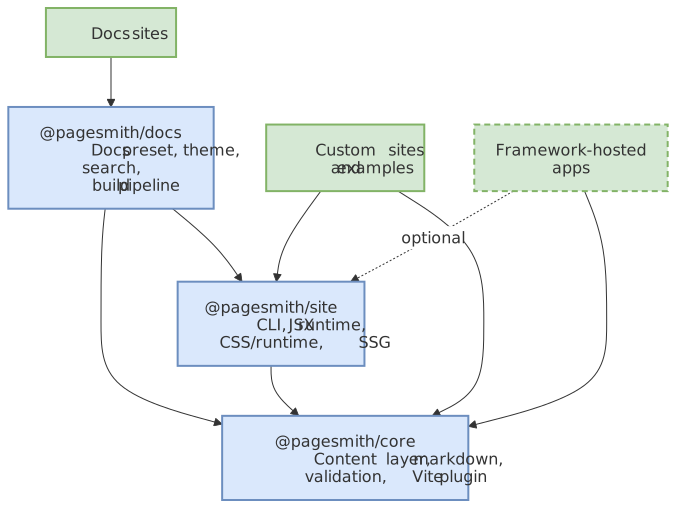
Notice that @pagesmith/core stays reusable on its own, while @pagesmith/site and @pagesmith/docs add progressively higher-level site and docs behavior on top of that foundation.
1.0 Architecture Principles
These principles are the long-term guardrails for implementation and docs decisions:
- Filesystem-first source of truth: content and companion assets live in the repository.
- Strict package boundaries: shared content primitives belong in
@pagesmith/core; shared site primitives belong in@pagesmith/site; docs conventions belong in@pagesmith/docs. - Boundary validation: schema + content validation happens before rendering.
- Vite-native tooling for Pagesmith-managed site builds: docs, CLI, and SSG flows remain Vite-centric, while the headless content layer stays usable from non-Vite apps.
- Static-first delivery: default output is static HTML with small progressive enhancements.
- Configuration-first experience: sensible defaults first, explicit overrides second.
- Docs and AI guidance parity: user docs and assistant guidance must track behavior changes in the same release.
Package Dependency Graph
@pagesmith/core is standalone with no internal workspace dependencies. @pagesmith/site depends on @pagesmith/core, and @pagesmith/docs depends on both packages:
| Package | Depends on | Notes |
|---|---|---|
@pagesmith/core |
— | Headless content layer |
@pagesmith/site |
@pagesmith/core |
CLI, JSX, CSS/runtime bundles, Vite SSG |
@pagesmith/docs |
@pagesmith/core, @pagesmith/site |
Docs preset, theme, schemas, MCP |
Site-driven custom sites (most of the examples/ projects) depend on @pagesmith/site, which in turn depends on @pagesmith/core internally. Framework-hosted apps can still use @pagesmith/core directly and add @pagesmith/site/css/content plus @pagesmith/site/runtime/content only when they want the shared markdown presentation layer.
Core Package Internals
Entry Points
The package exposes multiple entry points via the exports field in package.json:
| Import path | Source | Purpose |
|---|---|---|
@pagesmith/core |
src/index.ts |
Main barrel — config helpers, content layer, markdown, schemas, loaders, validation |
@pagesmith/core/vite |
src/vite/index.ts |
Vite content plugin — pagesmithContent() |
@pagesmith/core/markdown |
src/markdown/index.ts |
processMarkdown() function |
@pagesmith/core/schemas |
src/schemas/index.ts |
Zod schemas and inferred TypeScript types |
@pagesmith/core/loaders |
src/loaders/index.ts |
Loader classes and the resolveLoader() registry |
@pagesmith/core/assets |
src/assets/index.ts |
Static file copying, content-hash filenames, AVIF/WebP variant generation |
@pagesmith/core/ai |
src/ai/index.ts |
AI assistant artifact installer |
@pagesmith/core/create |
src/create/index.ts |
Project scaffolding utilities |
@pagesmith/core/cli-kit |
src/cli-kit/index.ts |
Shared CLI building blocks (cac wrapper, clack prompts, config loader) |
@pagesmith/core/mcp |
src/mcp/index.ts |
Programmatic MCP server (createCoreMcpServer, startCoreMcpServer) |
Module Map
config.ts defineConfig(), defineCollection(), defineCollections()content-layer.ts ContentLayer interface + createContentLayer() factoryentry.ts ContentEntry class (slug, data, lazy render())store.ts ContentStore -- file discovery, loading, validation, cachingconvert.ts convert() -- markdown-to-HTML convenience wrapperfrontmatter.ts extractFrontmatter(), validateFrontmatter()toc.ts extractToc() -- heading extraction from HTMLmarkdown/ pipeline.ts Unified pipeline (remark + built-in Pagesmith renderer + rehype)schemas/ collection.ts CollectionDef<S>, RawEntry, CollectionMap, InferCollectionData content-config.ts ContentLayerConfig, ContentPlugin markdown-config.ts MarkdownConfig, MarkdownConfigSchema frontmatter.ts BaseFrontmatterSchema, BlogFrontmatterSchema, ProjectFrontmatterSchema heading.ts Heading { depth, text, slug }loaders/ index.ts resolveLoader() registry, defaultIncludePatterns() types.ts Loader, LoaderResult, LoaderType, LoaderKind interfaces markdown.ts MarkdownLoader (gray-matter + body) json.ts / jsonc.ts JSON and JSON-with-comments loaders yaml.ts / toml.ts YAML and TOML loadersvalidation/ runner.ts runValidators(), builtinMarkdownValidators types.ts ContentValidator, ValidatorContext schema-validator.ts validateSchema() via Zod safeParse link-validator.ts linkValidator + createLinkValidator() — empty link text, missing alt, raw <img> outside <picture>, broken internal links, themed-image pair mismatches, optional external reachability heading-validator.ts Warn on no headings, empty heading text, multiple h1, skipped levels code-block-validator.ts Warn on meta without language, unknown meta keys, malformed line ranges image-structure-validator.ts Enforce <figure><picture>...<img></picture><figcaption?></figure> structure content-validator.ts validateContent() + formatContentValidationReport() for the validate CLI load-content-config.ts discover content.config.* and build per-file schema mapsvite/ index.ts pagesmithContent() plugin + type exports content-plugin.ts Virtual module resolution, HMR, and DTS generation dts.ts TypeScript declaration file generator for virtual modulesassets/ index.ts collectContentAssets, CONTENT_ASSET_EXTS, ContentAssetMap images.ts sharp-based dimensions + AVIF/WebP variant generation copier.ts copyPublicFiles() hasher.ts hashAssets() — content-hash + HTML rewrite pipelineai/ index.ts installAiArtifacts(), getAiArtifacts(), getAiArtifactContent() content-shared.ts llms.txt / llms-full.txt / markdown-guidelines renderers content-claude.ts / content-codex.ts / content-gemini.ts content-memory.ts CLAUDE.md / AGENTS.md / GEMINI.md renderercli/ bin.ts pagesmith-core CLI entry defaults.ts readCoreCliDefaults() skills-install.ts installPackageSkills() commands/ templates, create, ai, skills, validatecli-kit/ parse.ts defineCli(), withInteractivityFlags, withConfigFlag (cac wrapper) modes.ts resolveInteractive, isInteractive, isNonInteractiveEnv, assertValue prompts.ts promptText/Confirm/Select/Multiselect, intro/outro/note/log/spinner load-config.ts findPagesmithConfig, loadPagesmithConfig, readPagesmithConfig errors.ts CliError, formatCliError, exitCodeFormcp/ server.ts createCoreMcpServer, startCoreMcpServer shared.ts package version + REFERENCE resolution helperscreate/ index.ts listTemplates(), createProject(), templates registryplugins/ index.ts collectRemarkPlugins, collectRehypePlugins, runPluginValidatorsutils/ slug.ts toSlug() glob.ts discoverFiles() (fast-glob) read-time.ts computeReadTime()Content Loading Flow
The content layer follows a strict pipeline when getCollection(name) is called:
1. Resolve collection definition CollectionDef { loader, directory, schema, include, exclude, ... }2. Discover files discoverFiles({ directory, include, exclude }) via fast-glob Default include patterns derived from loader extensions3. Load each file through the registered loader resolveLoader(def.loader) -> Loader instance loader.load(filePath) -> { data, content? }4. Generate slug def.slugify(filePath, directory) or toSlug(filePath, directory)5. Apply transform (pre-validation) def.transform(rawEntry) -> RawEntry6. Apply computed fields def.computed: { fieldName: (entry) => value } Merged into entry.data before validation7. Apply filter def.filter(entry) -> boolean (false excludes from results)8. Schema validation validateSchema(data, def.schema) via Zod safeParse Produces ValidationIssue[] with field paths Validates the enriched data including computed fields9. Custom validation def.validate(rawEntry) -> string | undefined Appended as error-severity issue10. Content validators (markdown collections only) Parse MDAST once, shared across all validators via ValidatorContext.mdast Built-in: linkValidator, headingValidator, codeBlockValidator, imageStructureValidator Custom: def.validators[] Disable built-ins: def.disableBuiltinValidators11. Plugin validators ContentPlugin.validate() runs after all other validation12. Cache ContentStore stores { entry: ContentEntry<T>, issues: ValidationIssue[] } Subsequent calls return from cache until invalidated13. Return ContentEntry<T>[] entry.data is available immediately entry.render() triggers lazy markdown processingResults are cached per collection in ContentStore. Cache invalidation is available at three granularities:
invalidate(collection, slug)— single entryinvalidateCollection(collection)— all entries in a collectioninvalidateAll()— entire store
Markdown Pipeline
The markdown pipeline is built in src/markdown/pipeline.ts using the unified ecosystem with the built-in Pagesmith code renderer on top of Shiki for syntax highlighting and code block features. The processor is cached per MarkdownConfig object reference via a WeakMap to avoid rebuilding the plugin chain on every call.
remark-parse Parse markdown to MDAST -> remark-gfm Tables, strikethrough, task lists, autolinks -> remark-frontmatter Strip YAML frontmatter from AST -> remark-github-alerts > [!NOTE], > [!TIP], etc. -> remark-smartypants Smart quotes, dashes, ellipses -> remark-math (optional) Enabled when `markdown.math` is `true` or `'auto'` detects math markers -> [user remark plugins] From MarkdownConfig.remarkPlugins -> lang-alias transform Map unsupported languages to known aliases -> remark-rehype MDAST -> HAST (`allowDangerousHtml` defaults to true) -> rehype-mathjax/svg Render math to SVG when math is enabled -> applyPagesmithCodeRenderer Syntax highlighting, code frames, copy/collapse UI -> rehype-code-tabs Group consecutive titled code blocks into tabs -> rehype-scrollable-tables Wrap markdown tables for horizontal scrolling -> rehype-slug Add id="" to headings -> rehype-autolink-headings Wrap heading text in anchor links (behavior: 'wrap') -> rehype-external-links target="_blank" on external URLs -> rehype-accessible-emojis aria-label on emoji characters -> rehype-local-images Fill intrinsic image dimensions and JPEG picture fallbacks -> heading extraction Custom plugin: walk HAST, collect Heading[] -> [user rehype plugins] From MarkdownConfig.rehypePlugins -> rehype-stringify Serialize HAST to HTML stringThe built-in renderer defaults to github-light / github-dark dual themes and responds to Pagesmith’s color-scheme classes for automatic light/dark switching. It handles code block frames, titles, line numbers, copy buttons, line highlighting (mark / ins / del), collapsible sections, and word wrapping. Shared code block chrome ships in Pagesmith’s CSS bundles, while Shiki token colors are injected during markdown processing and the shared browser runtime wires copy/collapse behavior.
The built-in renderer and shared code block styles use Pagesmith design tokens via CSS custom properties such as --ps-font-sans, --ps-font-mono, --ps-font-size-sm, --ps-radius-lg, and --ps-color-border-subtle.
Vite Plugin Architecture
Pagesmith still implements Vite responsibilities across @pagesmith/core/vite and @pagesmith/site/vite, but @pagesmith/site/vite re-exports pagesmithContent so site consumers can keep Vite imports on one package:
pagesmithContent(collections, options?) — Content Virtual Modules
This plugin:
-
Registers virtual modules for each collection. The default module ID is
virtual:content. Each collection gets a sub-module atvirtual:content/<collection-name>. -
Generates TypeScript declarations (
pagesmith-content.d.ts) so that importingvirtual:content/postshas full type safety derived from the Zod schema in yourcontent.config.ts. -
Serializes collection data at load time. For markdown collections, entries are rendered to HTML with headings and frontmatter. For data collections, the raw validated data is serialized.
-
Handles HMR by watching content directories and the config file. When a content file changes, it invalidates the content layer cache, invalidates all virtual modules in Vite’s module graph, and triggers a full page reload.
The plugin uses enforce: 'pre' so virtual module resolution runs before other plugins.
@pagesmith/site/vite and pagesmithSsg(options) — Static Site Generation
Returns two plugins:
-
pagesmith:ssg-dev(apply: 'serve'): Adds a middleware to the Vite dev server that intercepts HTML navigation requests, loads the SSR entry module on-the-fly viaserver.ssrLoadModule(), and renders pages in real time. It also serves companion content assets (images referenced from markdown) and injects the Vite HMR client for live reload. -
pagesmith:ssg-build(apply: 'build'): Runs as acloseBundlehook after the client build. It builds a separate SSR bundle via a child process, loads the SSR module, callsgetRoutes()to discover all route paths, renders each route to an HTML file, copies content assets and fonts to the output, and optionally runs Pagefind for search indexing.
The SSR entry module must export:
getRoutes(config: SsgRenderConfig): string[]— returns route paths to pre-renderrender(url: string, config: SsgRenderConfig): string | Promise<string>— renders a route to an HTML string
sharedAssetsPlugin() — Font Assets in Dev
A simple middleware plugin that serves @pagesmith/site’s bundled font files (woff2) and fonts.css during development. In production, fonts are copied to the output directory by the SSG build plugin.
prerenderRoutes(options) — Lower-Level Pre-rendering
A utility function (not a Vite plugin) for simpler SSG scenarios where you run separate client and SSR builds yourself. It loads the SSR entry, renders each route, and injects the rendered HTML into the client template by replacing a <!--ssr-outlet--> placeholder.
Docs Package Internals
The @pagesmith/docs package builds on @pagesmith/core and @pagesmith/site to provide a convention-based documentation site.
Site Engine
The central module that implements build(), startDev(), and preview(). It:
- Reads
pagesmith.config.json5and resolves all paths to absolute - Discovers content by walking the
contentDirfilesystem tree - Reads
meta.json5files at the root and section levels for navigation order, display names, series grouping, and layout assignments - Processes markdown through
@pagesmith/core/markdown, then applies docs-specific link and asset transforms so relative.mdlinks resolve to site routes and local content assets publish under/assets/ - Builds a site model containing navigation items, sidebar sections (per content section), and a page map
- Renders pages using JSX theme layouts (DocHome, DocPage, DocNotFound) or custom layouts registered via
theme.layoutsin the config - Bundles CSS using
@pagesmith/site/css(LightningCSS) - Bundles runtime JS for the shared site chrome and content runtime: footer year sync, responsive search trigger, sidebar modal behavior, skip-link focus, theme controls, TOC highlight, plus code copy/tab/collapse interactions
- Runs Pagefind indexing on the built output (when search is enabled)
Layout Override System
The docs package has four built-in layout keys: home, page, listing, and notFound. Each maps to a default JSX component (DocHome, DocPage, DocListing, DocNotFound). Custom layouts can be registered in pagesmith.config.json5 under theme.layouts, and section-level meta.json5 files can assign layouts to sections or individual items via layout and itemLayout fields.
When a custom layout module is loaded, the engine looks for exports in this priority order:
defaultexport- Named export matching the layout key (e.g.,
DocHome,Homefor thehomelayout)
Build Pipeline Phases
Development (pagesmith-docs dev)
1. Load and resolve pagesmith.config.json52. Build initial site model (discover content, parse markdown, build nav/sidebar)3. Bundle CSS from theme styles4. Bundle runtime JS5. Start HTTP server6. Start WebSocket server for live reload7. Watch content/ directory and config file via chokidar8. On change: rebuild site model -> notify connected browsers via WebSocketProduction Build (pagesmith-docs build)
1. Load and resolve pagesmith.config.json52. Build site model3. Bundle CSS (minified via LightningCSS)4. Bundle runtime JS (minified)5. Render all pages to HTML via JSX layouts6. Copy public/ directory to output7. Copy font assets from @pagesmith/site8. Copy content companion assets (images) to `output/assets/`, preserving their content-relative paths so same-name files from different pages do not collide9. Run Pagefind indexer on output HTML (if search enabled)10. Write sitemap and any generated artifactsPreview (pagesmith-docs preview)
1. Load config to determine output directory2. Start static HTTP server serving the output directory3. Handle MIME types for all common web file formatsCaching Strategy
Pagesmith uses multiple layers of caching for performance:
| Cache | Location | Scope | Invalidation |
|---|---|---|---|
| Content entries | ContentStore (in-memory Map) |
Per collection, keyed by slug | invalidate(), invalidateCollection(), invalidateAll() |
| Markdown processor | WeakMap in pipeline.ts |
Per MarkdownConfig object reference |
Automatic GC when config object is unreferenced |
| Rendered HTML | ContentEntry._rendered |
Per entry | entry.clearRenderCache() or entry.render({ force: true }) |
| Vite virtual modules | Vite module graph | Per virtual module ID | HMR handler invalidates on content file changes |
Important Design Decisions
- Pagesmith ships its own renderer instead of ad-hoc Shiki glue — the built-in renderer handles syntax highlighting, code frames, line numbers, copy buttons, tabs, and line highlighting behind a Pagesmith-specific DOM/runtime contract.
- Markdown validation shares one MDAST parse across all validators via
ValidatorContext.mdast, avoiding redundant parsing. - Schema validation parses once via Zod
safeParseand reuses the coerced result for the entry data. - Loader parse failures are wrapped with structured file-aware errors so the content layer can report which file failed and why.
- The docs experience uses the package-owned
pagesmith-docsCLI while custom-site examples build directly on@pagesmith/site, reinforcing the separation between convention-based docs and flexible custom sites. - Processor caching via WeakMap means the unified plugin chain is built once per unique
MarkdownConfigand reused for all entries sharing that config.