Page Frontmatter Reference
Frontmatter is YAML metadata at the top of each markdown file, enclosed in --- delimiters. Pagesmith uses frontmatter for page titles, descriptions, ordering, draft status, and feature-specific fields like hero sections and blog metadata.
Tip
AI quick-start: Tell your AI agent “add frontmatter to my page” or “set up a blog post with tags and a cover image” and it will generate the correct fields for your content type.
Note
For version-matched docs frontmatter rules, point the agent at node_modules/@pagesmith/docs/schemas/docs-page-frontmatter.schema.json for regular pages and node_modules/@pagesmith/docs/schemas/docs-home-frontmatter.schema.json for the home page.
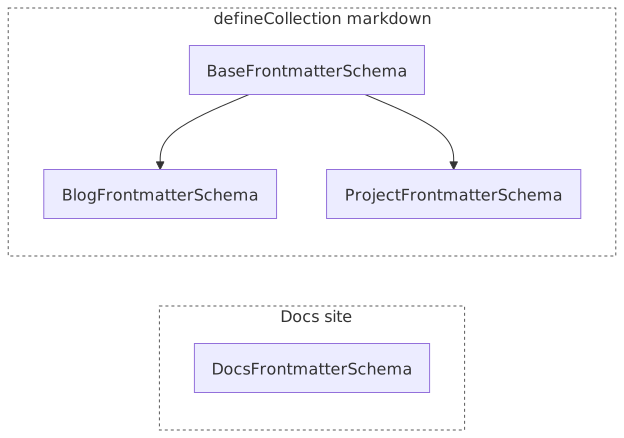
Notice docs schemas keep most fields optional with passthrough extras, while collection schemas enforce the required fields called out in the tables below.
Frontmatter Format
Frontmatter is written in YAML at the very beginning of a markdown file:
---title: Getting Starteddescription: Learn how to set up your first Pagesmith projectorder: 1---# Getting StartedYour content here...Field Reference
Docs Frontmatter (DocsFrontmatterSchema)
These fields are recognized by @pagesmith/docs for documentation sites. The schema uses .passthrough(), so additional custom fields are preserved and available in layouts.
| Field | Type | Default | Description |
|---|---|---|---|
title |
string |
Auto-generated from slug | Page title used in <title>, sidebar, navigation, and the page heading. If omitted, the title is generated from the content slug using title-case conversion. |
description |
string |
undefined |
Page description used in the <meta name="description"> tag and OpenGraph metadata. |
navLabel |
string |
Same as title |
Override the label shown in the top navigation bar. Useful when the full title is too long for the nav. |
sidebarLabel |
string |
Same as title |
Override the label shown in the sidebar. Useful for shorter sidebar entries while keeping a descriptive page title. |
order |
number |
undefined |
Manual sort order within a section. Lower numbers appear first. When not set, pages follow the order defined in the section’s meta.json5 items array, or fall back to alphabetical order. |
publishedDate |
string |
undefined |
Publication date for the page. Used by listing pages when orderBy: "publishedDate" is set in the section’s meta.json5. Accepts any date string parsable by Date. |
lastUpdatedOn |
string |
undefined |
Last modification date. Displayed on the page when the site config has lastUpdated enabled. |
draft |
boolean |
false |
Mark a page as a draft. Draft pages are excluded from the build output entirely — they do not appear in navigation, search, or sitemap. |
layout |
string |
undefined |
Override the page layout. Accepted values depend on your registered layouts (e.g. "home", "page"). When omitted, the docs theme picks a layout automatically based on page position. |
chrome |
object |
undefined |
Toggle page chrome sections. Each property is a boolean: header, sidebar, toc, footer. Set any to false to hide that section on a per-page basis. |
socialImage |
string |
Config theme.socialImage |
Path to a custom Open Graph image for this page. Overrides the site-level default set in pagesmith.config.json5. |
hero |
object |
undefined |
Hero section data for the home page layout. Contains name, text, tagline, badge, and actions. Only used when the page uses the home layout. |
features |
array |
undefined |
Feature cards for the home page layout. Each entry is an object with title, details, and optional icon. Only used when the page uses the home layout. |
install |
string |
undefined |
Install command shown on the home page layout (e.g. "npm add @pagesmith/docs"). |
packages |
array |
undefined |
Package cards for the home page layout. Each entry has name, description, and optional href, tag, version. |
codeExample |
object |
undefined |
Code snippet displayed on the home page. Has code (required), plus optional label and title. |
tagline |
string |
undefined |
Short tagline shown on the home page. Can also be set inside the hero object. |
badge |
string |
undefined |
Badge text shown on the home page. Can also be set inside the hero object. |
actions |
array |
undefined |
Action buttons for the home page. Each entry has text, link (required), plus optional theme ("brand" or "alt") and icon. Can also be set inside the hero object. |
Hero Object Fields
When using the home layout, the hero object supports:
| Field | Type | Description |
|---|---|---|
hero.name |
string |
Prominent name/brand text above the heading |
hero.text |
string |
Large h1 heading text in the hero section |
hero.tagline |
string |
Subtitle below the heading |
hero.badge |
string |
Badge text shown above the name |
hero.actions |
array |
Array of { text: string, link: string, theme?: 'brand' | 'alt' } button links |
Features Array Fields
Each entry in the features array supports:
| Field | Type | Description |
|---|---|---|
title |
string |
Feature card heading |
details |
string |
Feature card body text |
icon |
string |
Optional icon identifier |
Chrome Object Fields
Control which parts of the page chrome are visible:
| Field | Type | Default | Description |
|---|---|---|---|
chrome.header |
boolean |
true |
Show or hide the site header |
chrome.sidebar |
boolean |
true |
Show or hide the sidebar navigation |
chrome.toc |
boolean |
true |
Show or hide the table of contents |
chrome.footer |
boolean |
true |
Show or hide the site footer |
Packages Array Fields
Each entry in the packages array supports:
| Field | Type | Description |
|---|---|---|
name |
string |
Package name (required) |
description |
string |
Package description (required) |
href |
string |
Link to the package docs |
tag |
string |
Tag label (e.g. “core”, “theme”) |
version |
string |
Current version string |
Code Example Object Fields
| Field | Type | Description |
|---|---|---|
code |
string |
The code snippet to display (required) |
label |
string |
Tab or section label |
title |
string |
Code block title |
Base Frontmatter (BaseFrontmatterSchema)
These fields are defined in @pagesmith/core and are available when using the content layer directly with defineCollection. They form the foundation for blog and project schemas.
| Field | Type | Default | Description |
|---|---|---|---|
title |
string |
required | Page title. Required in the base schema (unlike the docs schema where it is optional). |
description |
string |
required | Page description. Required in the base schema. |
publishedDate |
date |
required | Publication date. Accepts any date string that JavaScript’s Date constructor can parse (e.g. 2026-01-15, January 15, 2026). The schema uses z.coerce.date() for flexible parsing. |
lastUpdatedOn |
date |
undefined |
Last modification date. Same flexible date parsing as publishedDate. |
tags |
string[] |
[] |
Array of tag strings for categorization and filtering. |
draft |
boolean |
false |
Mark as draft to exclude from output. |
Blog Frontmatter (BlogFrontmatterSchema)
Extends BaseFrontmatterSchema with blog-specific fields. Use this schema when defining a blog collection with defineCollection.
| Field | Type | Default | Description |
|---|---|---|---|
| All base fields | Inherits all fields from BaseFrontmatterSchema above. |
||
category |
string |
undefined |
Blog post category for grouping and filtering. |
featured |
boolean |
undefined |
Flag a post as featured for highlighting in listings. |
coverImage |
string |
undefined |
Path to a cover image displayed at the top of the post or in listing cards. |
Project Frontmatter (ProjectFrontmatterSchema)
Extends BaseFrontmatterSchema with project-specific fields. Use this schema for portfolio or project showcase collections.
| Field | Type | Default | Description |
|---|---|---|---|
| All base fields | Inherits all fields from BaseFrontmatterSchema above. |
||
gitRepo |
string |
undefined |
URL to the project’s git repository. Validated as a URL. |
links |
array |
undefined |
Array of { url: string, text: string } objects for related links (docs, demo, etc.). Both url and text are required per entry. |
Common Patterns
Minimal Docs Page
The simplest frontmatter for a documentation page — just a title:
---title: Installation---When even the title is omitted, Pagesmith generates one from the file’s directory name using title-case conversion (e.g. getting-started becomes “Getting Started”).
Docs Page with Navigation Labels
Override sidebar and nav labels independently from the page title:
---title: Configuration Reference for pagesmith.config.json5navLabel: ConfigurationsidebarLabel: Config Referencedescription: Complete guide to all configuration options---Draft Page
Keep a page in your content directory without publishing it:
---title: Upcoming Featuredescription: Documentation for a feature still in developmentdraft: true---Home Page with Hero and Features
The home page layout reads hero and features from frontmatter (or from home.json5 if not present in frontmatter):
---title: My Projectdescription: A modern toolkit for building content siteshero: name: My Project text: Build content-driven sites tagline: Zero configuration, maximum output actions: - text: Get Started link: /guide/getting-started theme: brand - text: View on GitHub link: https://github.com/my-org/my-project theme: altfeatures: - title: Fast Builds details: Parallel page processing and incremental dev server - title: Full-Text Search details: Built-in Pagefind integration with zero configuration - title: Type-Safe Content details: Zod schema validation for all frontmatter and data---Blog Post
Using BlogFrontmatterSchema in a custom collection:
---title: Announcing v1.0description: Our first stable release is herepublishedDate: 2026-03-01tags: - release - announcementcategory: releasesfeatured: truecoverImage: ./cover.png---Project Entry
Using ProjectFrontmatterSchema in a portfolio collection:
---title: Pagesmithdescription: A filesystem-first content toolkitpublishedDate: 2025-06-01tags: - tooling - static-sitegitRepo: https://github.com/user/pagesmithlinks: - url: https://pagesmith.dev text: Documentation - url: https://pagesmith.dev/guide/getting-started text: Quick Start---Schema Usage in Collections
The base, blog, and project schemas are exported from @pagesmith/core for use with defineCollection:
import { defineCollection, defineConfig, BaseFrontmatterSchema, BlogFrontmatterSchema, ProjectFrontmatterSchema,} from "@pagesmith/core";const posts = defineCollection({ loader: "markdown", directory: "content/posts", schema: BlogFrontmatterSchema,});const projects = defineCollection({ loader: "markdown", directory: "content/projects", schema: ProjectFrontmatterSchema,});export default defineConfig({ collections: { posts, projects },});For docs sites using @pagesmith/docs, the DocsFrontmatterSchema is applied automatically to all content pages. You do not need to configure it manually.
Validation Rules
Frontmatter validation happens at different stages depending on the package:
@pagesmith/docs validation
The docs package applies DocsFrontmatterSchema automatically to all content pages. Key rules:
- All fields are optional. If
titleis omitted, it is auto-generated from the content slug using title-case conversion. - Unknown fields are preserved via
.passthrough(). ordermust be a number if present. String values like"first"will fail validation.draft: truepages are excluded from build, navigation, search, and sitemap.
@pagesmith/core validation
When using defineCollection with a custom Zod schema, validation rules depend on your schema:
- Required fields cause build errors if missing from frontmatter.
- Type coercion works for
z.coerce.date()(accepts date strings) andz.coerce.number(). - Default values from
z.default()are applied when the field is missing. - Strict schemas (without
.passthrough()) reject unknown frontmatter fields.
Content validators (additional checks)
After schema validation, content validators run on the parsed MDAST:
| Validator | Rule |
|---|---|
| Heading validator | Single h1, sequential depth, non-empty text |
| Link validator | No bare URLs, no empty link text, no suspicious protocols |
| Code block validator | Language specified, no unknown aliases |
Disable built-in validators per collection with disableBuiltinValidators: true.
Custom Fields
Both DocsFrontmatterSchema and BaseFrontmatterSchema use .passthrough(), which means any additional YAML fields you add to frontmatter are preserved in the page’s frontmatter object. Custom layouts can access these fields:
---title: API Referencedescription: Full API documentationcustomBadge: betashowToc: false---These custom fields are available as page.frontmatter.customBadge and page.frontmatter.showToc in layout components. No schema changes are needed.