Docs CLI Reference
Docs projects use the package-owned pagesmith-docs CLI from @pagesmith/docs. It is the canonical command surface for scaffolding, developing, building, previewing, and exposing docs-aware MCP tools.
Installation
npm add @pagesmith/docsThen run commands with npx pagesmith-docs ... or through package scripts.
Command Summary
pagesmith-docs init [options]pagesmith-docs dev [options]pagesmith-docs build [options]pagesmith-docs preview [options]pagesmith-docs validate [options]pagesmith-docs mcp --stdio [options]Configuration File
pagesmith-docs resolves the config file in this order (first match wins):
--config <path>(explicit override)pagesmith.config.ts(loaded viajiti, supportsdefineConfig)pagesmith.config.mtspagesmith.config.mjspagesmith.config.jspagesmith.config.json5pagesmith.config.json
import { defineConfig } from "@pagesmith/docs";export default defineConfig({ name: "my-docs", title: "My Docs", origin: "https://example.com", basePath: "/my-docs",});init writes a JSON5 file. When you already have a .ts/.js config, init reads it for prompt defaults but does not overwrite the file — the user owns code-shaped configs.
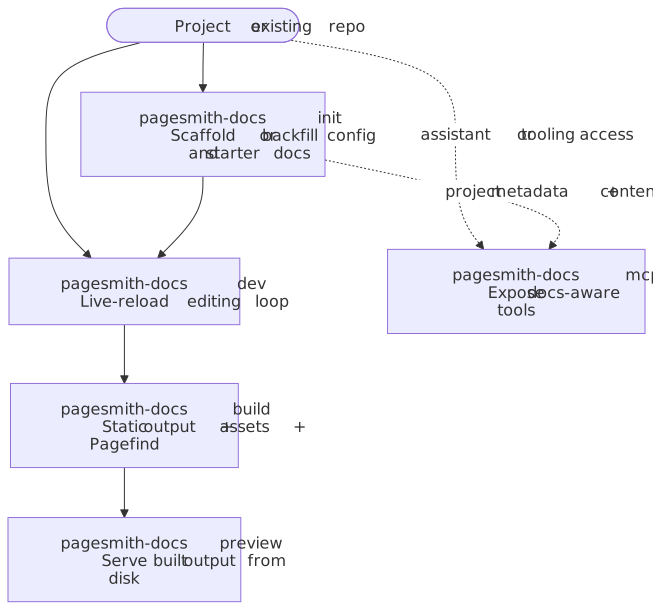
How The Commands Fit Together
Notice that init is a setup step you can rerun safely, dev/build/preview form the main docs workflow, and mcp --stdio is a separate path for assistant tooling rather than static-site output.
pagesmith-docs init
Use init when you want Pagesmith to scaffold or backfill a docs project.
What it does:
- Creates or updates
pagesmith.config.json5. - Adds the
$schemareference tonode_modules/@pagesmith/docs/schemas/pagesmith-config.schema.json. - Scaffolds starter content when the expected docs pages are missing.
- Detects GitHub Pages-friendly defaults from the repo name and git remote.
- Optionally installs AI artifacts with
--ai.
Common flags:
| Flag | Purpose |
|---|---|
-y, --yes |
Accept detected defaults without prompting |
--non-interactive |
Same as --yes, named for CI/CD pipelines |
--interactive |
Force prompts even when the environment looks non-TTY |
--ai |
Install AI memory files, skills, Markdown guidance, and llms*.txt |
--no-llms |
Skip llms.txt and llms-full.txt generation |
--config <path> |
Write the config to a non-default path |
--name <value> |
Override detected project name |
--title <value> |
Override detected site title |
--content-dir <path> |
Choose a specific docs directory |
--base-path <path> |
Override the detected GitHub Pages-style base path |
--origin <url> |
Override the detected site origin |
--search / --no-search |
Enable or disable built-in search |
--starter-content / --no-starter-content |
Create or skip starter docs pages |
init runs as an interactive prompt by default when stdout and stdin are both
TTYs. It auto-falls back to non-interactive mode (using the detected defaults)
when --yes / --non-interactive is passed, when CI=1 or
PAGESMITH_NON_INTERACTIVE=1 is set, or when stdout/stdin are not TTYs. This
keeps CI/CD pipelines from blocking on a prompt.
In non-interactive mode init fails fast when --name, --origin, or
--base-path cannot be resolved from flags, the existing
pagesmith.config.{ts,json5,...}, or smart defaults (git remote, package.json
name, repo basename). The error message points at the missing flag and config
key so the failure is immediately actionable.
Examples:
npx pagesmith-docs initnpx pagesmith-docs init --yes --ainpx pagesmith-docs init --non-interactive --ai --content-dir docs --base-path /my-repo --origin https://my-user.github.ioCI=1 npx pagesmith-docs init --ai # non-interactive auto-detected from envinit is safe to rerun. It backfills missing config fields instead of blindly replacing the whole file.
pagesmith-docs dev
Starts the docs development server with live reload.
npx pagesmith-docs devCommon flags:
| Flag | Purpose |
|---|---|
--port <number> |
Change the dev port |
--open |
Open the browser automatically |
--config <path> |
Use a non-default config file |
--out-dir <path> |
Override the output directory |
--base-path <path> |
Override the configured base path |
--log-level <level> |
Set silent, error, warn, info, or verbose |
Use dev for content editing, layout work, navigation checks, and local theme iteration.
pagesmith-docs build
Builds the full static docs site.
npx pagesmith-docs buildThe build resolves config, loads content and meta.json5, renders markdown through the shared Pagesmith pipeline, renders docs layouts, copies static assets, publishes markdown companion assets under preserved content-relative /assets/... paths, and runs Pagefind when search is enabled.
Examples:
npx pagesmith-docs buildnpx pagesmith-docs build --base-path /my-repoBASE_URL=/my-repo npx pagesmith-docs buildBase-path precedence:
--base-pathBASE_URLbasePathin config- Git remote detection
/
pagesmith-docs preview
Serves the built output directly from disk.
npx pagesmith-docs previewUse preview to verify production behavior such as built search assets, slashless routing, and basePath handling.
pagesmith-docs validate
Runs the docs validator against your content and (optionally) the build output.
npx pagesmith-docs validatenpx pagesmith-docs validate --content # only contentnpx pagesmith-docs validate --build # only build output (after a build)npx pagesmith-docs validate --full # enable every opt-in offline checkCommon flags:
| Flag | Purpose |
|---|---|
--content |
Only run content validation |
--build |
Only run build-output validation |
--full |
Enable every opt-in offline check (raster fallbacks, both trailing-slash forms, internal-links-must-be-markdown, canonical internal links) |
--content-dir <path> |
Content directory override |
--out-dir <path> |
Build output directory override |
--base-path <path> |
Site base path override |
--trailing-slash / --no-trailing-slash |
Force trailing-slash routing mode |
--check-external |
Fetch external URLs and report non-2xx as warnings |
--require-raster-modern-formats |
Require webp+avif siblings for <picture> raster fallbacks |
--require-theme-variants / --no-theme-variants |
Enforce light + dark <picture> sources (default: on) |
--require-both-trailing-slash-forms |
Warn when pages lack a redirect sibling |
--internal-links-must-be-markdown |
Fail if a non-image internal link resolves to a non-markdown file |
--require-canonical-internal-links / --no-require-canonical-internal-links |
Require ./relative/path.md authoring form (default: on under docs preset) |
--no-require-alt-text |
Downgrade missing image alt text from error to warning |
--allow-html-img-tag |
Allow raw <img> tags in markdown |
--no-theme-variant-pairs |
Do not enforce adjacent -light/-dark image pairing |
--required-file <name> |
Require <name> in the build output (repeatable) |
--no-required-files |
Skip the default required-output-files check |
--content-config <path> / --no-content-config |
Explicit or disabled content.config.* auto-load |
--timeout-ms <number> |
External fetch timeout (default: 10000) |
--concurrency <number> |
External fetch concurrency (default: 8) |
--show-clean |
Also list files that pass content validation |
Validate exits non-zero on the first error so it works as a CI gate.
pagesmith-docs mcp --stdio
Starts the docs-aware MCP server from @pagesmith/docs.
npx pagesmith-docs mcp --stdioCommon flags:
| Flag | Purpose |
|---|---|
--config <path> |
Config used by the docs MCP tools |
--root <path> |
Project root for resolving config and content |
The server exposes tools such as:
docs_validate_configdocs_resolve_configdocs_list_pagesdocs_get_pagedocs_search_pages
Version-matched resources exposed by the docs MCP server:
pagesmith://docs/agents/usagepagesmith://docs/llms-fullpagesmith://docs/referencepagesmith://core/reference
Zero-Config Behavior
pagesmith-docs dev, build, preview, and mcp --stdio can run without pagesmith.config.json5 when the project already follows the default conventions:
<repo-root>/docsif it exists, otherwise<repo-root>/content- standard docs pages like
README.md - optional
meta.json5files for navigation - default output under
gh-pages
init is still the preferred way to make the contract explicit, add schema validation, and install AI artifacts.
Recommended Scripts
{ "scripts": { "docs:dev": "pagesmith-docs dev", "docs:build": "pagesmith-docs build", "docs:preview": "pagesmith-docs preview" }}Typical Workflow
npx pagesmith-docs init --yes --ainpx pagesmith-docs dev --opennpx pagesmith-docs buildnpx pagesmith-docs preview