Virtual Modules
AI Quick Start
Ask your AI agent: “Explain how Pagesmith virtual modules work and set up typed imports for my collections.”
The pagesmithContent Vite plugin exposes your collections as virtual modules. This lets you import collection data directly in application code with full type safety.
If your app is not using Pagesmith’s Vite integration, skip virtual modules and use createContentLayer() plus entry.render() directly instead. See Next.js (App Router) for that pattern.
How It Works
When you configure pagesmithContent in your Vite config:
import { defineConfig } from "vite";import { pagesmithContent, pagesmithSsg } from "@pagesmith/site/vite";import collections from "./content.config";export default defineConfig({ plugins: [pagesmithContent(collections), ...pagesmithSsg({ entry: "./src/entry-server.tsx" })],});The plugin creates virtual modules for each collection defined in your config. If your content.config.ts exports collections named posts and authors, you get:
| Virtual Module | Content |
|---|---|
virtual:content |
Root module re-exporting all collections |
virtual:content/posts |
Array of processed posts entries |
virtual:content/authors |
Array of processed authors entries |
At a glance, pagesmithContent() sits between your content sources and the imports your app consumes:
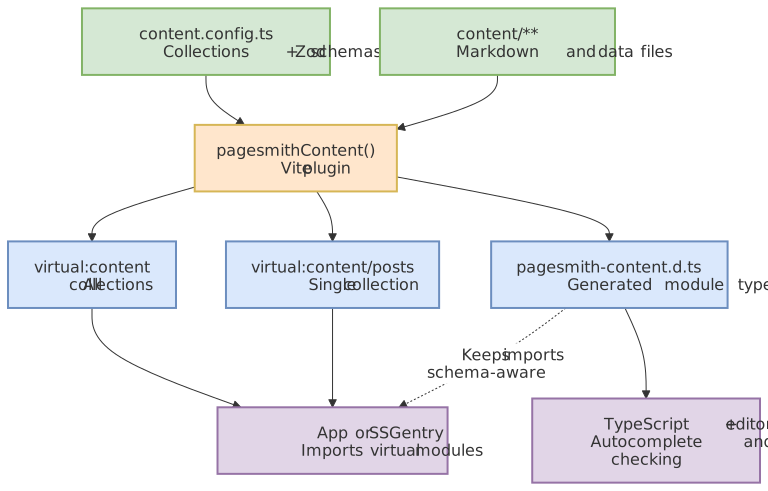
Notice that the same plugin generates both the runtime virtual modules and the declaration file, so imported content stays aligned with your collection schemas.
Importing Collections
// Import a single collectionimport posts from "virtual:content/posts";// Import all collections at onceimport content from "virtual:content";const { posts, authors } = content;Markdown Collections
For collections using the markdown loader, each entry contains:
type MarkdownContentModuleEntry = { id: string; // Same as contentSlug contentSlug: string; // URL-safe slug derived from file path html: string; // Rendered HTML from markdown pipeline headings: Heading[]; // Extracted headings for TOC frontmatter: T; // Validated data matching the Zod schema};Data Collections
For collections using json, yaml, toml, or other data loaders:
type DataContentModuleEntry = { id: string; // Same as contentSlug contentSlug: string; // URL-safe slug derived from file path data: T; // Validated data matching the Zod schema};Type Safety
The plugin auto-generates a TypeScript declaration file (pagesmith-content.d.ts) that provides full type inference from your Zod schemas. When you use the site-facing Vite barrel, the generated declarations stay on that same public import path:
// Generated by @pagesmith/site/vite. Do not edit manually.type __PagesmithCollections = typeof import("../content.config").default;declare module "virtual:content" { const content: import("@pagesmith/site/vite").ContentModuleMap<__PagesmithCollections>; export default content;}declare module "virtual:content/posts" { const collection: import("@pagesmith/site/vite").ContentCollectionModule< __PagesmithCollections["posts"] >; export default collection;}This means post.frontmatter.title is typed as string, post.frontmatter.date is typed as Date, etc. — all inferred from the Zod schema in your content.config.ts.
DTS Output Location
By default, the declaration file is written to:
src/pagesmith-content.d.tsif asrc/directory existspagesmith-content.d.tsat project root otherwise
Override with the dts option:
pagesmithContent(collections, { dts: "./types/content.d.ts",});// Or disable entirelypagesmithContent(collections, { dts: false });Configuration Options
pagesmithContent(collections, { // Custom virtual module prefix (default: 'virtual:content') moduleId: "virtual:my-content", // Path to content config for DTS generation (default: './content.config.ts') configPath: "./src/content.config.ts", // Shared content root for slug computation contentRoot: "./content", // DTS generation (default: auto-detect) dts: true | false | "./path/to/output.d.ts",});Hot Module Replacement
During development, the plugin watches your content files and config:
- Content file change: Invalidates the affected collection’s cache and its virtual module in Vite’s module graph, then triggers a full page reload in the browser.
- Config file change: Regenerates type declarations, invalidates all collections, and triggers a full page reload.
Cache invalidation is scoped to the affected collection — editing a file in content/posts/ only invalidates the posts collection cache, not authors. However, the browser always receives a full page reload since virtual module changes cannot be hot-patched.
Slug Generation
Virtual module entries get their contentSlug from the file path relative to the content root:
| File Path | Content Slug |
|---|---|
content/posts/hello-world/README.md |
posts/hello-world |
content/posts/getting-started.md |
posts/getting-started |
content/authors/jane.json |
authors/jane |
The content root defaults to the deepest common parent directory of all collection directories. Override with contentRoot.
SSG Entry Contract
The pagesmithSsg plugin expects your entry module to export two functions:
import type { SsgRenderConfig } from "@pagesmith/site/vite";export function getRoutes(config: SsgRenderConfig): string[] { // Return all URL paths to pre-render return ["/", "/posts/hello-world", "/404"];}export function render(url: string, config: SsgRenderConfig): string { // Return the complete HTML document for a given URL return "<html>...</html>";}SsgRenderConfig provides base (base path), root (absolute project root), cssPath, jsPath, searchEnabled, and isDev.
SSG Utilities
The @pagesmith/site/ssg-utils module provides shared utilities commonly needed in SSG entries:
import { normalizeRoute, // Strip base path from URLs leafSlug, // Strip collection prefix from contentSlug routeFor, // Generate route URL for an entry escapeHtml, // HTML entity escaping formatDate, // Locale-aware date formatting estimateReadTime, // Word-count read time estimate renderDocumentShell, // Full HTML document with search/sidebar dialogs menuIcon, // SVG icon strings closeIcon, searchIcon,} from "@pagesmith/site/ssg-utils";See the framework examples (examples/frameworks/with-react/, examples/frameworks/with-svelte/, etc.) for complete Vite usage. For non-Vite host apps, see Next.js (App Router).