Next.js (App Router)
AI Quick Start
Ask your AI agent: “Integrate Pagesmith into my Next.js App Router project. Read node_modules/@pagesmith/site/skills/pagesmith-site-setup/references/setup-site.md, node_modules/@pagesmith/site/skills/pagesmith-site-setup/references/usage.md, and node_modules/@pagesmith/site/REFERENCE.md first. Keep Next.js in charge of routing and export, but use @pagesmith/site as the app-facing Pagesmith package for defineCollection(), createContentLayer(), and entry.render(). Add @pagesmith/site/css/content and mount @pagesmith/site/runtime/content once in a client component.”
Source: examples/frameworks/with-nextjs/ | Output: Live Demo
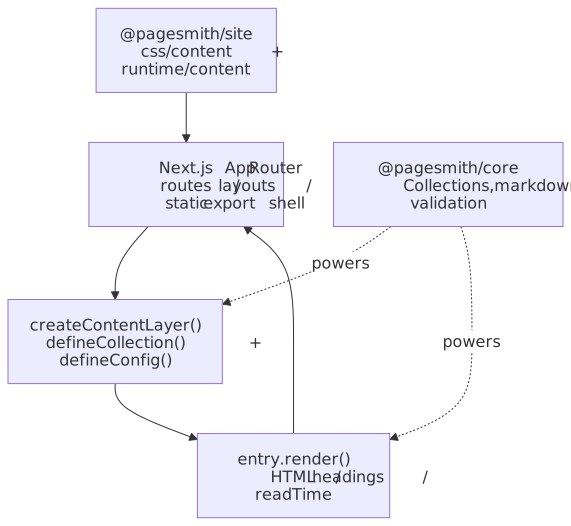
The Next.js example keeps Next.js in charge of routing, layouts, metadata, and static export while using @pagesmith/site as the app-facing Pagesmith package. @pagesmith/site owns the imports for collection definitions, markdown rendering, headings, and read time in this shape, while the underlying implementation still builds on @pagesmith/core.
The diagram highlights the boundary: the App Router stays in charge of the shell while @pagesmith/site supplies rendered markdown data plus the shared prose/code-block layer.
When to Choose This Pattern
- You already have a Next.js App Router project.
- You want
createContentLayer()instead of Pagesmith’s Vite plugins. - You want to keep the site shell and most styling decisions in Next.js.
- You still want Pagesmith’s markdown pipeline, headings, and optional code-block UI.
Package Split
| Package | Used for |
|---|---|
@pagesmith/site |
Collections, schemas, createContentLayer(), entry.render(), headings, read time, and shared markdown CSS/runtime |
@pagesmith/core |
Lower-level implementation and headless fallback when you intentionally do not want the site package surface |
next |
Routing, layouts, metadata, static export, and app shell |
If you own all markdown styling and browser behavior yourself, you can use @pagesmith/core on its own.
Dependencies
{ "dependencies": { "@pagesmith/site": "*", "next": "^16.2.3", "react": "^19.2.5", "react-dom": "^19.2.5" }}Content Config
Define collections exactly as you would in any other Pagesmith content integration:
import { defineCollection, defineCollections, z } from "@pagesmith/site";export const posts = defineCollection({ loader: "markdown", directory: "./content/posts", schema: z.object({ title: z.string(), description: z.string().optional(), date: z.coerce.date(), tags: z.array(z.string()).default([]), }),});export default defineCollections({ posts });Server-Side Content Helpers
Keep the content layer in normal server-side app code. The Next.js example creates the layer once at module scope and reuses it across lookups:
import { createContentLayer, defineConfig } from "@pagesmith/site";import collections from "../content.config.js";let layer;function getLayer() { if (!layer) { layer = createContentLayer( defineConfig({ root: process.cwd(), collections, }), ); } return layer;}export async function getPostBySlug(slug) { const entry = await getLayer().getEntry("posts", slug); if (!entry) return null; const rendered = await entry.render(); return { slug: entry.slug, title: entry.data.title, html: rendered.html, headings: rendered.headings, readTime: rendered.readTime, };}The same helper can power getAllPosts() from the cached layer:
export async function getAllPosts() { const entries = await getLayer().getCollection("posts"); return Promise.all( entries.map(async (entry) => { const rendered = await entry.render(); return { slug: entry.slug, title: entry.data.title, html: rendered.html, headings: rendered.headings, readTime: rendered.readTime, }; }), );}This is the heart of the integration: Next.js receives rendered HTML and metadata-friendly data, not raw markdown files. @pagesmith/site stays the one package surface for both content loading and the shared presentation/runtime layer.
Layout and Runtime
When you want the shipped Pagesmith prose and code-block UI, import the shared CSS once in the app layout:
import "@pagesmith/site/css/content";import "./globals.css";Mount the browser runtime once through a tiny client component:
"use client";import "@pagesmith/site/runtime/content";export function PagesmithContentRuntime() { return null;}That runtime wires copy buttons, code tabs, and collapse toggles for the HTML produced by entry.render().
Routes and Metadata
The App Router keeps all of the routing and metadata logic:
import { notFound } from "next/navigation";import { getAllPosts, getPostBySlug } from "../../../lib/content";export async function generateStaticParams() { const posts = await getAllPosts(); return posts.map((post) => ({ slug: post.slug }));}export default async function PostPage({ params }) { const { slug } = await params; const post = await getPostBySlug(slug); if (!post) notFound(); return <div className="prose" dangerouslySetInnerHTML={{ __html: post.html }} />;}Use generateMetadata() for page titles and descriptions, and build your own shell exactly as you would in any other Next.js app.
Build and Export Notes
- The example uses
next build --output=exportsemantics to produce static HTML underout/. basePathandassetPrefixare set so the example can publish under/pagesmith/examples/nextjs.- In this monorepo, the example currently uses Next 16’s webpack mode because Turbopack trips over Pagesmith’s package-relative Node resolution during the server build.
What You Can Skip
This pattern does not require:
pagesmithContentfrom@pagesmith/site/vitepagesmithSsgfrom@pagesmith/site/vite@pagesmith/site/jsx-runtime- the
pagesmith-siteorpagesmith-docsCLIs
Use those only when Pagesmith is also responsible for the site build itself.
Read Next
- Getting Started — collections, schemas, and
createContentLayer() - Runtime —
@pagesmith/site/css/*and@pagesmith/site/runtime/* - Framework Integrations — compare Vite, template-engine, docs, and Next.js patterns