Vite Framework Apps
AI Quick Start
Ask your AI agent: “Set up a Pagesmith content-driven static site with [React/SolidJS/Svelte]. Create content.config.ts on @pagesmith/site, keep the app-facing imports on @pagesmith/site, add vite.config.ts with pagesmithContent and pagesmithSsg from @pagesmith/site/vite, and an SSR entry that exports getRoutes() and render(). Read node_modules/@pagesmith/site/skills/pagesmith-site-setup/references/setup-site.md and node_modules/@pagesmith/site/skills/pagesmith-site-setup/references/usage.md for reference.”
Then read on to understand what happened and customize further.
All three Vite framework integrations follow the same pattern: define collections in content.config.ts with @pagesmith/site, wire up the pagesmithContent and pagesmithSsg Vite plugins from @pagesmith/site/vite, and write an SSR entry that exports getRoutes() and render(). The framework-specific differences are limited to the JSX/template syntax, the rendering function, and how raw HTML is injected.
Shared Architecture
Every Vite framework example uses the same content setup:
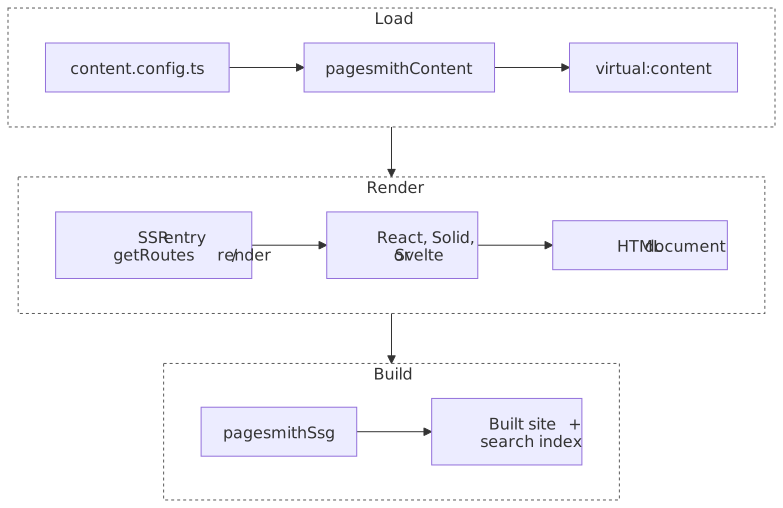
The diagram below shows the shared pipeline across all three examples. Notice that only the framework renderer changes; the content definitions, virtual modules, and getRoutes() / render() contract stay the same.
import { defineCollection, defineCollections, z } from "@pagesmith/site";export const guide = defineCollection({ loader: "markdown", directory: "./content/guide", schema: z.object({ title: z.string(), description: z.string().optional(), date: z.coerce.date(), tags: z.array(z.string()).default([]), order: z.number().optional(), series: z.string().optional(), seriesOrder: z.number().optional(), }),});export const pages = defineCollection({ loader: "markdown", directory: "./content/pages", schema: z.object({ title: z.string(), description: z.string().optional(), }),});export default defineCollections({ guide, pages });All frameworks import content through virtual modules:
import guideCollection from "virtual:content/guide";import pagesCollection from "virtual:content/pages";Each entry provides contentSlug, html, headings, and frontmatter with full type safety derived from the Zod schema.
SSR Entry Contract
The pagesmithSsg plugin expects two exports from the entry server:
export async function getRoutes(): Promise<string[]> { // Return all URL paths to pre-render}export async function render(url: string, config: SsgRenderConfig): Promise<string> { // Return a complete HTML document string for the given URL}The SsgRenderConfig provides:
| Property | Description |
|---|---|
base |
Base path without trailing slash (e.g., /my-site) |
root |
Absolute path to the project root |
cssPath |
Path to the built CSS asset |
jsPath |
Path to the built JS asset (undefined in some dev scenarios) |
searchEnabled |
Whether Pagefind search is enabled (false in dev) |
isDev |
Whether running in development mode |
React
Source: examples/frameworks/with-react/ | Output: Live Demo
Dependencies
{ "dependencies": { "@pagesmith/site": "*", "pagefind": "^1.5.0", "react": "^19.2.4", "react-dom": "^19.2.4" }, "devDependencies": { "@types/react": "^19.2.14", "@types/react-dom": "^19.2.3", "typescript": "^5.7.0" }}Vite Config
import { defineConfig } from "vite";import collections from "./content.config";import { pagesmithContent, pagesmithSsg, sharedAssetsPlugin } from "@pagesmith/site/vite";export default defineConfig({ plugins: [ sharedAssetsPlugin(), pagesmithContent(collections), ...pagesmithSsg({ entry: "./src/entry-server.tsx", contentDirs: ["./content"] }), ], oxc: { jsx: { runtime: "automatic", importSource: "react", }, },});TypeScript Config
{ "compilerOptions": { "jsx": "react-jsx", "jsxImportSource": "react" }}Rendering
React uses renderToStaticMarkup() from react-dom/server. Raw markdown HTML is injected via dangerouslySetInnerHTML:
import { renderToStaticMarkup } from "react-dom/server";const bodyHtml = renderToStaticMarkup( <PageBody title={entry.frontmatter.title} content={entry.html} headings={entry.headings} />,);<div className="prose" dangerouslySetInnerHTML={{ __html: entry.html }} />Runtime
The client entry imports theme CSS and runtime JavaScript for progressive enhancements (TOC highlight, sidebar toggle). Search is handled by Pagefind Component UI in the server-rendered HTML, not in this bundle:
import "./src/theme.css";import "./src/runtime.ts";SolidJS
Source: examples/frameworks/with-solid/ | Output: Live Demo
Dependencies
{ "dependencies": { "@pagesmith/site": "*", "pagefind": "^1.5.0", "solid-js": "^1.9.12" }, "devDependencies": { "vite-plugin-solid": "^2.11.11", "typescript": "^5.7.0" }}Vite Config
import { defineConfig } from "vite";import collections from "./content.config";import solid from "vite-plugin-solid";import { pagesmithContent, pagesmithSsg, sharedAssetsPlugin } from "@pagesmith/site/vite";export default defineConfig({ plugins: [ sharedAssetsPlugin(), solid({ ssr: true }), pagesmithContent(collections), ...pagesmithSsg({ entry: "./src/entry-server.tsx", contentDirs: ["./content"] }), ],});No oxc.jsx configuration needed — vite-plugin-solid handles the JSX transform.
TypeScript Config
{ "compilerOptions": { "jsx": "preserve", "jsxImportSource": "solid-js" }}Rendering
Solid uses renderToString() from solid-js/web. Components use For and Show primitives. Raw HTML uses innerHTML (not dangerouslySetInnerHTML), and class instead of className:
import { renderToString } from "solid-js/web";const bodyHtml = renderToString(() => ( <PageBody title={entry.frontmatter.title} content={entry.html} headings={entry.headings} />));<div class="prose" innerHTML={entry.html} />Svelte
Source: examples/frameworks/with-svelte/ | Output: Live Demo
Dependencies
{ "dependencies": { "@pagesmith/site": "*", "pagefind": "^1.5.0", "svelte": "^5.55.1" }, "devDependencies": { "@sveltejs/vite-plugin-svelte": "^7.0.0", "typescript": "^5.7.0" }}Vite Config
import { defineConfig } from "vite";import { svelte } from "@sveltejs/vite-plugin-svelte";import collections from "./content.config";import { pagesmithContent, pagesmithSsg, sharedAssetsPlugin } from "@pagesmith/site/vite";export default defineConfig({ plugins: [ sharedAssetsPlugin(), svelte(), pagesmithContent(collections), ...pagesmithSsg({ entry: "./src/entry-server.ts", contentDirs: ["./content"] }), ],});Note the entry is .ts (not .tsx) since Svelte uses .svelte files for components.
Svelte Config
import { vitePreprocess } from "@sveltejs/vite-plugin-svelte";export default { preprocess: vitePreprocess(),};Architecture
The Svelte example splits concerns across files:
src/site.ts— shared data module that imports virtual content and exports sorted/typed entry arrayssrc/App.svelte— root component that switches between page kindssrc/components/— individual Svelte componentssrc/entry-server.ts— SSR entry that orchestrates rendering
Rendering
Svelte uses render() from svelte/server, which returns { body, head }:
import { render as renderSvelte } from "svelte/server";import App from "./App.svelte";const rendered = renderSvelte(App, { props: { pageKind: "page", pageTitle: entry.frontmatter.title, pageContent: entry.html, pageHeadings: entry.headings, },});Raw HTML in Svelte templates uses {@html content}:
<div class="prose">{@html content}</div>Svelte 5 components use $props() runes for prop declarations:
<script lang="ts"> let { title, content, headings } = $props()</script>Shared Patterns
CSS and Styling
All examples can import pre-built CSS from @pagesmith/site:
| Import path | Contents |
|---|---|
@pagesmith/site/css/standalone |
Full bundle (reset, tokens, prose, code, layout, TOC) |
@pagesmith/site/css/content |
Content-only bundle (reset, prose, code, viewport) |
@pagesmith/site/css/fonts |
Bundled web fonts (Open Sans, JetBrains Mono) |
@pagesmith/site/css/viewport |
Viewport / responsive base only |
The sharedAssetsPlugin() copies font files and fonts.css into the build output.
Pagefind Search
The pagesmithSsg plugin automatically runs Pagefind after the production build. To enable search:
- Mark searchable content with
data-pagefind-body - Conditionally include Pagefind Component UI CSS/JS (
pagefind-component-ui.css,pagefind-component-ui.jsastype="module") based onconfig.searchEnabled - Add
<pagefind-modal-trigger>in the header and a<pagefind-modal reset-on-close>tree (with<pagefind-input>,<pagefind-results>, etc.) in the document
Search is disabled during development and enabled automatically in production builds. Keyboard shortcuts and modal behavior are handled natively by the Component UI web components, not by calling new PagefindUI({ ... }).
Development and Building
# Start the dev server with HMRvp dev# Type-check the projectvp check# Build for production (SSG + Pagefind indexing)vp buildFramework Comparison
| Aspect | React | SolidJS | Svelte |
|---|---|---|---|
| Vite plugin | None (OXC JSX) | vite-plugin-solid |
@sveltejs/vite-plugin-svelte |
| Render function | renderToStaticMarkup |
renderToString |
render from svelte/server |
| Raw HTML injection | dangerouslySetInnerHTML |
innerHTML |
{@html content} |
| Class attribute | className |
class |
class |
| Component format | .tsx |
.tsx |
.svelte |
| SSR entry extension | .tsx |
.tsx |
.ts |