AI Assistants
Pagesmith ships versioned AI guidance inside each npm package and can also install project-local memory, skills, and markdown rules into your repo.
Start With The Right Package Prompt
Before you ask an agent to scaffold anything, hand it the package-owned setup prompt that matches your goal:
| Goal | Read first |
|---|---|
| Typed content layer in an existing app | node_modules/@pagesmith/core/skills/pagesmith-core-setup/references/setup-core.md |
| Custom site on top of core | node_modules/@pagesmith/site/skills/pagesmith-site-setup/references/setup-site.md |
| Convention-based docs site | node_modules/@pagesmith/docs/skills/pagesmith-docs-setup/references/setup-docs.md |
Hosted copies for copy-paste are available under /prompts/ on this docs site:
Install AI Artifacts
Use the command that matches the package workflow:
Pick the branch that matches your project: docs init scaffolds the site plus AI files, while the core CLI only layers AI artifacts onto an existing app.
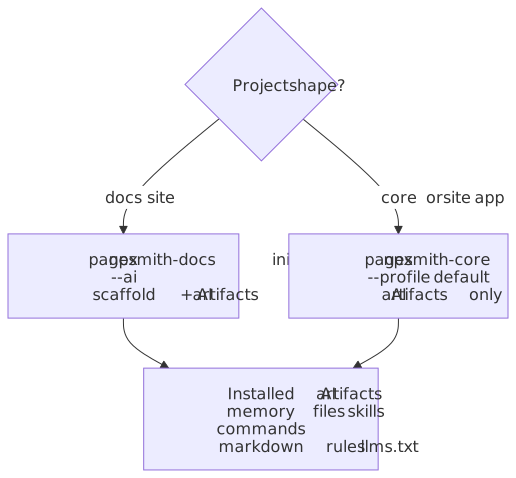
Core or site projects
npx pagesmith-core ai --profile defaultThis installs assistant memory files, package-aware skills/commands, .pagesmith/markdown-guidelines.md, and llms.txt / llms-full.txt without scaffolding a docs site.
If a repo stays on @pagesmith/site only and does not install @pagesmith/core directly, you can rely on the package-owned prompts and references under node_modules/@pagesmith/site/skills/pagesmith-site-setup/references/ instead of adding core only for AI artifact generation.
Docs projects
npx pagesmith-docs init --aiThis scaffolds pagesmith.config.json5, content, and the same AI artifacts in one flow. If the repo already has custom root llms.txt files, add --no-llms.
What Gets Installed
| Artifact | Purpose |
|---|---|
CLAUDE.md, AGENTS.md, GEMINI.md |
Project memory files that point future sessions at the right package docs |
| Assistant-specific skills/commands | Reusable package-aware commands such as /pagesmith, /update-docs, and /ps-update-all-docs |
.pagesmith/markdown-guidelines.md |
Shared markdown authoring rules for Pagesmith content |
llms.txt / llms-full.txt |
Compact and expanded LLM context files |
Install Consumer Agent Skills With pagesmith skills install
In addition to the assistant-specific commands above, each Pagesmith package ships its own skills/ folder inside the npm package (not as separate npm packages). Install versioned-pointer stubs for them with the umbrella command. The pagesmith bin ships from @pagesmith/site, so it resolves whenever @pagesmith/site or @pagesmith/docs (which depends on site) is installed:
npx pagesmith skills installIn a core-only install (@pagesmith/core without @pagesmith/site), the pagesmith bin is not present — use the package-scoped command instead, which installs from every resolvable @pagesmith/*:
npx pagesmith-core skillsWhat gets written (pointers, not copies)
Unlike a naive “copy the skill folder in” installer, pagesmith skills install never duplicates a skill body into your repo. For every skill shipped by a resolvable @pagesmith/core / @pagesmith/site / @pagesmith/docs, it writes:
- A canonical pointer stub at
.agents/skills/<name>/SKILL.md— frontmatter (name,description) plus a link straight back to the version-pinned original atnode_modules/@pagesmith/<pkg>/skills/<name>/SKILL.md. - Thin mirror stubs at
.claude/skills/<name>/SKILL.md,.cursor/skills/<name>/SKILL.md,.codex/skills/<name>/SKILL.md, and/or.continue/skills/<name>/SKILL.mdfor whichever harnesses you use — each one points back at the canonical.agents/skills/<name>/SKILL.mdstub, not atnode_modulesdirectly.
Every stub carries an HTML-comment marker recording the owning package and its installed version, for example:
<!-- pagesmith-skill-pointer: pkg=@pagesmith/core version=0.11.0 generator=@pagesmith/core@0.11.0 -->That marker is what makes re-runs safe: bump @pagesmith/core and run the command again, and every stub whose marker version is behind the installed package refreshes automatically (reported as updated); nothing changes and it reports unchanged otherwise. A skill folder outside the pagesmith-* namespace, or a hand-authored pagesmith-* folder that never carried the marker, is never touched or swept.
Flags
| Flag | Effect |
|---|---|
--package <pkg> |
Repeatable. Limit the install to specific packages (default: every resolvable package). |
--dir <path> |
Install into a different project directory (default: cwd). |
--harness <list> |
Comma-separated harnesses to mirror into: claude,cursor,codex,continue (default: auto-detected from existing .claude/, .cursor/, etc. folders). |
--only <name> |
Repeatable or comma-separated. Restrict to specific skills, with or without the pagesmith- prefix. |
--check |
Verify only, write nothing. Exits nonzero if any stub is missing, stale (behind the installed version), or orphaned (shipped skill removed or no longer installed). Wire this into CI after upgrading Pagesmith. |
--dry-run |
Show planned created / updated / unchanged / removed actions without writing. |
--json |
Emit a machine-readable { schemaVersion, command: "skills-install", ... } envelope instead of the human report. |
--check in CI looks like:
npx pagesmith skills install --checkA green exit means every stub matches the installed package version and no shipped skill or package went missing since the last install; a nonzero exit means someone upgraded @pagesmith/* (or deleted/hand-edited a stub) without re-running the installer.
Available skills (all live inside the package they document):
| Package | Skills |
|---|---|
@pagesmith/docs |
pagesmith-docs-setup, pagesmith-docs-add-page, pagesmith-docs-configure-nav, pagesmith-docs-add-search, pagesmith-docs-customize-theme, pagesmith-docs-deploy-gh-pages, pagesmith-generate-docs |
@pagesmith/site |
pagesmith-site-setup, pagesmith-site-use-preset, pagesmith-site-customize-theme |
@pagesmith/core |
pagesmith-core-setup, pagesmith-core-add-collection, pagesmith-core-add-loader, pagesmith-core-customize-markdown, pagesmith-core-write-validator |
Each skill always reads node_modules/@pagesmith/<pkg>/REFERENCE.md first so the agent uses the CLI flags and config schema that match the version actually installed in the project, instead of relying on globally cached or generic guidance. Every skill’s SKILL.md also carries allowed-tools frontmatter scoped to its own package’s CLI (for example Bash(npx pagesmith-core *)), so an assistant that honors that frontmatter can run it without an extra permission prompt.
Browse the full set in the pagesmith repo packages/<pkg>/skills/ folders. You can still copy a skill folder into .agents/skills/, .claude/skills/, or .cursor/skills/ by hand instead of running the installer — the copy just will not auto-update on upgrade the way a pointer stub does.
Migrating from the old copy-based installer
Earlier releases (pagesmith-core skills, pre-0.11.0) copied each skill’s full SKILL.md body into .agents/skills/<name>/SKILL.md, so upgrading @pagesmith/* left the copied bodies silently behind the newly installed version until you re-ran the installer with --no-overwrite-aware judgement calls. pagesmith skills install replaces that with the pointer stubs described above: nothing is duplicated, drift is detectable (--check), and upgrades update themselves.
pagesmith-core skills still works — it forwards to the exact same pointer installer and prints a one-line deprecation notice to stderr — but it is deprecated in favor of pagesmith skills install and will be removed in a future minor. If a repo has leftover full-body copies from the old installer, just re-run pagesmith skills install: it overwrites each .agents/skills/<name>/SKILL.md with the new pointer stub (a copy and a stub never happen to be byte-identical, so the first run after upgrading always reports updated, not unchanged).
Version-Matched Package Files
The installed package is the source of truth for AI guidance:
node_modules/@pagesmith/core/skills/pagesmith-core-setup/references/*node_modules/@pagesmith/site/skills/pagesmith-site-setup/references/*node_modules/@pagesmith/docs/skills/pagesmith-docs-setup/references/*node_modules/@pagesmith/docs/schemas/*.schema.json
Use the docs site when you want the latest main-branch guidance. Use node_modules/ when you want the exact version that is actually installed in the project.
Recommended Read Order
| Task | Read first |
|---|---|
| Core bootstrap / retrofit | setup-core.md, then usage.md, then REFERENCE.md |
| Site bootstrap / retrofit | setup-site.md, then usage.md, then REFERENCE.md |
| Docs bootstrap / retrofit | setup-docs.md, then usage.md, then REFERENCE.md |
| Docs config or frontmatter edits | setup-docs.md, REFERENCE.md, and schemas/*.schema.json |
| Markdown authoring | .pagesmith/markdown-guidelines.md |
| Large code or docs audit | llms-full.txt |
Profiles
| Profile | Used for | Generated context |
|---|---|---|
default |
@pagesmith/core or @pagesmith/site projects |
Core content-layer guidance plus site references when relevant |
docs |
@pagesmith/docs projects |
Default profile plus docs config, navigation, layout, and schema guidance |
Docs Maintenance Skills
Project-level Claude installs also generate docs-maintenance skills for docs-profile projects:
| Skill | Use for |
|---|---|
/update-docs |
Focused docs refresh after a code change |
/ps-update-all-docs |
Full docs and AI-context refresh across the repo |
These skills read pagesmith.config.json5, meta.json5, package guidance, and .pagesmith/markdown-guidelines.md before editing docs content.
MCP Commands
Docs projects expose the docs-aware MCP server through @pagesmith/docs:
pagesmith-docs mcp --stdioThat gives editors and agents access to docs-specific tools: docs_validate_config, docs_resolve_config, docs_list_pages, docs_get_page, and docs_search_pages.
Keep AI Context Current
Regenerate AI artifacts whenever the installed Pagesmith version or package mix changes:
npx pagesmith-core ai --profile default# or, for docs projectsnpx pagesmith-docs init --ai --no-llmsThe installer updates managed sections inside existing memory files, so custom content outside those managed blocks is preserved.