Template Engines (EJS & Handlebars)
AI Quick Start
Ask your AI agent: “Set up a Pagesmith static site using [EJS/Handlebars] templates with createContentLayer. Create content.config.mjs on @pagesmith/site, keep the app-facing imports on @pagesmith/site, use createContentLayer() from @pagesmith/site, wire pagesmithSsg from @pagesmith/site/vite, and build the HTML shell in templates. Read node_modules/@pagesmith/site/skills/pagesmith-site-setup/references/setup-site.md and node_modules/@pagesmith/site/skills/pagesmith-site-setup/references/usage.md for reference.”
Then read on to understand what happened and customize further.
The template engine integrations keep @pagesmith/site as the app-facing package for both content and site-building concerns. Unlike the React, Solid, and Svelte examples that use virtual content modules (virtual:content/*), these examples use the programmatic createContentLayer API directly. The result is a fully static site with no framework runtime shipped to the browser.
Notice that pagesmithSsg drives the build while the content layer and templates meet at entry.render() output feeding the final HTML.
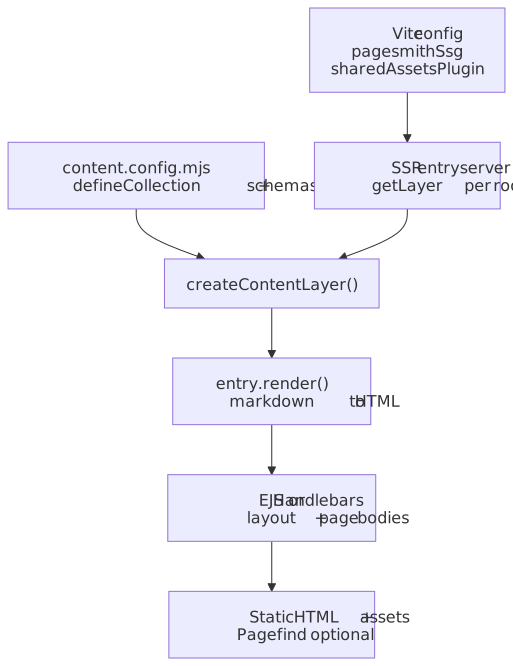
Shared Architecture
Both EJS and Handlebars follow the same pattern:
- Define collections in
content.config.mjs(.mjssince they usecreateContentLayerdirectly) - Create a content layer with
createContentLayerin the entry server - Load collections, render markdown, and pass HTML into templates
- Templates compose the final HTML pages
Content Config
import { defineCollection, defineCollections, z } from "@pagesmith/site";export const guide = defineCollection({ loader: "markdown", directory: "./content/guide", schema: z.object({ title: z.string(), description: z.string().optional(), date: z.coerce.date(), tags: z.array(z.string()).default([]), order: z.number().optional(), series: z.string().optional(), seriesOrder: z.number().optional(), }),});export const pages = defineCollection({ loader: "markdown", directory: "./content/pages", schema: z.object({ title: z.string(), description: z.string().optional(), }),});export default defineCollections({ guide, pages });Vite Config
Template engine examples use only pagesmithSsg and sharedAssetsPlugin from @pagesmith/site/vite (no pagesmithContent since content is loaded via the API):
import { defineConfig } from "vite";import { pagesmithSsg, sharedAssetsPlugin } from "@pagesmith/site/vite";export default defineConfig({ plugins: [ sharedAssetsPlugin(), ...pagesmithSsg({ entry: "./src/entry-server.tsx", contentDirs: ["./content"] }), ], oxc: { jsx: { runtime: "automatic", importSource: "@pagesmith/site", }, },});Content Layer
The content layer is created once and reused across renders:
import { createContentLayer } from "@pagesmith/site";import contentConfig from "../content.config.mjs";const { guide, pages } = contentConfig;let layer: ReturnType<typeof createContentLayer>;let layerRoot: string;function getLayer(root: string) { if (!layer || layerRoot !== root) { layerRoot = root; layer = createContentLayer({ collections: { guide, pages }, root }); } return layer;}Content is loaded, rendered, and sorted at render time:
async function loadContent(root: string) { const l = getLayer(root); const allGuide = await l.getCollection("guide"); // Render markdown to HTML const rendered = []; for (const entry of allGuide) { const result = await entry.render(); rendered.push({ entry, ...result }); } // Sort by series order then date return rendered.sort((a, b) => { const so = (a.entry.data.seriesOrder ?? 99) - (b.entry.data.seriesOrder ?? 99); if (so !== 0) return so; return a.entry.data.date.getTime() - b.entry.data.date.getTime(); });}EJS
Source: examples/frameworks/with-vanilla-ejs/ | Output: Live Demo
Dependencies
{ "dependencies": { "@pagesmith/site": "*", "ejs": "^3.1.10", "pagefind": "^1.5.0" }}Project Structure
with-vanilla-ejs/ content/ guide/ # Guide articles pages/ # Standalone pages src/ entry-server.tsx theme.css templates/ layout.ejs # Outer HTML shell index.ejs # Home page body article.ejs # Article body about.ejs # About page body content.config.mjs vite.config.tsRendering with EJS
Templates are loaded from disk and rendered with ejs.render(). A layout wrapper composes the outer HTML shell:
import ejs from "ejs";import { readFileSync } from "fs";import { join } from "path";function loadTemplate(root: string, name: string) { return readFileSync(join(root, "templates", `${name}.ejs`), "utf-8");}function renderWithLayout(root: string, body: string, vars: Record<string, any>) { const layout = loadTemplate(root, "layout"); return ejs.render(layout, { ...vars, body });}Template Syntax
EJS uses <%- for unescaped output (rendered markdown HTML) and <%= for escaped output:
<article> <% if (date) { %> <p class="doc-page-meta"> <time><%= formatDate(date) %></time> <% if (readTime) { %> · <%= readTime %> min read <% } %> </p> <% } %> <div class="prose"><%- content %></div></article>Key Differences
- Templates use
<%- content %>for raw HTML (rendered markdown) - Layout composition via
ejs.render()with template loading from disk - Simpler mental model: template strings with embedded JavaScript
Handlebars
Source: examples/frameworks/with-vanilla-hbs/ | Output: Live Demo
Dependencies
{ "dependencies": { "@pagesmith/site": "*", "handlebars": "^4.7.8", "pagefind": "^1.5.0" }}Project Structure
with-vanilla-hbs/ content/ guide/ # Guide articles pages/ # Standalone pages src/ entry-server.tsx theme.css templates/ layout.hbs # Outer HTML shell with inline partials index.hbs # Home page article.hbs # Article page about.hbs # About page content.config.mjs vite.config.tsCustom Helpers
Handlebars requires registering helpers for common operations:
import Handlebars from "handlebars";Handlebars.registerHelper("formatDate", (value: any) => { const date = new Date(value); return date.toLocaleDateString("en-US", { year: "numeric", month: "long", day: "numeric", });});Handlebars.registerHelper("eq", (left: any, right: any) => left === right);Handlebars.registerHelper( "startsWith", (str: any, prefix: any) => typeof str === "string" && str.startsWith(prefix),);Rendering with Handlebars
The layout is registered as a partial, and child templates use partial block syntax:
Handlebars.registerPartial("layout", loadTemplate(root, "layout"));const articleTemplate = Handlebars.compile(loadTemplate(root, "article"));return articleTemplate({ title: item.entry.data.title, content: item.html, headings: item.headings,});Template Syntax
Handlebars uses triple-braces {{{content}}} for raw HTML and double-braces {{title}} for escaped output. Inline partials define reusable blocks:
{{#> layout}} {{#*inline "body"}} <article> {{#if date}} <p class="doc-page-meta"> <time>{{formatDate date}}</time> {{#if readTime}} · {{readTime}} min read {{/if}} </p> {{/if}} <div class="prose">{{{content}}}</div> </article> {{/inline}}{{/layout}}Key Differences
- Triple-braces
{{{content}}}for raw HTML (rendered markdown) - Partial block syntax (
{{#> layout}}...{{/layout}}) for layout composition - Custom helpers for date formatting, equality, and string operations
- Inline partials (
{{#*inline "name"}}) for reusable blocks
Shared Patterns
CSS and Styling
Both examples import CSS from @pagesmith/site:
@import "@pagesmith/site/css/standalone";| Import path | Contents |
|---|---|
@pagesmith/site/css/standalone |
Full bundle (reset, tokens, prose, code, layout, TOC) |
@pagesmith/site/css/content |
Content-only bundle (reset, prose, code, viewport) |
@pagesmith/site/css/fonts |
Bundled web fonts (Open Sans, JetBrains Mono) |
@pagesmith/site/css/viewport |
Viewport / responsive base only |
Development and Building
# Start the dev server with hot reloadvp dev# Build the static site (runs SSG + Pagefind indexing)vp build# Type-check the projectvp checkTemplate Engine Comparison
| Aspect | EJS | Handlebars |
|---|---|---|
| Raw HTML output | <%- content %> |
{{{content}}} |
| Escaped output | <%= title %> |
{{title}} |
| Layout composition | ejs.render() with layout wrapper |
Partial blocks ({{#> layout}}) |
| Helpers | Plain JavaScript functions | Registered via Handlebars.registerHelper |
| Reusable blocks | N/A (re-render or extract functions) | Inline partials ({{#*inline}}) |
| Logic in templates | Full JavaScript (<% if/for %>) |
Block helpers ({{#if}}, {{#each}}) |