Doc Site with @pagesmith/docs
Overview
The Doc Site pattern is the high-level Pagesmith docs workflow. Instead of wiring collections, JSX chrome, and SSG by hand, you install @pagesmith/docs, point it at a docs content directory, and let the preset handle navigation, the default theme, Pagefind search, and the build pipeline.
That means:
- the docs preset owns page discovery, sidebar generation, and search wiring
- you write markdown in a docs tree plus a
pagesmith.config.json5 - optional layout overrides stay on
@pagesmith/docsvia@pagesmith/docs/jsx-runtime - the example can stay focused on docs content and a couple of custom layouts
Source: examples/doc-site/ | Output: Live Demo
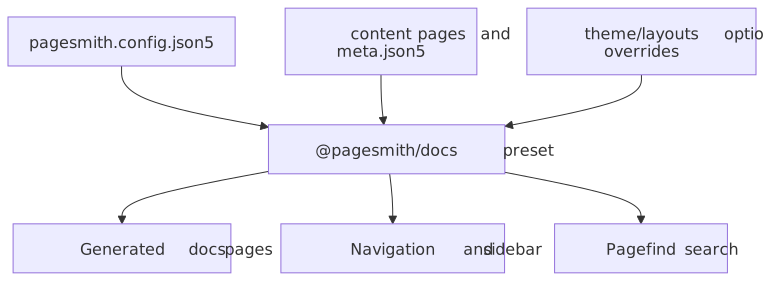
The diagram below highlights the boundary: your project supplies content, config, and optional overrides, while @pagesmith/docs owns the docs-specific runtime and generation pipeline.
Prerequisites
- Node.js 24+
Project Setup
package.json
The example depends only on @pagesmith/docs. Because this repo builds the workspace package directly, the scripts call the local CLI entrypoint; in an installed project you would use pagesmith-docs ... instead.
{ "name": "@pagesmith/example-doc-site", "private": true, "type": "module", "scripts": { "dev": "node ../../packages/docs/dist/cli/bin.mjs dev --config ./pagesmith.config.json5", "build": "node ../../packages/docs/dist/cli/bin.mjs build --config ./pagesmith.config.json5", "check": "tsc --noEmit" }, "dependencies": { "@pagesmith/docs": "*" }, "devDependencies": { "typescript": "^6.0.2" }}For a standalone project after installation, the equivalent commands are simply pagesmith-docs dev --config ./pagesmith.config.json5 and pagesmith-docs build --config ./pagesmith.config.json5.
Project Structure
doc-site/ pagesmith.config.json5 content/ README.md # Home page guide/ meta.json5 # Section metadata and series installation.md project-structure.md content-collections.md layouts-and-rendering.md configuration.md search-integration.md kitchen-sink.md pages/ about.md theme/ layouts/ DocHome.tsx # Home layout override DocPage.tsx # Inner-page layout override shared.tsx # Shared helpers/components for the overrides public/ favicon.svg package.jsonThis example intentionally uses an explicit content/ directory. In zero-config repos, @pagesmith/docs prefers docs/ when that folder exists and falls back to content/ otherwise.
pagesmith.config.json5
The example is configured entirely through pagesmith.config.json5. This excerpt shows the main knobs:
{ $schema: "../../node_modules/@pagesmith/docs/schemas/pagesmith-config.schema.json", preset: "@pagesmith/docs", name: "Pagesmith", title: "Example Docs", description: "Documentation site built with @pagesmith/docs", origin: "https://projects.sujeet.pro", contentDir: "./content", outDir: "../../gh-pages/examples/doc-site", basePath: "/pagesmith/examples/doc-site", homeLink: "/pagesmith", maintainer: { name: "Sujeet Jaiswal", link: "https://sujeet.pro", }, copyright: { projectName: "Example Docs", startYear: 2024, endYear: null, }, sidebar: { collapsible: true }, theme: { defaultColorScheme: "auto", defaultTheme: "paper", layouts: { home: "./theme/layouts/DocHome.tsx", page: "./theme/layouts/DocPage.tsx", }, }, footerLinks: [ { header: "Guide", links: [ { label: "Installation", path: "/guide/installation" }, { label: "Configuration", path: "/guide/configuration" }, ], }, ], editLink: { repo: "https://github.com/sujeet-pro/pagesmith", branch: "main", label: "Edit this page", }, lastUpdated: true, search: { enabled: true, showImages: false, showSubResults: true, },}Key points from the example:
contentDiris explicit here, but@pagesmith/docscan also run zero-config whendocs/orcontent/follows the standard layouttheme.layoutsoverrides only thehomeandpagelayouts; the rest of the docs preset stays intactsearch.enabledturns on Pagefind without any extra plugin wiring- the monorepo example builds into
../../gh-pages/examples/doc-site, while a standalone docs site would typically build intogh-pages
Content Structure and Navigation
Top-level folders under content/ become sections. This example keeps one primary guide section plus a small pages/ section for standalone pages.
content/guide/meta.json5 uses the current series-based structure:
{ displayName: "Guide", orderBy: "manual", series: [ { slug: "getting-started", displayName: "Getting Started", articles: ["installation", "project-structure", "content-collections"], }, { slug: "customization", displayName: "Customization", articles: ["layouts-and-rendering", "configuration", "search-integration"], }, { slug: "markdown-showcase", displayName: "Markdown Showcase", articles: ["kitchen-sink"], }, ],}That is the important convention to copy from the example: current docs projects use series groups, not the older flat items: [...]-only pattern shown in some pre-refresh docs.
Layout Overrides
Layout overrides stay on the docs package surface. The example uses @pagesmith/docs/jsx-runtime and reuses the shared docs shell pieces instead of reimplementing everything from scratch.
import { h } from "@pagesmith/docs/jsx-runtime";import { Html } from "@pagesmith/docs/theme";theme/layouts/DocHome.tsx maps the home page frontmatter (hero, features, packages, install, codeExample) onto the stock docs home structure. theme/layouts/DocPage.tsx keeps the expected article landmarks such as:
data-pagefind-bodyon the article content- the shared docs header/sidebar/footer components
- mobile and desktop table-of-contents regions
- prev/next and edit-link props that
@pagesmith/docsresolves for you
If you want to customize layout behavior, prefer composing @pagesmith/docs/theme, @pagesmith/docs/components, and @pagesmith/docs/layouts instead of cloning the whole preset.
Search and Runtime
Pagefind is built in. This example only configures it in pagesmith.config.json5:
{ search: { enabled: true, showImages: false, showSubResults: true, },}When search is enabled, @pagesmith/docs handles:
- indexing during the build
- shipping the Pagefind web component assets
- rendering the modal markup in the document shell
- wiring the trigger and keyboard shortcuts through the shared standalone runtime
Running The Example
From the repo root:
vp installvp run dev:eg:doc-siteInside the example directory, the local scripts are:
node ../../packages/docs/dist/cli/bin.mjs dev --config ./pagesmith.config.json5node ../../packages/docs/dist/cli/bin.mjs build --config ./pagesmith.config.json5In a published project with @pagesmith/docs installed, the same workflow becomes:
pagesmith-docs dev --config ./pagesmith.config.json5pagesmith-docs build --config ./pagesmith.config.json5pagesmith-docs preview --config ./pagesmith.config.json5When To Use This Shape
Choose this pattern when:
- you want a convention-based docs site with minimal app code
- you want navigation, Pagefind, and the docs theme handled for you
- you still want the option to override layouts without leaving the docs package surface
If you need a fully custom site shell, step down to @pagesmith/site. If your framework already owns the entire shell and you only want the headless content layer, use a lower-level @pagesmith/core or framework-hosted @pagesmith/site integration instead.