Markdown Features
Pagesmith ships with a rich markdown pipeline by default. You can write standard markdown, GitHub-style alerts, GitHub Flavored Markdown extensions, LaTeX math, and advanced code block metadata without wiring up your own plugin stack.
No extra configuration is required to use the built-in features. The pages in this section are organized as feature-focused demos so you can see realistic rendered output instead of only API notes.
When you use stock @pagesmith/docs, the pagesmith.config.json5 markdown field stays JSON-safe: allowDangerousHtml, math, and shiki. Function-valued remarkPlugins and rehypePlugins belong to lower-level @pagesmith/core integrations, not the default docs config file.
Feature Guides
- Alerts & Callouts - GitHub-style callouts, multi-paragraph notes, lists, and code blocks inside alerts
- GFM Extensions - tables, task lists, strikethrough, autolinks, and footnotes
- Typography - headings, links, images, blockquotes, lists, and smart punctuation
- Math & LaTeX - inline and display equations rendered with MathJax
- Code Blocks - titles, line numbers, highlighting, diff markers, collapse, and tabs
Built In By Default
| Feature | Plugin or stage | Where to explore it |
|---|---|---|
| Alerts | remark-github-alerts |
Alerts & Callouts |
| GitHub Flavored Markdown | remark-gfm |
GFM Extensions |
| Smart typography | remark-smartypants |
Typography |
| Math | remark-math, rehype-mathjax |
Math & LaTeX |
| Code blocks | built-in Pagesmith renderer on top of Shiki | Code Blocks |
| External link handling | rehype-external-links |
Overview below |
| Heading anchors | rehype-slug, rehype-autolink-headings |
Overview below |
| Accessible emojis | rehype-accessible-emojis |
Overview below |
| Local images | rehype-local-images |
Overview below |
External Links
Any link with an absolute URL (starting with http:// or https://) automatically gets target="_blank" and rel="noopener noreferrer". Internal links and anchor links are left alone.
[GitHub repository](https://github.com/sujeet-pro/pagesmith)[Getting Started](../getting-started/README.md)[Jump to code blocks](#built-in-by-default)Rendered sample:
Accessible Emojis
Emoji characters are wrapped with accessible markup so screen readers announce their meaning instead of skipping them.
Ship it 🚀Rendered sample:
Ship it 🚀
HTML output:
Ship it <span role="img" aria-label="rocket">🚀</span>Local Images
When Pagesmith knows the markdown source path, relative local images inherit intrinsic dimensions automatically. Relative JPEGs can also render as a <picture> with AVIF and WebP fallbacks while keeping the original JPEG as the <img> fallback.
Collection entries keep those refs inside the collection directory, and stock docs keeps them inside contentDir. If a relative ref escapes that allowed root, Pagesmith leaves the image tag unchanged instead of inferring dimensions or picture fallbacks. If you call convert() or layer.convert() outside a collection entry, pass sourcePath when you want the same behavior for local assets; add assetRoot when the allowed root should be broader than the markdown file’s own directory.
Generated raster variants
For every convertible raster source (PNG, JPEG, WebP, GIF) Pagesmith emits three files alongside the source:
<stem>.avifand<stem>.webp— display variants capped at 1600px wide (designed for ~800px content columns at 2x DPR).<stem>.zoom.webp— high-resolution zoom variant capped at 4800px wide, used by the image-zoom modal.
Smaller-than-cap sources keep their native dimensions (withoutEnlargement: true). SVGs are passed through unchanged.
Image zoom
Every figure-wrapped image ships with a hidden expand button (<button class="ps-img-zoom-btn" hidden data-ps-img-zoom-btn>) and the figure carries the ps-figure-zoomable class. With JavaScript disabled the button stays hidden — no overlay, no modal.
Load @pagesmith/site/runtime/image-zoom (also bundled into @pagesmith/site/runtime/content and runtime/standalone) and initImageZoom() will:
- Reveal the per-figure expand button on hover (or always on touch devices).
- Open a singleton full-viewport modal sized so the image fills the constrained viewport axis at 100% (preserving aspect ratio). For a 16:9 viewport and a square image, the image is sized to 100vh on both sides.
- Step the zoom by 10% with the toolbar
+/-buttons. Clamps: 50% min, 400% max for raster, 1000% max for SVG. - Zoom toward the pointer with Ctrl/Cmd+wheel; plain wheel pans the modal once the image is larger than the viewport.
- Swap source on
<html>color-scheme-light/color-scheme-darktoggles when the image carriesdata-zoom-src-light/data-zoom-src-dark(themed light/dark pairs).
Images wrapped in a link intentionally skip the zoom button — the link click is the primary action.
Heading IDs and Anchors
All headings automatically receive:
- A URL-safe
idviarehype-slug - A self-link via
rehype-autolink-headings
## My SectionThis renders to HTML like:
<h2 id="my-section"><a href="#my-section">My Section</a></h2>Custom Plugins In @pagesmith/core Integrations
If you wire markdown through @pagesmith/core APIs such as defineConfig(), you can extend the built-in pipeline with your own remark and rehype plugins:
import remarkToc from "remark-toc";import rehypeFigure from "rehype-figure";const config = defineConfig({ collections: { posts }, markdown: { remarkPlugins: [remarkToc], rehypePlugins: [rehypeFigure], },});Custom remark plugins run after the built-in remark plugins but before remark-rehype. Custom rehype plugins run after the built-in rehype plugins but before rehype-stringify.
Stock @pagesmith/docs keeps pagesmith.config.json5 JSON-safe and does not execute function-valued remark or rehype plugins. Use the docs package when the built-in pipeline is enough; drop to @pagesmith/core when you need custom plugin functions or a custom site shell.
Docs-Specific Link And Asset Transforms
Stock @pagesmith/docs adds a docs pass after heading extraction:
- Relative link resolution — relative links between content pages (e.g.,
../getting-started,./sub-page, or../reference/architecture/README.md) are resolved to root-relative URLs underbasePath. ThetrailingSlashconfig controls whether the output uses/guide/getting-startedor/guide/getting-started/. - Absolute link formatting — absolute internal links like
/guide/getting-started/are normalized to match thetrailingSlashsetting and prefixed withbasePath. - Asset path publishing — relative images and diagrams keep the intrinsic dimensions from the shared local-image pass, then publish under flat content-hashed paths (
/assets/name.hash.ext). *.inline.svgimages inline only when they stay inside the current page directory subtree.- The
.invert.filename convention and light/dark pair handling are core features (see the Markdown Reference); the docs asset pass only handles URL rewriting to published paths.
Example:
[Architecture](../../reference/architecture/README.md)[Getting Started](../getting-started/README.md)Pipeline Order
The diagram below shows the shared core pipeline plus the docs-only post-processing that stock @pagesmith/docs adds after heading extraction. If you are using @pagesmith/core directly, the custom plugin slots are where your own remark and rehype plugins fit.
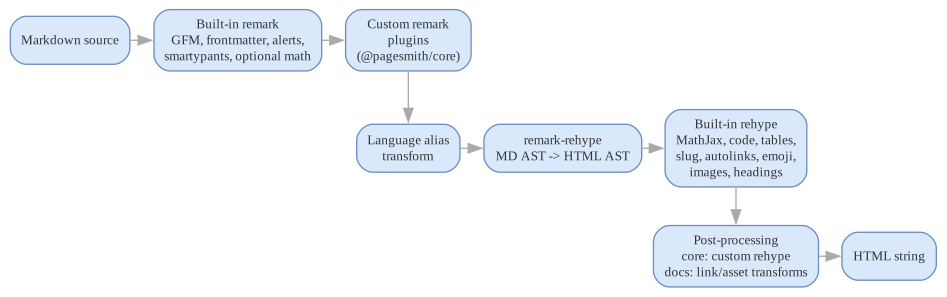
For @pagesmith/core integrations:
remark-parse Parse markdown to ASTremark-gfm Tables, strikethrough, task lists, autolinks, footnotesremark-frontmatter Strip YAML frontmatter from ASTremark-github-alerts > [!NOTE], > [!TIP], etc.remark-smartypants Smart quotes, en/em dashes, ellipsesremark-math (optional) Enabled when `markdown.math` is `true` or `'auto'` detects math markers[user remark plugins] From MarkdownConfig.remarkPluginslang-alias transform Map fenced-code language tags via markdown.shiki.langAliasremark-rehype Markdown AST -> HTML ASTrehype-mathjax Render math to SVG before code rendering when math is enabledapplyPagesmithCodeRenderer Syntax highlighting, code frames, copy buttonrehype-code-tabs Group consecutive titled blocks into tabsrehype-scrollable-tables Wrap markdown tables for horizontal scrollingrehype-slug Add id="" to headingsrehype-autolink-headings Wrap heading text in anchor linksrehype-external-links target="_blank" on external URLsrehype-accessible-emojis aria-label on emoji charactersrehype-local-images Fill intrinsic image dimensions and JPEG picture fallbacksheading extraction Collect headings for TOC[user rehype plugins] From MarkdownConfig.rehypePluginsrehype-stringify HTML AST -> HTML stringFor stock @pagesmith/docs:
remark-parse Parse markdown to ASTremark-gfm Tables, strikethrough, task lists, autolinks, footnotesremark-frontmatter Strip YAML frontmatter from ASTremark-github-alerts > [!NOTE], > [!TIP], etc.remark-smartypants Smart quotes, en/em dashes, ellipsesremark-math (optional) Enabled when `markdown.math` is `true` or `'auto'` detects math markers[custom remark plugins in lower-level integrations] Available when a docs integration intentionally drops below the JSON-safe config surfacelang-alias transform Map fenced-code language tags via markdown.shiki.langAliasremark-rehype Markdown AST -> HTML ASTrehype-mathjax Render math to SVG before code rendering when math is enabledapplyPagesmithCodeRenderer Syntax highlighting, code frames, copy buttonrehype-code-tabs Group consecutive titled blocks into tabsrehype-scrollable-tables Wrap markdown tables for horizontal scrollingrehype-slug Add id="" to headingsrehype-autolink-headings Wrap heading text in anchor linksrehype-external-links target="_blank" on external URLsrehype-accessible-emojis aria-label on emoji charactersrehype-local-images Fill intrinsic image dimensions and JPEG picture fallbacksheading extraction Collect headings for TOCdocs link/asset transforms Rewrite relative docs links and companion assets for the docs siterehype-stringify HTML AST -> HTML stringFor validation details and lifecycle notes, see Validation & Rendering.