Validation and Rendering
AI Quick Start
Ask your AI agent: “Add a custom content validator to my Pagesmith collection that checks for missing image alt text and warns on TODO markers in markdown files.” Then read on to understand what happened and customize further.
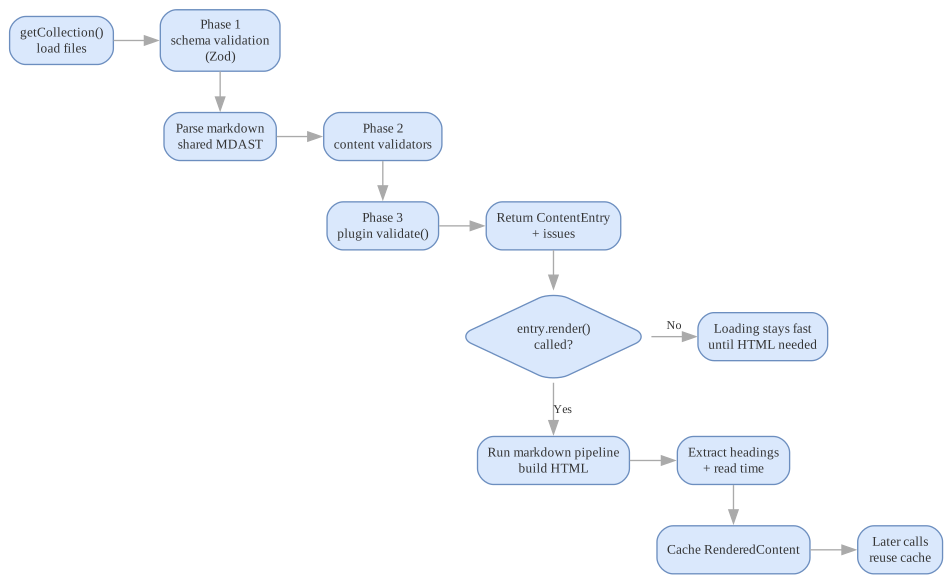
Pagesmith separates validation from rendering so you can keep content workflows fast. Validation happens at load time (when getCollection() is called), while rendering is lazy and happens only when you call entry.render().
The diagram below highlights the key boundary on this page: getCollection() performs the full validation path up front, while entry.render() is a separate lazy step that builds and caches HTML only when you need it.
Validation Pipeline
Validation runs in three phases during content loading, all orchestrated by ContentStore:
Phase 1: Schema Validation
Every entry’s data object is validated against the collection’s Zod schema using validateSchema(). This wraps Zod’s safeParse and converts errors into structured ValidationIssue[] objects:
type ValidationIssue = { message: string; severity: "error" | "warn"; field?: string; // Dot-path to the invalid field (e.g., "tags.0")};The coerced result from safeParse is reused as the entry data, so Zod transforms (like z.coerce.date()) are applied automatically.
Phase 2: Content Validators
For markdown collections, Pagesmith runs content validators on the raw markdown AST (MDAST). The key optimization is that one MDAST parse is shared across all validators via the ValidatorContext.mdast field, avoiding redundant parsing.
The ValidatorContext provides:
type ValidatorContext = { filePath: string; // Absolute path to the source file slug: string; // URL-friendly slug collection: string; // Collection name rawContent?: string; // Raw markdown body data: Record<string, any>; // Parsed frontmatter/data mdast?: Root; // Pre-parsed MDAST tree (shared)};The MDAST tree is parsed once in runValidators() using unified().use(remarkParse).parse(rawContent) and set on the context before any validators execute.
Built-in Validators
Pagesmith provides four built-in validators for markdown content (the builtinMarkdownValidators array):
linkValidator (configurable via createLinkValidator(options)) — Checks links and images:
- Warns on empty link text.
- Errors on missing image
alttext (toggle withrequireAltText). - Errors on raw
<img>tags outside a<picture>element (toggle withforbidHtmlImgTag). - Errors when adjacent
*-light.<ext>/*-dark.<ext>image pairs do not match (toggle withrequireThemeVariantPairs). - Warns on malformed external URLs.
- Errors on broken internal links (resolved against the markdown source path, the configured
rootDir/basePath, andadditionalRoots). - Optional checks:
internalLinksMustBeMarkdown,requireCanonicalInternalLinks, and an opt-in external-URL reachability fetch (unreachableSeverity,fetchTimeoutMs,fetchConcurrency).
headingValidator — Checks heading structure (all warnings, never aborts):
- Warns when a document with content has no headings.
- Warns on empty heading text.
- Warns when more than one
h1is present (one warning per extrah1). - Warns when heading levels skip (for example
h1→h3).
codeBlockValidator — Checks fenced code block meta syntax:
- Warns when meta is set but the code block has no language identifier.
- Warns on unknown meta keys (anything outside
title,showLineNumbers,startLineNumber,wrap,frame,mark,ins,del,collapse). - Warns on malformed line ranges in
mark,ins,del, orcollapse.
imageStructureValidator — Enforces the <figure><picture>...<img></picture><figcaption?></figure> shape (and <figure><img></figure> for SVG/GIF). Errors on <figure> nested inside <picture>, missing or multiple <img> inside <picture>, unbalanced <picture> tags, or foreign tags inside <picture>. Walks both MDAST html nodes and raw markdown.
Custom Content Validators
Implement the ContentValidator interface and add to the validators array:
import type { ContentValidator } from "@pagesmith/core";const noTodoValidator: ContentValidator = { name: "no-todo", validate(ctx) { const issues = []; if (ctx.rawContent?.includes("TODO")) { issues.push({ message: "Content contains TODO markers", severity: "warn" as const, }); } return issues; },};const posts = defineCollection({ loader: "markdown", directory: "content/posts", schema: z.object({ title: z.string() }), validators: [noTodoValidator],});Custom validators receive the same shared ValidatorContext with the pre-parsed MDAST tree. You can walk the MDAST tree for structural analysis:
import type { ContentValidator } from "@pagesmith/core";import { visit } from "unist-util-visit";const imageAltValidator: ContentValidator = { name: "image-alt-text", validate(ctx) { const issues = []; if (ctx.mdast) { visit(ctx.mdast, "image", (node: any) => { if (!node.alt || node.alt.trim() === "") { issues.push({ message: `Image missing alt text: ${node.url}`, severity: "warn" as const, }); } }); } return issues; },};Disabling Built-in Validators
Set disableBuiltinValidators: true on a collection to skip the built-in link, heading, code block, and image-structure validators:
const posts = defineCollection({ loader: "markdown", directory: "content/posts", schema: z.object({ title: z.string() }), disableBuiltinValidators: true, validators: [myCustomValidator],});Error Handling in Validators
Validators that throw errors are caught and converted to error-severity issues, so one failing validator does not abort the rest:
for (const validator of validators) { try { const result = await validator.validate(ctx); issues.push(...result); } catch (err) { const message = err instanceof Error ? err.message : String(err); issues.push({ message: `Validator "${validator.name}" threw: ${message}`, severity: "error", }); }}Phase 3: Plugin Validators
If ContentPlugin instances are registered in the config, their validate() hooks run after all other validation. Plugin validators receive { data, content? } and return string[] of error messages:
type ContentPlugin = { name: string; rehypePlugin?: () => (tree: any) => void; remarkPlugin?: () => (tree: any) => void; validate?: (entry: { data: Record<string, any>; content?: string }) => string[];};Collection-Level Validate Hook
The validate hook on CollectionDef provides a lightweight alternative to full ContentValidator instances. It runs during loading and returns a string error message or undefined:
const posts = defineCollection({ loader: "markdown", directory: "content/posts", schema: z.object({ title: z.string(), date: z.coerce.date(), }), validate(entry) { if (entry.data.date > new Date()) { return "Post date cannot be in the future"; } },});Rendering Model
Lazy Rendering
ContentEntry.render() is lazy — content loads with metadata, schema validation, and AST validation, but markdown becomes HTML only when you explicitly call render().
The ContentEntry class stores:
slug— URL-friendly identifiercollection— collection namefilePath— absolute path to source filedata— validated data (typed by the Zod schema)rawContent— raw markdown body (only for markdown loaders)
When render() is called:
- If a cached result exists (and
forceis not set), return immediately - If
rawContentis empty (non-markdown entry), return{ html: '', headings: [], readTime: 0 } - Process
rawContentthrough the unified markdown pipeline (processMarkdown()) - Compute read time from the raw markdown source (not the rendered HTML)
- Cache and return the
RenderedContent:
type RenderedContent = { html: string; // Processed HTML headings: Heading[]; // Extracted headings for TOC { depth, text, slug } readTime: number; // Estimated read time in minutes};Render Caching
Rendered output is cached per entry after the first render() call. You can control caching with:
entry.render()— returns cached result if availableentry.render({ force: true })— forces a re-render, replacing the cacheentry.clearRenderCache()— clears the cache without re-rendering
Read Time Computation
Read time is computed from the original markdown source rather than rendered HTML. This produces better estimates because it counts the actual words the reader will see, not HTML tags and attributes. The computation uses a standard 200 words-per-minute reading rate.
Markdown Pipeline
The markdown pipeline is built using the unified ecosystem with a built-in Shiki-backed code renderer for syntax highlighting and code block features. The full chain:
remark-parse Parse markdown to MDAST -> remark-gfm Tables, strikethrough, task lists, autolinks -> remark-frontmatter Strip YAML frontmatter from AST -> remark-github-alerts > [!NOTE], > [!TIP], etc. -> remark-smartypants Smart quotes, dashes, ellipses -> remark-math (optional) Enabled when `markdown.math` is `true` or `'auto'` detects math markers -> [user remark plugins] From MarkdownConfig.remarkPlugins -> lang-alias transform Map fenced-code language tags via `markdown.shiki.langAlias` -> remark-rehype MDAST -> HAST (`allowDangerousHtml` defaults to true) -> rehype-mathjax/svg Render math to SVG (when math is enabled) -> applyPagesmithCodeRenderer Syntax highlighting, code frames, copy/collapse UI -> rehype-code-tabs Group consecutive titled blocks into tabs -> rehype-scrollable-tables Wrap markdown tables for overflow-safe scrolling -> rehype-slug Add id="" to headings -> rehype-autolink-headings Wrap heading text in anchor links (behavior: 'wrap') -> rehype-external-links target="_blank" on external URLs -> rehype-accessible-emojis aria-label on emoji characters -> rehype-local-images Fill intrinsic image dimensions, AVIF/WebP <picture> fallbacks, light/dark <picture> pairs, <figure>/<figcaption> wrapping -> heading extraction Custom plugin: walk HAST, collect Heading[] -> [user rehype plugins] From MarkdownConfig.rehypePlugins -> rehype-stringify Serialize HAST to HTML stringThe processor is cached per MarkdownConfig object reference via a WeakMap to avoid rebuilding the plugin chain on every call.
Built-in Code Renderer Configuration
Pagesmith uses a built-in Shiki-backed code renderer for all code block processing. It handles:
- Dual-theme syntax highlighting (defaults to
github-light/github-dark) - Code block frames with title bars
- Line numbers (enabled by default)
- Copy-to-clipboard buttons
- Line highlighting, insertions, and deletions
- Collapsible sections
- Code block grouping/tabs
Shared code-block chrome ships in the normal Pagesmith CSS bundles, while Shiki token colors are injected during markdown processing and the shared Pagesmith content runtime handles copy/collapse behavior in the browser.
The renderer respects Pagesmith design tokens for font families, sizes, and border radius via CSS custom properties (--ps-font-sans, --ps-font-mono, --ps-font-size-sm, --ps-radius-lg, --ps-color-border-subtle).
Code Block Meta Syntax
The built-in renderer supports a rich meta syntax on fenced code blocks. Add options after the language identifier:
Title
Display a filename or label in the code block header:
```js title="app.js"console.log('hello')```Line Numbers
Line numbers are shown by default (controlled by markdown.shiki.defaultShowLineNumbers). Hide them per block:
```js showLineNumbers=falseconsole.log('no line numbers')```Line Highlighting
Mark lines to draw attention. Use mark for neutral highlights, ins for additions (green), and del for deletions (red):
```js mark={3} ins={4} del={5}const a = 1const b = 2const c = 3 // highlightedconst d = 4 // inserted (green)const e = 5 // deleted (red)```Line ranges are supported: mark={1-3,7}, ins={2-4}, del={8-10}.
Collapsible Sections
Collapse line ranges to keep long code blocks readable:
```js collapse={1-5,12-14}// These lines will be collapsedimport { a } from 'a'import { b } from 'b'import { c } from 'c'import { d } from 'd'// Visible code hereconst result = a + b + c + dconsole.log(result)// These will also be collapsed// cleanup code// more cleanup```Word Wrap
Enable word wrapping for long lines:
```js wrapconst veryLongVariable = 'this is a very long string that would normally overflow the code block and require horizontal scrolling'```Frame Type
Control the frame style (code, terminal, or none). When omitted, the frame is auto-detected from the language:
```bash frame="terminal"npm install @pagesmith/core```Combined Example
Multiple options can be combined on a single code block:
```ts title="server.ts" mark={3-4} ins={6} collapse={1-2}import express from 'express'import { createContentLayer } from '@pagesmith/core'const layer = createContentLayer(config)const app = express()app.get('/api/posts', async (req, res) => { const posts = await layer.getCollection('posts') res.json(posts.map(p => p.data))})```Plugins
Content plugins can inject into the markdown pipeline at two points:
remarkPlugin— runs as a remark plugin on the MDASTrehypePlugin— runs as a rehype plugin on the HAST
Plugin remark and rehype plugins are collected and appended to the pipeline during rendering, so they run on every markdown entry. Plugin validators run during the loading phase, not during rendering.
import { defineConfig } from "@pagesmith/core";const myPlugin = { name: "my-plugin", rehypePlugin: () => (tree) => { // Transform the HAST tree }, validate: (entry) => { const errors = []; if (!entry.data.title) { errors.push("Missing required title field"); } return errors; },};const config = defineConfig({ collections: { posts }, plugins: [myPlugin],});Direct Conversion
Use the content layer when you need collection semantics (file discovery, schema validation, caching). Use direct conversion when you only have an isolated markdown string:
// Via the content layer (respects the layer's markdown config)const fragment = await layer.convert("# Hello\n\nWorld");// fragment.html, fragment.headings, fragment.toc, fragment.frontmatter// Via the standalone convert() functionimport { convert } from "@pagesmith/core";const result = await convert("# Hello\n\nWorld", { markdown: { shiki: { themes: { light: "github-light", dark: "github-dark" } } },});// result.html, result.headings, result.toc, result.frontmatterThe ConvertResult type:
type ConvertResult = { html: string; headings: Heading[]; /** @deprecated Use `headings` instead. */ toc: Heading[]; frontmatter: Record<string, any>;};convert() extracts headings from the rendered HTML using extractToc() (regex-based) and exposes them on both headings and the deprecated toc alias. entry.render() extracts headings from the HAST during processing (more accurate) and only returns headings.
Validation in CI
Use layer.validate() in application code when you want content validation results as structured data:
const layer = createContentLayer(config);// Validate all collectionsconst results = await layer.validate();// Validate a specific collectionconst postResults = await layer.validate("posts");// Check resultsfor (const result of results) { console.log(`${result.collection}: ${result.errors} errors, ${result.warnings} warnings`); for (const entry of result.entries) { for (const issue of entry.issues) { console.log(` [${issue.severity}] ${entry.slug}: ${issue.message}`); } }}The ValidationResult type:
type ValidationResult = { collection: string; entries: Array<{ slug: string; filePath: string; issues: ValidationIssue[]; }>; errors: number; warnings: number;};Validation Issue Lifecycle
Issues are collected during loading and stored alongside each entry in the ContentStore. The lifecycle:
- Schema issues — generated by
validateSchema()during loading - Content issues — generated by
runValidators()during loading - Plugin issues — generated by plugin
validate()hooks during loading - Load failures — caught and wrapped as error-severity issues
Issues do not prevent an entry from being returned by getCollection(). Entries with validation errors are still accessible — they may just have partial or coerced data. Use layer.validate() to inspect issues programmatically.