Framework Integrations
AI Quick Start
Ask your AI agent:
- “Integrate Pagesmith into my Vite app. I’m using [React/Solid/Svelte] — set up
pagesmithContentandpagesmithSsgfrom@pagesmith/site/vitewith an SSR entry.” - “Integrate Pagesmith into my Next.js App Router project. Keep Next.js in charge of routing and export, but use
@pagesmith/siteas the app-facing Pagesmith package fordefineCollection(),createContentLayer(), andentry.render(). If I want the shipped prose/code-block UI, import@pagesmith/site/css/contentand mount@pagesmith/site/runtime/contentonce.” Then read on to understand what happened and customize further.
Pagesmith’s content layer is framework-agnostic. Define collections once in content.config.ts, then consume entries through virtual imports or the programmatic content-layer API in any rendering stack.
Read this diagram left to right: headless integrations can stay on @pagesmith/core, Vite and custom-site paths usually live on @pagesmith/site, and @pagesmith/docs is the convention-based path when you want a docs site with built-in navigation, search, and theme.
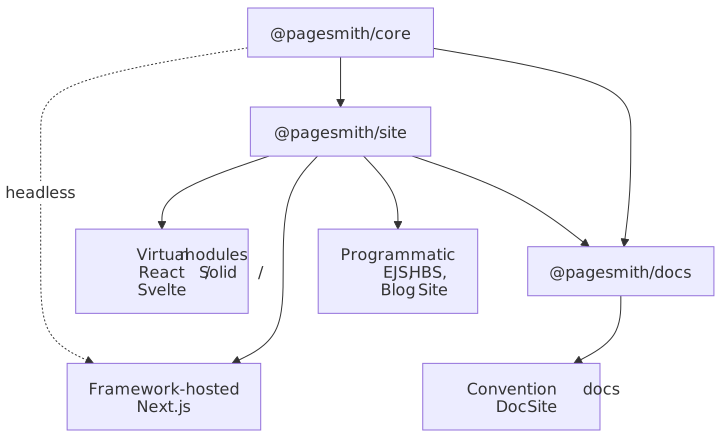
Three Approaches
Virtual Content Modules (pagesmithContent)
Used by the React, Solid, and Svelte integrations. You define collections in content.config.ts and the pagesmithContent Vite plugin exposes them as virtual:content/* modules with pre-rendered HTML:
import guideCollection from "virtual:content/guide";Programmatic Content Layer (createContentLayer)
Used by the EJS, Handlebars, and Blog Site integrations. You create a content layer directly and call getCollection() / entry.render() at render time:
const layer = createContentLayer({ collections: { guide, blog, pages }, root });const entries = await layer.getCollection("guide");const rendered = await entries[0].render();Framework-Hosted Rendering (createContentLayer + app-owned routing)
Used by the Next.js integration. The host app keeps routing, layout, metadata, and build tooling, while Pagesmith provides the content layer and markdown pipeline:
const layer = createContentLayer(defineConfig({ collections }));const entry = await layer.getEntry("posts", "hello-world");const rendered = await entry?.render();Import @pagesmith/site/css/content and @pagesmith/site/runtime/content only when you want the shared markdown prose, code-block chrome, tabs, copy buttons, and collapse behavior.
Convention-Based (@pagesmith/docs)
Used by the Doc Site integration. You write markdown in a content/ tree and configure the site in pagesmith.config.json5. No Vite config or entry server needed.
Example Matrix
The repo includes a full example matrix. Each example is self-contained with its own package.json, content, styles, and build configuration.
| Example | Package | Renderer | Content Access | Demo |
|---|---|---|---|---|
| React | @pagesmith/site |
react-dom/server |
virtual:content/* |
Live |
| Solid | @pagesmith/site |
solid-js/web |
virtual:content/* |
Live |
| Svelte | @pagesmith/site |
svelte/server |
virtual:content/* |
Live |
| Next.js | @pagesmith/site |
Next.js App Router | createContentLayer |
Live |
| EJS | @pagesmith/site |
EJS templates | createContentLayer |
Live |
| Handlebars | @pagesmith/site |
Handlebars templates | createContentLayer |
Live |
| Doc Site | @pagesmith/docs |
Docs theme | Convention-based | Live |
| Blog Site | @pagesmith/site |
Custom JSX layouts | Filesystem + site re-exported content layer | Live |
Vite Plugins and Shared Presentation Layer
The Vite-based examples wire Pagesmith through plugins. Framework-hosted examples such as Next.js use the content layer directly and opt into the shared presentation layer only when they want shipped markdown styling and code-block behavior.
| Surface | Purpose | Used By |
|---|---|---|
sharedAssetsPlugin() |
Serves or copies bundled fonts and fonts.css for Vite builds |
React, Solid, Svelte, EJS, Handlebars, Blog Site |
pagesmithContent(collections) |
Loads content and exposes virtual:content/* modules |
React, Solid, Svelte |
pagesmithSsg({ entry, contentDirs }) |
Dev SSR middleware, pre-rendering, asset copying, Pagefind indexing | React, Solid, Svelte, EJS, Handlebars, Blog Site |
@pagesmith/site/css/content |
Prose styles plus code-block chrome inside an existing app shell | Next.js and other framework-hosted apps |
@pagesmith/site/runtime/content |
Copy buttons, code tabs, and collapse toggles for rendered markdown | Next.js and other framework-hosted apps |
Shared Behavior
Across the examples, Pagesmith is responsible for the same core content jobs:
- Loading content from markdown files
- Validating frontmatter against Zod schemas
- Processing markdown through the unified pipeline (GFM, math, syntax highlighting, heading slugs)
- Extracting headings and read time from rendered markdown
Depending on the integration shape, @pagesmith/site may also handle:
- Copying companion assets into the final build
- Pre-rendering and preview server behavior
- Pagefind indexing for full-text search
Theme and Shell Choices
The examples do not all share the same page chrome:
- Docs-like and standalone site examples can implement the full Pagesmith theme system, including appearance/theme/text-size controls and persisted preferences.
- Framework-hosted examples such as Next.js can keep the outer shell fully native to the host app and reuse only the shared content CSS/runtime.
- Template and custom-site examples can pick either approach depending on how much of the site shell they want Pagesmith to own.
For full details, see the Theming reference.
CSS Imports
All examples can use pre-built CSS from @pagesmith/site:
| Import path | Contents |
|---|---|
@pagesmith/site/css/standalone |
Full bundle (reset, tokens, prose, code, layout, TOC) |
@pagesmith/site/css/content |
Content-only bundle (reset, prose, code, viewport) |
@pagesmith/site/css/fonts |
Bundled web fonts (Open Sans, JetBrains Mono) |
@pagesmith/site/css/viewport |
Viewport / responsive base only |
JSX Runtime
Two JSX runtimes are used across the examples:
- Framework JSX (React, Solid, Svelte) — each framework’s own JSX transform via their Vite plugin
- Pagesmith server-side JSX —
@pagesmith/site/jsx-runtimepowers custom site layouts such as the Blog Site, while@pagesmith/docs/jsx-runtimepowers docs layout overrides. Both produce HTML strings withh()andFragment(), useclass(notclassName), and useinnerHTMLfor raw HTML.
Choosing a Pattern
| If you want… | Choose… |
|---|---|
| A documentation site that works from configuration alone | Doc Site |
| Full layout control with a specific framework (React, Solid, Svelte) | Vite Framework Apps |
| An existing Next.js app that should keep its own router, layouts, and build | Next.js (App Router) |
| No framework runtime, simple templates | Template Engines |
| A fully custom site with its own design system | Blog Site |
Read Next
- Vite Framework Apps — React, SolidJS, Svelte
- Next.js (App Router) —
createContentLayer()inside a Next.js app - Template Engines — EJS, Handlebars
- Doc Site
- Blog Site