Theming
Pagesmith uses a class-based multi-theme system with two orthogonal axes: color scheme (light vs dark) and theme variant (visual style). Both are controlled via CSS classes on <html> and can be switched at runtime with JavaScript, while working correctly without it.
How It Works
The theme system sits on two independent CSS class axes applied to <html>:
| Axis | Classes / Attribute | Controls |
|---|---|---|
| Color scheme | color-scheme-auto, color-scheme-light, color-scheme-dark |
Which side of light-dark() the browser picks |
| Theme variant | theme-paper, theme-high-contrast |
Which set of token overrides is active |
| Text size | html[data-text-size="small|base|large"] |
Root font size scaling |
Theme State Flow
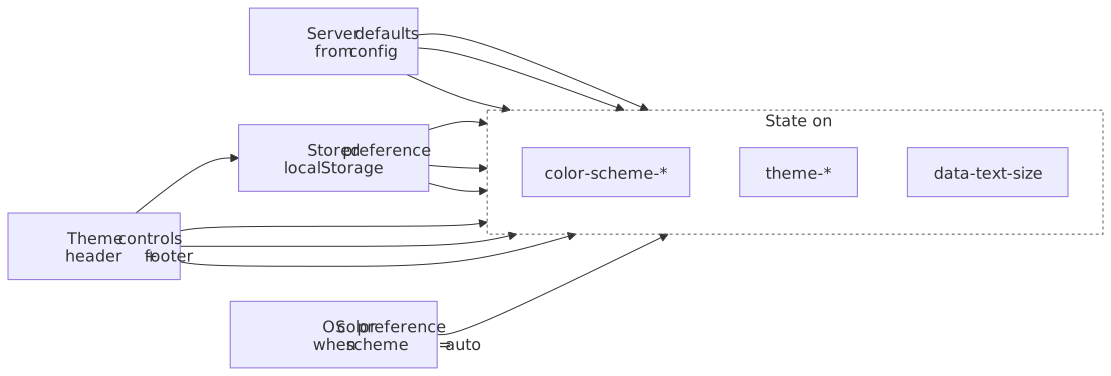
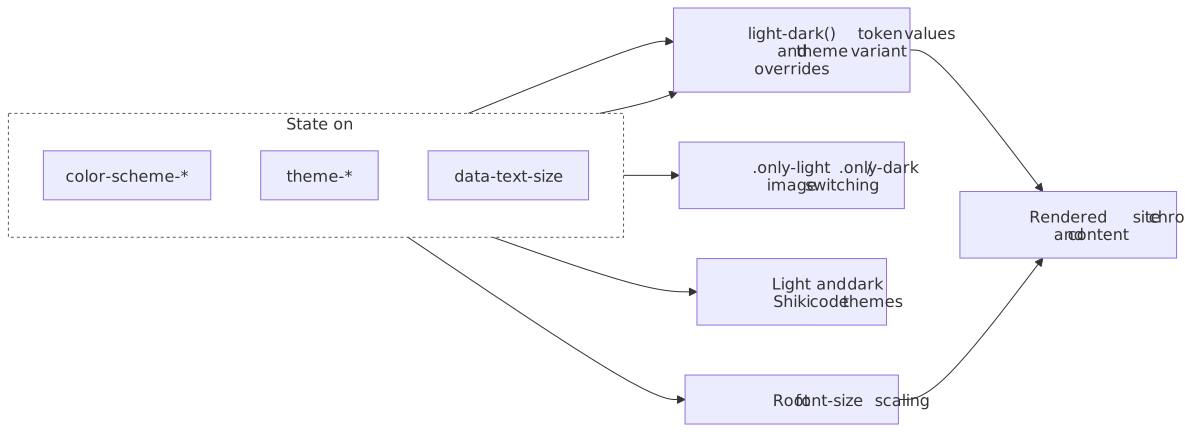
This state-flow view shows how server defaults, stored preferences, and theme controls all feed the <html> state. Notice that color scheme drives light/dark asset switching and code themes, while theme variant and text size change token resolution and typography.
First, server defaults, stored preferences, theme controls, and OS color preference all feed the <html> state classes and data attributes:
Second, those <html> classes and data attributes drive token resolution, image switching, code themes, and typography that compose the rendered site:
The server-rendered default is:
<html class="no-js color-scheme-auto theme-paper"></html>Color Scheme Classes
The color-scheme-* classes control the CSS color-scheme property, which determines how light-dark() values resolve:
/* Auto — follows OS preference */.color-scheme-auto { color-scheme: light dark;}/* Force light */.color-scheme-light { color-scheme: light;}/* Force dark */.color-scheme-dark { color-scheme: dark;}With color-scheme-auto, the browser reads prefers-color-scheme from the operating system. With color-scheme-light or color-scheme-dark, one side is forced regardless of the OS setting.
Theme Variant Classes
Theme variants override the design tokens to create distinct visual styles. Each variant defines the full set of color tokens using light-dark(), so both light and dark modes work within every variant:
.theme-paper { --color-bg: light-dark(#f5f4f0, #111110); --color-text: light-dark(#111110, #f5f4f0); --color-accent: light-dark(#d4381e, #e04a2e); /* ... all other tokens */}.theme-high-contrast { --color-bg: light-dark(#ffffff, #000000); --color-text: light-dark(#000000, #ffffff); --color-accent: light-dark(#0050a0, #60b0ff); /* ... all other tokens */}Text Size
The text size feature scales the root font-size via a data-text-size attribute on <html>:
html[data-text-size="small"] { font-size: 87.5%;} /* 14px */html[data-text-size="base"] { font-size: 100%;} /* 16px */html[data-text-size="large"] { font-size: 112.5%;} /* 18px */When data-text-size is not set or equals "base", the default 16px size applies. All rem-based sizing throughout the site scales accordingly. The attribute is set and removed by the runtime JavaScript; the "base" value removes the attribute entirely since it matches the default.
Built-in Themes
Paper (default)
A warm, low-contrast theme with cream-tinted backgrounds and a red accent. Designed for comfortable long-form reading.
| Token | Light | Dark |
|---|---|---|
--color-bg |
#f5f4f0 |
#111110 |
--color-bg-alt |
#efefeb |
#1a1a18 |
--color-text |
#111110 |
#f5f4f0 |
--color-text-secondary |
#333330 |
#ccccca |
--color-text-muted |
#7a7a72 |
#888882 |
--color-accent |
#d4381e |
#e04a2e |
--color-border |
#d0cfc9 |
#2a2a28 |
High Contrast
Maximum contrast for accessibility. Pure white/black backgrounds, stronger borders, and a blue accent. Targets WCAG AAA color contrast ratios.
| Token | Light | Dark |
|---|---|---|
--color-bg |
#ffffff |
#000000 |
--color-bg-alt |
#f0f0f0 |
#0a0a0a |
--color-text |
#000000 |
#ffffff |
--color-text-secondary |
#1a1a1a |
#e6e6e6 |
--color-text-muted |
#4a4a4a |
#b0b0b0 |
--color-accent |
#0050a0 |
#60b0ff |
--color-border |
#808080 |
#666666 |
Building a Custom Theme
To create your own theme variant, define a CSS class that overrides the design tokens. Every color token must use light-dark() so that your theme works in both color schemes.
Step 1: Define the Token Overrides
Create a CSS file with your theme class. Override all the color tokens you want to change:
.theme-ocean { /* Backgrounds */ --color-bg: light-dark(#f0f5fa, #0d1520); --color-bg-alt: light-dark(#e8eff5, #111b28); --color-bg-elevated: light-dark(#f0f5fa, #152030); --color-bg-code: light-dark(#e8eff5, #111b28); --color-bg-hover: light-dark(#dce6f0, #1a2535); /* Text */ --color-text: light-dark(#0d1520, #e8eff5); --color-text-secondary: light-dark(#2a3a4a, #b8c8d8); --color-text-muted: light-dark(#6a7a8a, #7a8a9a); /* Borders */ --color-border: light-dark(#c0d0e0, #253545); --color-border-subtle: light-dark(#dce6f0, #1a2535); --color-border-hover: light-dark(#a0b8cc, #354555); /* Accent */ --color-accent: light-dark(#0066cc, #4da6ff); --color-accent-hover: light-dark(#0052a3, #80c0ff); --color-accent-subtle: light-dark(rgba(0, 102, 204, 0.08), rgba(77, 166, 255, 0.1)); /* Code */ --color-code-bg: light-dark(#e8eff5, #111b28); --color-code-text: light-dark(#2a3a4a, #b8c8d8); /* Blockquotes */ --color-blockquote-border: light-dark(#c0d0e0, #354555); --color-blockquote-bg: light-dark(#e8eff5, #111b28); /* UI */ --color-overlay-bg: light-dark(rgba(0, 0, 0, 0.3), rgba(0, 0, 0, 0.5)); --color-header-bg: light-dark(rgba(240, 245, 250, 0.85), rgba(13, 21, 32, 0.85)); --color-text-inverse: light-dark(#e8eff5, #0d1520); /* Shadows */ --shadow-color: light-dark(rgba(0, 30, 60, 0.06), rgba(0, 0, 0, 0.3)); --shadow-color-md: light-dark(rgba(0, 30, 60, 0.08), rgba(0, 0, 0, 0.35)); --shadow-color-lg: light-dark(rgba(0, 30, 60, 0.1), rgba(0, 0, 0, 0.4));}Step 2: Import in Your CSS Entry
For custom sites built on @pagesmith/site, add the import after your foundations:
@import "@pagesmith/site/css/content";@import "./themes/ocean.css";For @pagesmith/docs sites, you’ll need a layout override that includes your custom CSS. See the Layout Overrides guide.
Step 3: Apply the Theme Class
In your HTML shell, set the theme class on <html>:
<html class="color-scheme-auto theme-ocean"></html>For sites using @pagesmith/site’s renderDocumentShell, the initial classes are set in the shell function. For @pagesmith/docs, use the defaultTheme config option (see below).
Complete Token Reference
These are all the CSS custom properties that a theme variant should override. Tokens not overridden will inherit from :root (which uses the Paper theme values).
Color Tokens
| Token | Purpose |
|---|---|
--color-bg |
Primary page background |
--color-bg-alt |
Alternate/secondary background (sidebars, code) |
--color-bg-elevated |
Elevated surface (cards, dropdowns, modals) |
--color-bg-code |
Inline and block code background |
--color-bg-hover |
Hover state background |
--color-text |
Primary text |
--color-text-secondary |
Secondary text (descriptions, body copy) |
--color-text-muted |
Muted text (labels, timestamps, placeholders) |
--color-border |
Default border |
--color-border-subtle |
Subtle/lighter border (dividers, separators) |
--color-border-hover |
Border on hover |
--color-accent |
Primary accent (links, active states, highlights) |
--color-accent-hover |
Accent hover state |
--color-accent-subtle |
Subtle accent background (active nav items, tags) |
--color-code-bg |
Inline code background |
--color-code-text |
Inline code text |
--color-blockquote-border |
Blockquote left border |
--color-blockquote-bg |
Blockquote background |
--color-overlay-bg |
Modal/overlay backdrop |
--color-header-bg |
Translucent header background |
--color-text-inverse |
Inverted text (for use on accent backgrounds) |
Shadow Tokens
| Token | Purpose |
|---|---|
--shadow-color |
Small shadow base color |
--shadow-color-md |
Medium shadow base color |
--shadow-color-lg |
Large shadow base color |
Typography Tokens
These are defined on :root and are shared across all themes. Override them to change fonts site-wide.
| Token | Default | Purpose |
|---|---|---|
--font-sans |
'Open Sans', system-ui, ... |
Body text font stack |
--font-mono |
'JetBrains Mono', 'Fira Code', ... |
Code font stack |
--font-size-xs |
0.75rem |
Extra small text |
--font-size-sm |
0.875rem |
Small text |
--font-size-base |
1rem |
Base body text |
--font-size-lg |
1.125rem |
Large text |
--font-size-xl |
1.25rem |
Extra large |
--font-size-2xl |
1.5rem |
Heading 2 |
--font-size-3xl |
2rem |
Heading 1 / hero |
Spacing and Shape Tokens
| Token | Default | Purpose |
|---|---|---|
--radius-sm |
2px |
Small border radius |
--radius-md |
4px |
Medium border radius |
--radius-lg |
6px |
Large border radius |
--transition-fast |
150ms cubic-bezier(0.4, 0, 0.2, 1) |
Quick interactions |
--transition-normal |
250ms cubic-bezier(0.4, 0, 0.2, 1) |
Standard transitions |
--header-height |
60px |
Fixed header height |
Docs Theme Configuration
When using @pagesmith/docs, configure the default color scheme and theme variant in pagesmith.config.json5:
{ theme: { defaultColorScheme: "auto", // 'auto' | 'light' | 'dark' defaultTheme: "paper", // 'paper' | 'high-contrast' defaultTextSize: "base", // 'small' | 'base' | 'large' lightColor: "#f5f4f0", // Browser chrome color (light) darkColor: "#111110", // Browser chrome color (dark) },}| Field | Type | Default | Description |
|---|---|---|---|
defaultColorScheme |
'auto' | 'light' | 'dark' |
'auto' |
Initial color scheme. 'auto' follows the OS preference. |
defaultTheme |
'paper' | 'high-contrast' |
'paper' |
Initial theme variant applied to <html>. |
defaultTextSize |
'small' | 'base' | 'large' |
'base' |
Initial text size applied via data-text-size on <html>. |
lightColor |
string |
'#f8fafc' |
<meta name="theme-color"> for light mode (browser chrome). |
darkColor |
string |
'#020617' |
<meta name="theme-color"> for dark mode (browser chrome). |
Theme Toggle UI
The @pagesmith/docs default theme includes two theme controls:
Header Dropdown
A sun icon button in the header opens a dropdown with radio buttons for all three axes:
- Appearance: Auto / Light / Dark
- Theme: Paper / High Contrast
- Text Size: Small (A) / Default (A) / Large (A) — displayed as segmented buttons with sized “A” labels
The dropdown closes on outside click or Escape.
Footer Selector
Segmented button groups at the bottom of each page for all three axes (Appearance, Theme, Text Size). Uses aria-pressed for accessibility. The text size buttons use <span class="doc-text-size-label" data-size="...">A</span> to visually differentiate the sizes.
No-JS Behavior
Both controls are wrapped in .no-js-hidden, so they are invisible when JavaScript is disabled. The site starts with class="no-js" on <html>, and a small inline script removes it immediately. Without JS:
- The color scheme follows the OS
prefers-color-schemeviacolor-scheme: light dark - The default theme variant (Paper) is applied via the server-rendered class
- The site is fully functional — theme switching is a progressive enhancement
FOUC Prevention
To avoid a flash of unstyled content when the user has previously selected a theme, a small inline <script> runs before CSS paints. It reads the stored preference from localStorage and swaps the HTML classes:
(function () { try { var p = JSON.parse(localStorage.getItem("pagesmith-theme")); if (p) { var d = document.documentElement; if (p.colorScheme) d.className = d.className.replace(/color-scheme-\w+/, "color-scheme-" + p.colorScheme); if (p.theme) d.className = d.className.replace(/theme-[\w-]+/, "theme-" + p.theme); if (p.textSize && p.textSize !== "base") d.dataset.textSize = p.textSize; } } catch (e) {}})();The script is inlined in the <head> before any stylesheet links. It is present in both @pagesmith/site’s renderDocumentShell and @pagesmith/docs’s Html.tsx. The textSize restoration uses dataset.textSize (a data attribute) rather than a CSS class, and only sets it when the value differs from the default "base".
Persistence
Theme preferences are stored in localStorage under the key pagesmith-theme as JSON:
{ "colorScheme": "dark", "theme": "high-contrast", "textSize": "large" }The runtime reads this on page load, applies the stored classes and data attributes, and syncs all UI controls (header dropdown radios and footer buttons). When the user changes a setting, the preference is immediately persisted.
Image Switching
Use standard markdown image syntax for all content images. The alt text should be a detailed description of what the image renders (for screen readers and when the image fails to load). The markdown title attribute becomes a visible <figcaption> below the image.
For content images that need different versions in light and dark modes, place the light and dark variants consecutively. The pipeline automatically merges them into a single themed figure:
The automatic merging is triggered by consecutive images whose filenames end with -light and -dark suffixes. The title on the first (light) image becomes the <figcaption>.
The resulting themed figure is tied to the color-scheme-* class on <html>, not directly to @media (prefers-color-scheme). In color-scheme-auto (the default), the OS preference drives the switch via a media query. In color-scheme-light or color-scheme-dark, the matching variant is forced regardless of OS preference. This ensures images switch correctly both when the OS preference changes and when the user manually selects a color scheme via the theme toggle.
Generic show/hide helpers
For non-image content that should toggle with the color scheme, use the generic helpers:
<div class="show-on-light">Visible in light mode</div><div class="show-on-dark">Visible in dark mode</div>These work on any element and follow the same color-scheme-* class logic.
Invert on dark
For a single image that works in light mode and can be inverted for dark, use the .invert. filename convention instead of maintaining two separate files:
Images with .invert. in their filename (e.g. flow.invert.svg) receive the invert-on-dark class automatically from the markdown pipeline, which applies invert(1) hue-rotate(180deg) in dark mode. Best for simple black-and-white SVGs or icons.
Code Block Themes
Syntax-highlighted code blocks use separate Shiki themes for light and dark modes. The default pair is github-light / github-dark. Configure alternatives in the markdown settings:
{ markdown: { shiki: { themes: { light: "catppuccin-latte", dark: "catppuccin-mocha", }, }, },}The built-in Pagesmith renderer maps its light and dark Shiki themes to the color-scheme classes, so code blocks respond to the same toggle as the rest of the site.
Custom Sites with @pagesmith/site
For sites built directly on @pagesmith/site (not @pagesmith/docs), use the provided CSS and utilities:
- Import the CSS foundations that include
color-scheme.css,tokens.css, andthemes.css:
@import "@pagesmith/site/css/standalone";Or import @pagesmith/site/css/content for content-only styling (no layout grid).
- Use
renderDocumentShellfrom@pagesmith/site/ssg-utilswhich sets up the correct HTML classes and FOUC script:
import { renderDocumentShell } from "@pagesmith/site/ssg-utils";const html = renderDocumentShell({ title: "My Page", basePath: "/my-site", cssPath: "/assets/style.css", jsPath: "/assets/main.js", bodyHtml: "<main>...</main>",});- Write your own theme toggle using the class-based API:
function setColorScheme(scheme: "auto" | "light" | "dark") { const root = document.documentElement; root.className = root.className.replace(/color-scheme-\w+/, "color-scheme-" + scheme); persist();}function setTextSize(size: "small" | "base" | "large") { if (size === "base") { delete document.documentElement.dataset.textSize; } else { document.documentElement.dataset.textSize = size; } persist();}function persist() { const classes = document.documentElement.className; localStorage.setItem( "pagesmith-theme", JSON.stringify({ colorScheme: classes.match(/color-scheme-(\w+)/)?.[1] || "auto", theme: classes.match(/theme-([\w-]+)/)?.[1] || "paper", textSize: document.documentElement.dataset.textSize || "base", }), );}The key contract: replace color-scheme-* classes for scheme changes, theme-* classes for variant changes, set data-text-size for size changes, and persist to localStorage('pagesmith-theme') as { colorScheme, theme, textSize }.