Collections and Loaders
AI Quick Start
Ask your AI agent: “Set up a content collection with schema validation for my blog posts in content/posts/. Use a Zod schema with title, date, tags, and draft fields. Read node_modules/@pagesmith/core/skills/pagesmith-core-setup/references/usage.md for reference.”
Then read on to understand what happened and customize further.
Collections are the core FS-CMS primitive in Pagesmith. Each collection maps a filesystem directory to:
- a loader (how to parse the files)
- a schema (how to validate the data)
- optional transforms, computed fields, filters, and validators
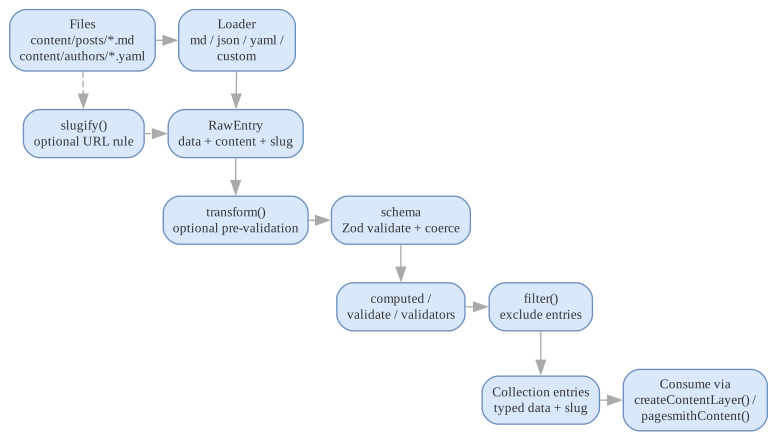
The diagram below gives the page’s mental model in one pass: files flow through a loader into a raw entry, then Pagesmith applies normalization, validation, derived fields, and optional filtering before you consume typed entries.
Defining a Collection
Use defineCollection() to create a type-safe collection definition:
import { defineCollection, z } from "@pagesmith/core";const posts = defineCollection({ loader: "markdown", directory: "content/posts", schema: z.object({ title: z.string(), date: z.coerce.date(), tags: z.array(z.string()).default([]), draft: z.boolean().default(false), }),});The defineCollection() function is a type-safe identity function — it does not transform the definition, but provides TypeScript inference from the Zod schema so that entry.data is fully typed.
CollectionDef Fields
The full CollectionDef<S> type accepts:
| Field | Type | Required | Description |
|---|---|---|---|
loader |
LoaderType | Loader |
Yes | Built-in loader type string or a custom Loader instance |
directory |
string |
Yes | Directory containing collection files (relative to root) |
schema |
ZodType |
Yes | Zod schema for validating entry data |
include |
string[] |
No | Glob patterns to include (defaults based on loader extensions) |
exclude |
string[] |
No | Glob patterns to exclude |
computed |
Record<string, (entry) => any> |
No | Computed fields derived from entry data |
transform |
(entry) => RawEntry |
No | Pre-validation transform |
filter |
(entry) => boolean |
No | Filter entries (return false to exclude) |
slugify |
(filePath, directory) => string |
No | Custom slug generation |
validate |
(entry) => string | undefined |
No | Custom validation hook |
validators |
ContentValidator[] |
No | Custom content validators |
disableBuiltinValidators |
boolean |
No | Disable built-in markdown validators |
Built-In Loaders
Each loader implements the Loader interface:
interface Loader { name: string; kind: "markdown" | "data"; extensions: string[]; load(filePath: string): LoaderResult | Promise<LoaderResult>;}interface LoaderResult { data: Record<string, any>; // Parsed data (frontmatter or full object) content?: string; // Raw body content (markdown only)}The kind field distinguishes between markdown loaders (which produce a body for rendering) and data loaders (which produce structured data only).
| Loader | Type String | Extensions | Kind | Parser | Notes |
|---|---|---|---|---|---|
MarkdownLoader |
markdown |
.md |
markdown |
gray-matter |
YAML frontmatter extracted as data, markdown body as content |
JsonLoader |
json / json5 |
.json, .json5 |
data |
JSON.parse / JSON5.parse |
Parser is chosen from the file extension |
JsoncLoader |
jsonc |
.jsonc |
data |
comment stripping + JSON.parse |
JSON with comments and trailing commas |
YamlLoader |
yaml |
.yml, .yaml |
data |
yaml package |
Structured config and content data |
TomlLoader |
toml |
.toml |
data |
smol-toml |
Useful for feature flags or settings |
Loader resolution happens through resolveLoader(). If you pass a string like 'markdown', it creates a new MarkdownLoader() instance. If you pass an object implementing the Loader interface, it uses it directly.
Default include patterns are derived from the loader’s extensions array: each extension becomes a **/*<ext> glob pattern.
Custom Loaders
Custom loaders are objects implementing the Loader interface. Use them for CSV, XML, or proprietary export formats when the built-in loaders are not enough.
import type { Loader, LoaderResult } from "@pagesmith/core/loaders";import { readFileSync } from "fs";import { parse as parseCsv } from "csv-parse/sync";const csvLoader: Loader = { name: "csv", kind: "data", extensions: [".csv"], load(filePath: string): LoaderResult { const raw = readFileSync(filePath, "utf-8"); const records = parseCsv(raw, { columns: true }); // Return the first row as data (or adapt to your needs) return { data: records[0] ?? {} }; },};const metrics = defineCollection({ loader: csvLoader, directory: "content/metrics", schema: z.object({ name: z.string(), value: z.coerce.number(), }),});Collection Hooks
Transform
The transform hook runs before schema validation and receives a RawEntry (which has data, optional content, filePath, and slug). Use it to normalize data before validation:
const posts = defineCollection({ loader: "markdown", directory: "content/posts", schema: z.object({ title: z.string(), tags: z.array(z.string()).default([]), }), transform(entry) { // Normalize tags to lowercase before validation if (entry.data.tags) { entry.data.tags = entry.data.tags.map((tag: string) => tag.toLowerCase()); } return entry; },});Transforms can also be async:
transform: async (entry) => { entry.data.wordCount = entry.content?.split(/\s+/).length ?? 0 return entry},Computed Fields
Computed fields are derived from entry data and merged into entry.data before schema validation (so they can be validated by the schema). They are defined as a map of field names to functions:
const posts = defineCollection({ loader: "markdown", directory: "content/posts", schema: z.object({ title: z.string(), date: z.coerce.date(), tags: z.array(z.string()).default([]), }), computed: { slugPath: (entry) => `/posts/${entry.slug}/`, year: (entry) => new Date(entry.data.date).getFullYear(), hasMultipleTags: (entry) => entry.data.tags.length > 1, },});Computed field types are inferred and included in InferCollectionData<T>, so entry.data.slugPath will be typed as string automatically.
Filter
The filter hook runs after computed fields but before schema validation. Return false to exclude an entry from the collection results:
const posts = defineCollection({ loader: "markdown", directory: "content/posts", schema: z.object({ title: z.string(), draft: z.boolean().default(false), }), filter(entry) { // Exclude drafts in production return process.env.NODE_ENV === "development" || !entry.data.draft; },});Custom Slug Generation
By default, Pagesmith generates slugs from relative file paths using toSlug(). Override this with slugify:
const posts = defineCollection({ loader: "markdown", directory: "content/posts", schema: z.object({ title: z.string(), date: z.coerce.date(), }), slugify(filePath, directory) { // Use date-prefixed slugs: 2024-01-15-hello-world -> hello-world const base = path.relative(directory, filePath).replace(/\.md$/, ""); return base.replace(/^\d{4}-\d{2}-\d{2}-/, ""); },});Custom Validate Hook
The validate hook provides a lightweight way to add entry-level validation without implementing a full ContentValidator. Return a string to report an error, or undefined to pass:
const posts = defineCollection({ loader: "markdown", directory: "content/posts", schema: z.object({ title: z.string(), date: z.coerce.date(), }), validate(entry) { if (entry.data.title.length > 100) { return "Title must be 100 characters or fewer"; } // Return undefined to pass },});Slugs
Pagesmith generates slugs from relative file paths by default. The toSlug() utility strips file extensions and directory-based README/index suffixes:
| File Path (relative to directory) | Generated Slug |
|---|---|
hello-world.md |
hello-world |
getting-started/README.md |
getting-started |
guide/setup/index.md |
guide/setup |
2024/my-post.yaml |
2024/my-post |
Use slugify(filePath, directory) when you need custom URL rules.
Schema Strategy
Prefer schemas that describe exactly what your templates need:
- Coerce dates at the schema level — use
z.coerce.date()so string dates from frontmatter becomeDateobjects automatically - Default array and boolean fields — use
.default([])and.default(false)to avoid undefined checks in templates - Keep markdown-derived fields as computed fields — read time, word count, and URL paths work well as computed fields rather than requiring them in frontmatter
- Use
.passthrough()sparingly — prefer explicit schemas that document all expected fields - Use
.optional()for truly optional fields — the schema should reflect what is required vs. optional
Example of a well-structured schema:
const posts = defineCollection({ loader: "markdown", directory: "content/posts", schema: z.object({ title: z.string(), description: z.string().optional(), date: z.coerce.date(), lastUpdated: z.coerce.date().optional(), tags: z.array(z.string()).default([]), category: z.enum(["tutorial", "guide", "reference"]).default("guide"), draft: z.boolean().default(false), featured: z.boolean().default(false), coverImage: z.string().optional(), }), computed: { url: (entry) => `/blog/${entry.slug}/`, readTime: (entry) => Math.ceil((entry.content?.split(/\s+/).length ?? 0) / 200), }, filter: (entry) => !entry.data.draft || process.env.NODE_ENV === "development",});Multiple Collections
Use defineCollections() for defining several collections at once with strong literal type inference:
import { defineCollection, defineCollections, z } from "@pagesmith/core";const collections = defineCollections({ posts: defineCollection({ loader: "markdown", directory: "content/posts", schema: z.object({ title: z.string(), date: z.coerce.date() }), }), authors: defineCollection({ loader: "yaml", directory: "content/authors", schema: z.object({ name: z.string(), bio: z.string() }), }), settings: defineCollection({ loader: "json", directory: "content/config", schema: z.object({ siteName: z.string(), features: z.record(z.boolean()) }), }),});Using Collections with the Content Layer
import { createContentLayer, defineConfig } from "@pagesmith/core";const config = defineConfig({ collections: { posts, authors }, markdown: { shiki: { themes: { light: "github-light", dark: "github-dark" } }, },});const layer = createContentLayer(config);// Get all entries in a collectionconst allPosts = await layer.getCollection("posts");// Get a single entry by slugconst post = await layer.getEntry("posts", "hello-world");// Render markdown to HTML (lazy, cached)if (post) { const rendered = await post.render(); // rendered.html, rendered.headings, rendered.readTime}// Validate all collectionsconst results = await layer.validate();Using Collections with the Vite Plugin
For Vite-based projects, use the pagesmithContent() plugin to expose collections as virtual modules. Most app integrations keep that import on @pagesmith/site/vite, while @pagesmith/core/vite remains available for lower-level content-only setups:
import { pagesmithContent } from "@pagesmith/site/vite";import collections from "./content.config";export default defineConfig({ plugins: [pagesmithContent(collections)],});Then import collection data in your application code:
import posts from "virtual:content/posts";// Markdown entries: { id, contentSlug, html, headings, frontmatter }// Data entries: { id, contentSlug, data }for (const post of posts) { console.log(post.frontmatter.title, post.html);}The Vite plugin generates TypeScript declarations (pagesmith-content.d.ts) so imports are fully typed.
Content Plugins
Content plugins extend the markdown pipeline and validation system. A ContentPlugin can inject remark and rehype plugins and add custom validation:
import { defineConfig } from "@pagesmith/core";const myPlugin = { name: "my-plugin", rehypePlugin: () => (tree) => { // Transform the HAST tree }, remarkPlugin: () => (tree) => { // Transform the MDAST tree }, validate: (entry) => { const errors = []; if (!entry.data.title) { errors.push("Missing required title field"); } return errors; },};const config = defineConfig({ collections: { posts }, plugins: [myPlugin],});Plugin remark and rehype plugins are appended to the pipeline during rendering. Plugin validators run during the loading phase, after schema and content validators.
Practical Guidance
- Use one collection per durable content type.
- Keep singleton config files in their own collection.
- Prefer markdown collections for longform content and structured loaders for metadata-heavy content.
- Use
includeandexcludepatterns when a directory contains mixed file types. - Keep schemas strict — they serve as documentation for your content model.
- Use transforms for data normalization and computed fields for derived values.
- Use filters to exclude draft content in production without removing files from the filesystem.