Blog Site with Pagesmith
Overview
The Blog Site pattern is the “custom site, no framework” shape in Pagesmith. It keeps the app-facing surface on @pagesmith/site: the example defines collections in src/content.ts, renders HTML with @pagesmith/site/jsx-runtime, and lets pagesmithSsg handle the dev/build/preview flow.
That means:
- no React, Solid, Svelte, or template engine runtime
- no
virtual:content/*imports - no separate docs preset
- one package (
@pagesmith/site) covering content loading, JSX, shared CSS/runtime, and SSG
Source: examples/blog-site/ | Output: Live Demo
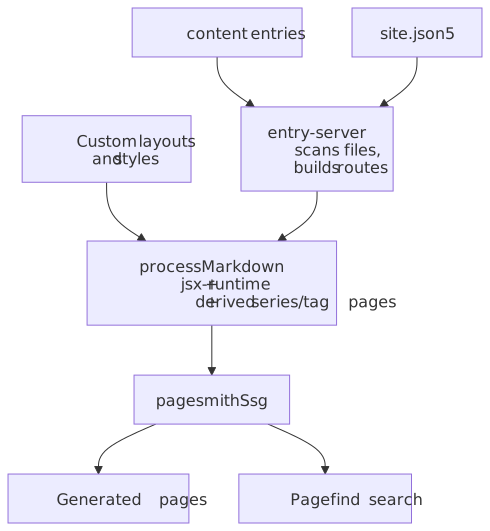
The diagram below highlights the ownership split: your project owns collections, routes, and page assembly, while Pagesmith provides the content layer, JSX runtime, shared site chrome, and static generation.
Prerequisites
- Node.js 24+
- vite-plus for the
vpworkflow used in this repo
Project Setup
package.json
The example keeps its dependencies intentionally small:
{ "name": "@pagesmith/example-blog-site", "private": true, "type": "module", "scripts": { "dev": "vite dev", "build": "vite build", "check": "vp check" }, "dependencies": { "@pagesmith/site": "*", "pagefind": "^1.5.0" }, "devDependencies": { "vite": "^8.0.3", "vite-plus": "0.1.16" }}Install with vp install from the repo root, or npm install inside a standalone copy of the example.
Project Structure
blog-site/ content/ guide/ # Guide articles for the example pages/ # Standalone pages (for example about) public/ favicon.svg # Static assets copied to the output root src/ content.ts # Collection definitions, content layer helpers components.tsx # JSX components and document shell entry-server.tsx # getRoutes() / render() SSG contract runtime.ts # Shared standalone runtime + one small custom enhancement theme.css # Shared standalone CSS + example-specific overrides client.js # Browser entry imports theme.css + runtime.ts vite.config.ts # Vite + pagesmithSsg + sharedAssetsPlugin package.json tsconfig.jsonVite Setup
vite.config.ts wires only the site-level SSG pieces. This example does not use pagesmithContent() because the SSR entry loads the content layer directly.
import { defineConfig } from "vite-plus";import { pagesmithSsg, sharedAssetsPlugin } from "@pagesmith/site/vite";export default defineConfig({ base: "/pagesmith/examples/blog-site", plugins: [ sharedAssetsPlugin(), ...pagesmithSsg({ entry: "./src/entry-server.tsx", contentDirs: ["./content"] }), ], build: { outDir: "../../gh-pages/examples/blog-site", emptyOutDir: true, rolldownOptions: { checks: { pluginTimings: false, }, }, }, oxc: { jsx: { runtime: "automatic", importSource: "@pagesmith/site", }, },});sharedAssetsPlugin() serves the bundled fonts during development, and the production build copies the packaged font assets into the final output. pagesmithSsg() provides the SSR contract, companion-asset publishing, Pagefind indexing, and the dev middleware used by the example.
Content Layer
src/content.ts owns the collections and content helpers. The example keeps collection setup separate from routing, then imports those helpers into the SSR entry.
import { resolve } from "path";import { createContentLayer, defineCollection, defineConfig, z } from "@pagesmith/site";export function buildLayer(root?: string) { const contentRoot = root ? resolve(root) : resolve(import.meta.dirname, ".."); return createContentLayer( defineConfig({ root: contentRoot, collections: { guide: defineCollection({ loader: "markdown", directory: resolve(contentRoot, "content/guide"), schema: z.object({ title: z.string(), description: z.string().optional(), date: z.coerce.date(), tags: z.array(z.string()).default([]), series: z.string().optional(), seriesOrder: z.number().optional(), }), }), pages: defineCollection({ loader: "markdown", directory: resolve(contentRoot, "content/pages"), schema: z.object({ title: z.string(), description: z.string().optional(), }), }), }, }), );}This is the important difference from the framework examples: there is no separate content.config.ts and no virtual-module import layer. The site asks the content layer for entries directly and then calls await entry.render().
SSR Entry Contract
src/entry-server.tsx implements the contract that pagesmithSsg() expects:
import type { SsgRenderConfig } from "@pagesmith/site/vite";export async function getRoutes(config: SsgRenderConfig): Promise<string[]> { // return every route you want emitted as static HTML}export async function render(url: string, config: SsgRenderConfig): Promise<string> { // return a full HTML document for that URL}In this example, getRoutes() derives routes from the loaded guide and pages entries, while render() looks up the matching rendered entry and feeds it into JSX components from src/components.tsx.
JSX Components
The document shell and page-body components live in src/components.tsx. Because the example uses @pagesmith/site/jsx-runtime, the JSX rules are Pagesmith’s server-side rules, not React’s:
- use
class, notclassName - use
innerHTMLto inject rendered markdown - return HTML strings only; there is no hydration step
CSS and Runtime
The browser entry is intentionally tiny:
import "./src/theme.css";import "./src/runtime.ts";src/theme.css starts from @pagesmith/site/css/standalone, then layers example-specific layout and theme rules on top. src/runtime.ts imports @pagesmith/site/runtime/standalone, so the shared search, sidebar, TOC, theme, and code-block behaviors come from the package. The example only adds one tiny enhancement of its own: scrolling the active sidebar item into view.
Content Structure
The example content tree is deliberately simple:
content/ guide/ overview.md content-layer.md project-structure.md css-approach.md jsx-runtime.md build-and-deploy.md kitchen-sink.md pages/ about.mdGuide entries use frontmatter like title, description, date, tags, series, and seriesOrder. Because entries live beside their own assets, normal relative image paths work well here too. For the canonical local-image and JPEG <picture> rules, see Markdown Features.
Running The Example
From the repo root:
vp installvp run dev:eg:blog-siteInside the example directory itself, the local scripts are:
vite devvite buildvp checkWhen To Use This Shape
Choose this pattern when:
- your app owns routing and page assembly
- you want Pagesmith’s content layer, JSX runtime, CSS/runtime bundles, and SSG helpers from one package
- you do not want a framework runtime or the
@pagesmith/docspreset
If you want a convention-based docs app instead, move up to @pagesmith/docs. If you only want the headless content layer and your framework already owns the whole shell, step down to @pagesmith/core or a framework-hosted @pagesmith/site setup.