Docs Theme Reference
@pagesmith/docs ships a default docs theme, but most of the implementation now lives in @pagesmith/site. The docs package owns config resolution, navigation and listing data, docs-only content transforms, and layout selection. The site package owns the reusable document shell, shared components, page shell, CSS bundles, and runtime modules.
Theme Architecture At A Glance
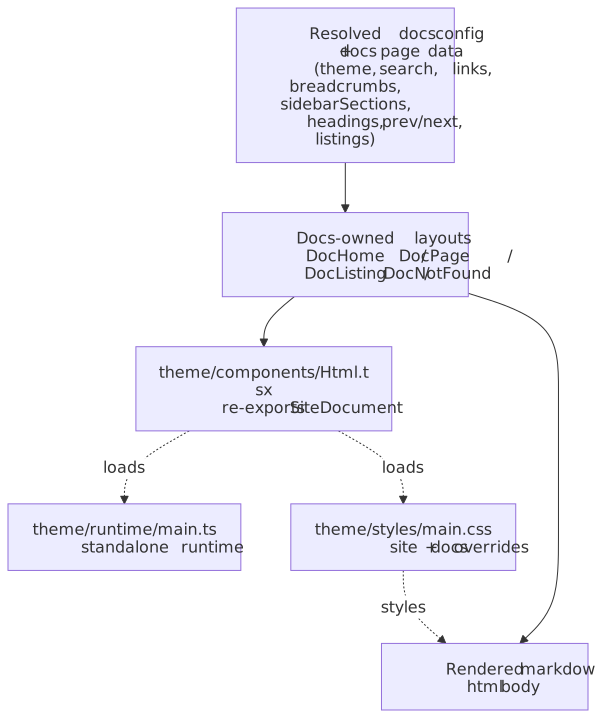
The main pattern is: docs layouts shape docs-specific page data, then hand off to the shared site shell for document markup, chrome, styles, and progressive enhancement.
First, resolved docs config and page data flow through the docs-owned layouts into the shared SiteDocument, runtime, and stylesheet:
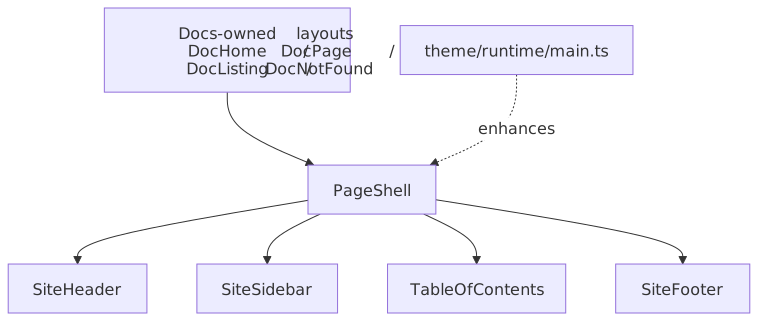
Second, the article and listing layouts hand off to PageShell, which composes the shared header, sidebar, mobile sidebar modal, table of contents, and footer:
Ownership Split
@pagesmith/docsowns docs config, page discovery, section metadata, breadcrumbs, prev/next resolution, listing data, and the default docs layouts.@pagesmith/siteownsSiteDocument,PageShell, the shared header/sidebar/TOC/footer components, shared CSS bundles, and runtime modules.@pagesmith/docs/componentsand@pagesmith/docs/layoutsare the supported override seams for the preset.
Theme File Structure
The default theme lives in packages/docs/theme/:
theme/ components/ Html.tsx Re-export of `@pagesmith/docs/components` -> shared `SiteDocument` DocHeader.tsx Re-export of shared site header DocSidebar.tsx Re-export of shared site sidebar DocTOC.tsx Re-export of shared table of contents DocFooter.tsx Re-export of shared site footer layouts/ DocHome.tsx Docs landing page layout DocPage.tsx Standard docs article layout DocListing.tsx Section listing layout DocNotFound.tsx 404 layout runtime/ main.ts Browser entry that imports `@pagesmith/site/runtime/standalone` styles/ main.css Imports shared site fonts + standalone CSS, plus docs home / 404 overrides utils/ chrome.ts Resolves `frontmatter.chrome` booleansThe runtime and stylesheet entries are intentionally tiny because the real reusable implementation ships from @pagesmith/site.
Default Layouts
DocHome
DocHome renders the landing page experience for the docs preset. It can compose:
- A hero from
herofrontmatter or the fallbacktitle/tagline/description/actionsfields - An install snippet bar from
install - A features grid from
features - A packages grid from
packages - A highlighted code example from
codeExample - Optional rendered markdown content below the landing sections
It uses the shared header/footer components and can still surface a mobile navigation drawer when top-level nav items exist.
DocPage
DocPage is the standard article layout. It delegates almost all shell behavior to PageShell from @pagesmith/site/layouts and passes in:
sidebarSectionsbreadcrumbsheadingsprev/next- edit metadata
- the rendered HTML body
The shared shell then decides when to render the header, left sidebar, right TOC, mobile TOC accordion, footer, and mobile sidebar modal.
DocListing
DocListing is the section-index layout for listing pages. It uses the same PageShell, but swaps the article body for listing cards or grouped listing cards derived from the docs navigation model.
DocNotFound
DocNotFound is the built-in 404 layout. It is intentionally thin: shared Html, optional shared header, and a centered not-found content block.
Shared Document And Shell
Html
theme/components/Html.tsx re-exports @pagesmith/docs/components, which in turn re-exports SiteDocument from @pagesmith/site/components.
SiteDocument is responsible for:
<html lang>and default theme classes- SEO, canonical, OpenGraph, theme-color, and CSP meta tags
- schema.org JSON-LD:
DocHomepassesisHome, so the generated home page gets aWebSiteblock;DocPagepassesmeta={{ ogType: 'article', publishedTime, modifiedTime, tags }}, so every content page gets anArticleblock (headlinefrom the page title,description, canonicalurl, and the resolved social image). Disable entirely withseo.jsonLd: falseonSiteDocumentData— there is nopagesmith.config.json5field that maps to it yet, so a docs theme override is currently the only way to turn it off for a docs site. - stylesheet and script tags
- font preloading
- Google Analytics injection when configured
- when
search.enabled !== false: the Pagefind UI script + stylesheet, the<pagefind-modal>markup, and an explicit<pagefind-config bundle-path="<basePath>/pagefind/">element rendered before the loader script (so the bundle path resolves correctly under any sub-path deploy —document.currentScriptisnullfor module scripts and Pagefind’s auto-detection silently falls back to/pagefind/without it)
PageShell
DocPage and DocListing both rely on PageShell from @pagesmith/site/layouts. That shell coordinates:
- shared header rendering
- sidebar and mobile sidebar modal
- breadcrumbs
- desktop TOC and mobile TOC accordion
- the article container with
data-pagefind-body - the shared footer
This is the main reason docs-theme overrides should prefer @pagesmith/docs/components and @pagesmith/docs/layouts instead of cloning an older docs-only shell.
Responsive Behavior
The preset uses a single, named breakpoint set defined in @pagesmith/site/styles/foundations/tokens.css. Do not invent new breakpoints in custom CSS — always reference the named @custom-media tokens (Lightning CSS expands them at build time).
Breakpoints are authored in rem so that a user with a larger browser font-size preference automatically gets layout transitions at proportionally larger viewports.
| Token | rem | px (at 16px) | Devices |
|---|---|---|---|
--bp-sm |
40 | 640 | Phone landscape |
--bp-md |
48 | 768 | Tablet portrait |
--bp-lg |
64 | 1024 | Tablet landscape / laptop |
--bp-xl |
80 | 1280 | Desktop |
Use them in CSS like this:
@import "@pagesmith/site/css/chrome"; /* or any file that pulls in tokens.css */@media (--bp-md) { .my-block { padding-inline: 2rem; }}@media (--below-sm) { .my-block { flex-direction: column; }}The matching --below-sm / --below-md / --below-lg / --below-xl aliases exist for the rare mobile-first override (max-width: <token - 0.01rem>).
What changes at each step:
| Region | < md (≤ 767px) | md (768–1023px) | lg (1024–1279px) | xl (≥ 1280px) |
|---|---|---|---|---|
| Header inline nav | hidden | visible | visible | visible |
| Burger toggle | visible | visible* | visible* | hidden* |
| Persistent left sidebar | none | none | none | visible |
| Persistent right TOC | none | none | visible | visible |
| Mobile TOC accordion | visible | visible | hidden | hidden |
| Footer link grid | 1 col (< sm), 2 cols (sm) | 4 cols (or compact override) | 4 cols | 4 cols |
| Doc page columns | 1 | 1 | 2 (content + TOC) | 3 (sidebar + content + TOC) |
| Layout max-width centred | — | — | — | yes (--doc-content-max-width-bound, equals --bp-xl) |
* On non-doc pages (e.g. the home layout) the burger only appears below md because there is no persistent sidebar to drawer-toggle above that.
Note on
reminside@media— by spec,remin a media query is relative to the browser’s default font-size (typically 16px), not the document root. So changingdata-text-sizeon<html>does not move the media-query thresholds at runtime; that attribute only scales content sizing. The breakpoints still scale for users who change their browser’s font-size preference.
Mobile Sidebar
The mobile sidebar is no longer a checkbox hack. It is a shared <dialog>-based modal from SiteSidebarModal:
- the header toggle button uses
data-sidebar-toggle - the modal root uses
data-sidebar-modal - backdrop and close buttons use
data-sidebar-close - the shared runtime handles focus trapping, Escape, close buttons, and closing after link clicks
Chrome Flags
frontmatter.chrome can disable parts of the shell on a per-page basis:
chrome: header: false sidebar: false toc: false footer: falseOmitted keys default to true.
Styling
The default docs stylesheet is mostly composition, not a separate design system:
@import "@pagesmith/site/css/fonts";@import "@pagesmith/site/css/standalone";@import "./layout/home.css";@import "./components/not-found.css";That means:
- prose, code block chrome, tabs, layout grid, sidebar, footer, TOC, theme controls, and shared tokens come from
@pagesmith/site - the docs theme adds docs-home and not-found styling on top
- docs overrides should usually start by layering more CSS on top of the shared bundles, not by forking the entire preset
For token-level theming and runtime-owned preferences, see Runtime and Theming.
Runtime
theme/runtime/main.ts is just:
import "@pagesmith/site/runtime/standalone";So the default docs preset inherits the full shared standalone runtime:
- footer year sync
- responsive search-trigger density
- mobile sidebar dialog behavior
- skip-link focus handling
- theme and text-size persistence
- TOC highlight
- code copy / tabs / collapse interactions
Search UI itself is also shared: SiteDocument loads the Pagefind web component assets and emits the modal markup when search is enabled.
Overriding Layouts
Register custom layouts in pagesmith.config.json5:
theme: { layouts: { home: './theme/layouts/CustomHome.tsx', page: './theme/layouts/CustomPage.tsx', listing: './theme/layouts/CustomListing.tsx', notFound: './theme/layouts/CustomNotFound.tsx', },}The engine resolves layout exports in this order:
default- A matching named export such as
DocHome,Home,DocPage, orPage
Section-level meta.json5 can also select registered layouts through layout and itemLayout.
When overriding, prefer reusing the shipped seams:
@pagesmith/docs/componentsforHtml, shared header/sidebar/TOC/footer, and listing cards@pagesmith/docs/layoutsforPageShell@pagesmith/docs/jsx-runtimefor JSX
Overriding Styles
The default build emits a single stylesheet to assets/style.css. To customize it:
- add your own stylesheet via the docs config or a custom layout
- override shared
--ps-*and layout-related CSS custom properties where possible - override component classes when you need a structural change
- replace a layout only when the shared shell can no longer express the change cleanly
If you are building a custom site rather than a docs preset, drop to @pagesmith/site directly. The docs theme is a preset layered on top of that shared site surface.