CSS Customization
The Pagesmith visual layer is built on CSS custom properties, making it straightforward to adjust colors, typography, spacing, and code block styling without modifying source files. This reference covers the design token system, import paths, and techniques for overriding the default theme.
Tip
AI quick-start: Tell your AI agent “change the accent color to blue” or “customize the font to Inter” and it will generate the correct CSS overrides using the design token system.
Design Tokens
All visual tokens are defined as CSS custom properties on :root in the core package’s token file. The default theme and all built-in styles reference these properties.
Color Tokens
Colors use the light-dark() function, so they automatically adapt to the user’s system preference. The color-scheme: light dark declaration on :root enables this behavior.
:root { color-scheme: light dark; /* Backgrounds */ --color-bg: light-dark(#f5f4f0, #111110); --color-bg-alt: light-dark(#efefeb, #1a1a18); --color-bg-elevated: light-dark(#f5f4f0, #1e1e1c); --color-bg-code: light-dark(#efefeb, #1a1a18); --color-bg-hover: light-dark(#efefeb, #222220); /* Text */ --color-text: light-dark(#111110, #f5f4f0); --color-text-secondary: light-dark(#333330, #ccccca); --color-text-muted: light-dark(#7a7a72, #888882); /* Borders */ --color-border: light-dark(#d0cfc9, #2a2a28); --color-border-subtle: light-dark(#e5e4de, #222220); --color-border-hover: light-dark(#c0bfb9, #3a3a38); /* Accent (links, highlights) */ --color-accent: light-dark(#d4381e, #e04a2e); --color-accent-hover: light-dark(#b82e16, #f05a3e); --color-accent-subtle: light-dark(rgba(212, 56, 30, 0.06), rgba(224, 74, 46, 0.08)); /* Code */ --color-code-bg: light-dark(#efefeb, #1a1a18); --color-code-text: light-dark(#333330, #ccccca); /* Blockquotes */ --color-blockquote-border: light-dark(#d0cfc9, #333330); --color-blockquote-bg: light-dark(#efefeb, #1a1a18); /* UI overlays */ --color-overlay-bg: light-dark(rgba(0, 0, 0, 0.3), rgba(0, 0, 0, 0.5)); --color-header-bg: light-dark(rgba(245, 244, 240, 0.85), rgba(17, 17, 16, 0.85)); --color-text-inverse: light-dark(#f5f4f0, #111110);}Shadow Tokens
:root { --shadow-color: light-dark(rgba(0, 0, 0, 0.04), rgba(0, 0, 0, 0.2)); --shadow-color-md: light-dark(rgba(0, 0, 0, 0.04), rgba(0, 0, 0, 0.25)); --shadow-color-lg: light-dark(rgba(0, 0, 0, 0.06), rgba(0, 0, 0, 0.3)); --shadow-sm: 0 1px 2px var(--shadow-color); --shadow-md: 0 4px 6px var(--shadow-color-md); --shadow-lg: 0 10px 25px var(--shadow-color-lg);}Typography Tokens
:root { /* Font families */ --font-sans: "Open Sans", system-ui, -apple-system, "Segoe UI", sans-serif; --font-mono: "JetBrains Mono", "Fira Code", Menlo, Consolas, monospace; /* Font sizes */ --font-size-xs: 0.75rem; --font-size-sm: 0.875rem; --font-size-base: 1rem; --font-size-lg: 1.125rem; --font-size-xl: 1.25rem; --font-size-2xl: 1.5rem; --font-size-3xl: 2rem;}Spacing and Layout Tokens
:root { --radius-sm: 2px; --radius-md: 4px; --radius-lg: 6px; --transition-fast: 150ms cubic-bezier(0.4, 0, 0.2, 1); --transition-normal: 250ms cubic-bezier(0.4, 0, 0.2, 1); --header-height: 60px;}CSS Import Paths
@pagesmith/site exposes several CSS entry points through its package exports map. These are used directly by @pagesmith/docs but can also be imported in custom sites built on @pagesmith/site’s app-facing surface.
| Import Path | Contents |
|---|---|
@pagesmith/site/css/content |
Prose typography, inline code, viewport base, reset |
@pagesmith/site/css/standalone |
Full standalone bundle: reset + prose + code + layout + TOC |
@pagesmith/site/css/viewport |
Responsive viewport base only |
@pagesmith/site/css/fonts |
Bundled Open Sans and JetBrains Mono font-face declarations |
In a Vite-based project, import these directly in your CSS:
@import "@pagesmith/site/css/content";@import "@pagesmith/site/css/fonts";Or in JavaScript/TypeScript:
import "@pagesmith/site/css/content";import "@pagesmith/site/css/fonts";Overriding Theme Styles
Adding Custom CSS
For @pagesmith/docs sites, the recommended approach is to create a custom CSS file and import it in a layout override. Since the docs theme compiles its own stylesheet, direct injection requires a layout override that adds your stylesheet to the HTML head.
For sites built on @pagesmith/site, add your overrides after the Pagesmith imports:
@import "@pagesmith/site/css/content";/* Override accent color */:root { --color-accent: light-dark(#2563eb, #60a5fa); --color-accent-hover: light-dark(#1d4ed8, #93c5fd);}Specificity Tips
The design token system is intentionally flat — most styles reference custom properties rather than deeply nested selectors. To override effectively:
- Change a token value: Redefine the custom property on
:root. This propagates everywhere. - Change one component: Target the specific element class. The default theme uses BEM-style class names.
- Avoid
!important: Redefining the custom property is almost always sufficient.
/* Change just the sidebar background */.sidebar { --color-bg-alt: light-dark(#ffffff, #0a0a0a);}/* Change prose link color without affecting navigation */.prose a { --color-accent: light-dark(#0969da, #58a6ff);}Theme Colors in Config
The theme.lightColor and theme.darkColor config fields control the <meta name="theme-color"> tag, which affects browser chrome (address bar color) on mobile devices. These do not change CSS custom properties:
{ theme: { lightColor: "#ffffff", darkColor: "#0a0a0a", },}Color Schemes and Themes
Pagesmith uses a class-based multi-theme system with two orthogonal axes on <html>:
- Color scheme (
color-scheme-auto|color-scheme-light|color-scheme-dark) — controls which side oflight-dark()the browser picks - Theme variant (
theme-paper|theme-high-contrast) — overrides design tokens for distinct visual styles
How The Customization Layers Fit Together
Notice that most visual changes flow through CSS custom properties: color-scheme classes choose the light-dark() branch, theme variants and your own overrides adjust token values, and theme.lightColor / theme.darkColor stay separate as browser-chrome metadata.
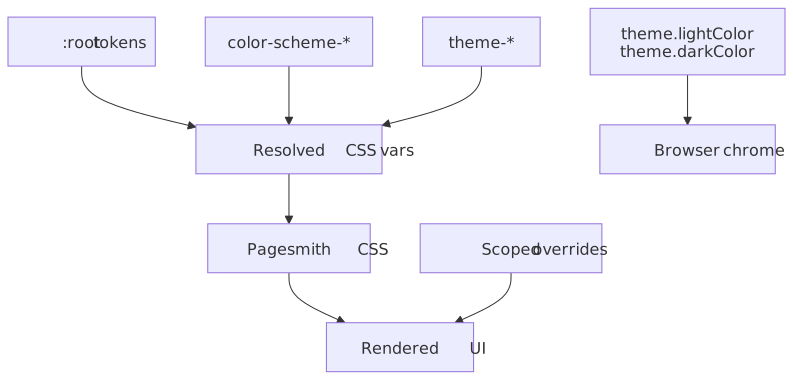
The @pagesmith/docs theme includes built-in UI for switching both axes (header dropdown + footer selector), with preferences persisted to localStorage. See the Theming reference for the full system, built-in themes, and how to create custom theme variants.
How light-dark() Works
The light-dark() function takes two values: the first for light mode, the second for dark mode. The browser selects the appropriate value based on the color-scheme property:
/* light-dark(light-value, dark-value) */--color-bg: light-dark(#f5f4f0, #111110);Overriding Per-Scheme Colors
To change colors for only one scheme, redefine the token with a new light-dark() value:
:root { /* Change background in dark mode only, keep light mode default */ --color-bg: light-dark(#f5f4f0, #0d1117);}Forcing a Single Scheme
To force light-only or dark-only mode, use the color scheme class or CSS:
:root { color-scheme: light; /* Force light mode */}This causes all light-dark() functions to use their first argument. Alternatively, use theme.defaultColorScheme: 'light' in pagesmith.config.json5 for @pagesmith/docs sites, or set the color-scheme-light class on <html> for core sites.
Code Block Styling
Syntax-highlighted code blocks are rendered by the built-in Pagesmith renderer during markdown processing. Shared code block chrome comes from the shipped Pagesmith CSS bundles, while Shiki token colors are injected into the HTML output and the shared Pagesmith content runtime wires copy/collapse behavior in the browser.
Default Themes
The default syntax highlighting themes are github-light and github-dark. Pagesmith maps them to the site’s color-scheme classes so code blocks follow the same light/dark toggle as the rest of the UI.
Configure different themes in your config:
{ markdown: { shiki: { themes: { light: "github-light", dark: "github-dark-dimmed", }, }, },}Any theme supported by Shiki is available. Popular options include one-dark-pro, dracula, nord, catppuccin-latte, and catppuccin-mocha.
Code Block Font and Size
The built-in renderer and shared code block styles read CSS custom properties for font settings and chrome:
/* These properties are consumed by the Pagesmith code block styles */--ps-font-sans → UI elements (file titles, line numbers)--ps-font-mono → Code text--ps-font-size-sm → Code font size (default: 0.875rem)The default code block chrome uses these variables:
| CSS Variable | Used For |
|---|---|
--ps-font-sans |
Toolbar labels, line numbers, copy/collapse controls |
--ps-font-mono |
Code text |
--ps-font-size-sm |
Code text and toolbar sizing |
--ps-radius-lg |
Code block border radius |
--ps-color-border-subtle |
Borders and subtle chrome accents |
To adjust code block appearance, define the --ps-* custom properties:
:root { --ps-font-mono: "Fira Code", monospace; --ps-font-size-sm: 0.8rem; --ps-radius-lg: 8px;}Inline Code
Inline code (backtick-delimited) is styled by the core CSS, not the code block renderer. Override inline code appearance through the standard custom properties:
:root { --color-code-bg: light-dark(#f0f0f0, #1a1a2e); --color-code-text: light-dark(#333333, #e0e0e0);}Typography Customization
Changing the Body Font
Override --font-sans to change the body text font. If using a custom font, load it via @font-face or a CSS import:
@import url("https://fonts.googleapis.com/css2?family=Inter:wght@400;500;600;700&display=swap");:root { --font-sans: "Inter", system-ui, sans-serif;}Changing the Code Font
Override --font-mono for both inline code and code blocks (via the --ps-font-mono alias):
:root { --font-mono: "Fira Code", "Cascadia Code", monospace; --ps-font-mono: var(--font-mono);}Font Size Scale
The type scale uses rem units anchored to the browser’s base font size (typically 16px). Override individual steps:
:root { --font-size-base: 1.0625rem; /* 17px */ --font-size-sm: 0.9375rem; /* 15px */ --font-size-lg: 1.1875rem; /* 19px */}CSS Architecture
The docs theme CSS is organized as follows:
main.css foundations/ reset.css → CSS reset (box-sizing, margins) color-scheme.css → Color scheme classes (auto/light/dark) fonts.css → @font-face for bundled fonts tokens.css → Design tokens (custom properties) themes.css → Theme variant overrides (paper, high-contrast) content/ prose.css → Prose typography (headings, paragraphs, lists, tables) toc.css → Table of contents sidebar styles alerts.css → GitHub-flavored alert boxes page-meta.css → Last updated, edit link, breadcrumbs code/ inline.css → Inline code styling (backtick code) layout/ grid.css → Page grid (header, sidebar, content, TOC) header.css → Site header and navigation sidebar.css → Sidebar navigation footer.css → Page footer home.css → Home page hero and features components/ search.css → Search modal styles theme-toggle.css → Header dropdown and footer theme selector not-found.css → 404 page stylesThe full theme CSS is bundled and minified by LightningCSS during pagesmith-docs build, producing a single assets/style.css file in the output directory. LightningCSS handles vendor prefixing, nesting compilation, and minification targeting Chrome 100+, Firefox 100+, and Safari 16+.