Choose Your Path
Need ready-to-run prompt templates for setup and maintenance? See the Prompts Cookbook.
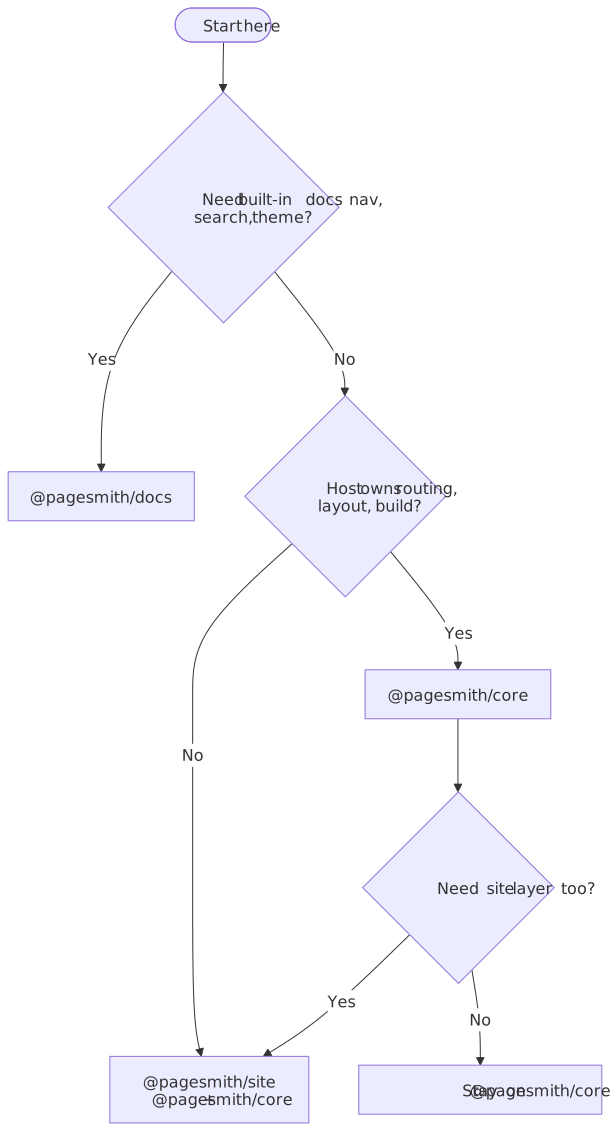
Use this diagram as the fast filter: docs-first projects go to @pagesmith/docs, host-owned apps start with @pagesmith/core, and @pagesmith/site is the app-facing package when a project wants the content layer plus shared JSX, CSS/runtime, and Vite SSG helpers from one place.
AI-First Starting Point
Pick the package that matches your goal, then give your agent the package-owned setup prompt instead of a vague install request.
@pagesmith/docs
Use this when you want a docs site with config, conventions, navigation, search, and the default docs theme.
Copy-paste prompt:
Install
@pagesmith/docs, then readnode_modules/@pagesmith/docs/skills/pagesmith-docs-setup/references/setup-docs.mdand follow it exactly. Usenpx pagesmith-docs init --yes --aifor bootstrap work, keeppagesmith.config.json5at the repo root, and explain any GitHub PagesoriginorbasePathdecisions before finishing.
@pagesmith/site
Use this when you want a custom site with Pagesmith’s content layer plus the shared Pagesmith site layer: JSX runtime, CSS/runtime bundles, Vite SSG helpers, or a preset-driven pagesmith-site workflow.
Copy-paste prompt:
Install
@pagesmith/site, then readnode_modules/@pagesmith/site/skills/pagesmith-site-setup/references/setup-site.mdand follow it exactly. Keep the app-facing imports on@pagesmith/site, use@pagesmith/coredirectly only if the repo intentionally wants the lower-level headless package, and choose between a Vite SSG setup or a framework-hosted setup based on the repo.
@pagesmith/core
Use this when the host app already owns routing, layout, or build tooling and only needs Pagesmith as a typed content layer plus markdown pipeline.
Copy-paste prompt:
Install
@pagesmith/core, then readnode_modules/@pagesmith/core/skills/pagesmith-core-setup/references/setup-core.mdand follow it exactly. Keep the work focused on collections, schemas,createContentLayer(), and eitherentry.render()orpagesmithContentfor Vite.
Package Roles
@pagesmith/core — Content Layer
Owns:
- collection definitions and schemas
- filesystem loading
- markdown rendering and validators
pagesmithContentfor Vite
Best for:
- Next.js or framework-hosted markdown
- custom SSR apps
- projects that want typed content data without a Pagesmith-owned site shell
Manual guide: Getting Started
@pagesmith/site — Site Toolkit
Owns:
pagesmith-site- re-exported content APIs from
@pagesmith/core @pagesmith/site/jsx-runtime@pagesmith/site/css/*@pagesmith/site/runtime/*@pagesmith/site/vite
Best for:
- custom static sites that want one Pagesmith package for content + site behavior
- projects that want the shared Pagesmith presentation layer
- preset-driven site workflows
@pagesmith/docs — Docs Preset
Owns:
pagesmith-docspagesmith.config.json5- docs navigation from folders and
meta.json5 - built-in Pagefind search
- docs layouts, schema files, and docs MCP
Best for:
- documentation sites
- product guides
- API references
- knowledge bases
Manual guide: Docs Getting Started
Decision Matrix
| Question | @pagesmith/core |
@pagesmith/site |
@pagesmith/docs |
|---|---|---|---|
| Do I already have my own router/build? | Yes | Maybe | Usually no |
| Do I want Pagesmith to own the site shell? | No | Partly | Yes |
| Do I need built-in docs navigation and search? | No | No | Yes |
| Do I want shared Pagesmith CSS/runtime and JSX? | Optional via site | Yes | Included |
| Canonical CLI | pagesmith-core |
pagesmith-site |
pagesmith-docs |
| Fastest AI entrypoint | setup-core.md |
setup-site.md |
setup-docs.md |
Start with @pagesmith/docs when the project is truly docs-first. Start with @pagesmith/core when the host app already owns the shell and only needs the headless content layer. Start with @pagesmith/site when the app should stay on one Pagesmith package for content plus site behavior.
What To Read Next
- AI Assistants for package-owned AI setup flows
- Prompts Cookbook for copy-paste prompts
- Getting Started for core-first integrations
- Docs Getting Started for docs-first integrations
- Next.js (App Router) for a framework-hosted core example