Layout Overrides
@pagesmith/docs ships with four built-in layouts: home, page, listing, and notFound. You can replace any of them with your own TSX components, or register entirely new layouts and assign them to specific sections through meta.json5.
The default docs chrome itself now lives behind @pagesmith/docs/components and @pagesmith/docs/layouts, so custom overrides can extend the built-in Pagesmith shell instead of copy-pasting the docs package internals.
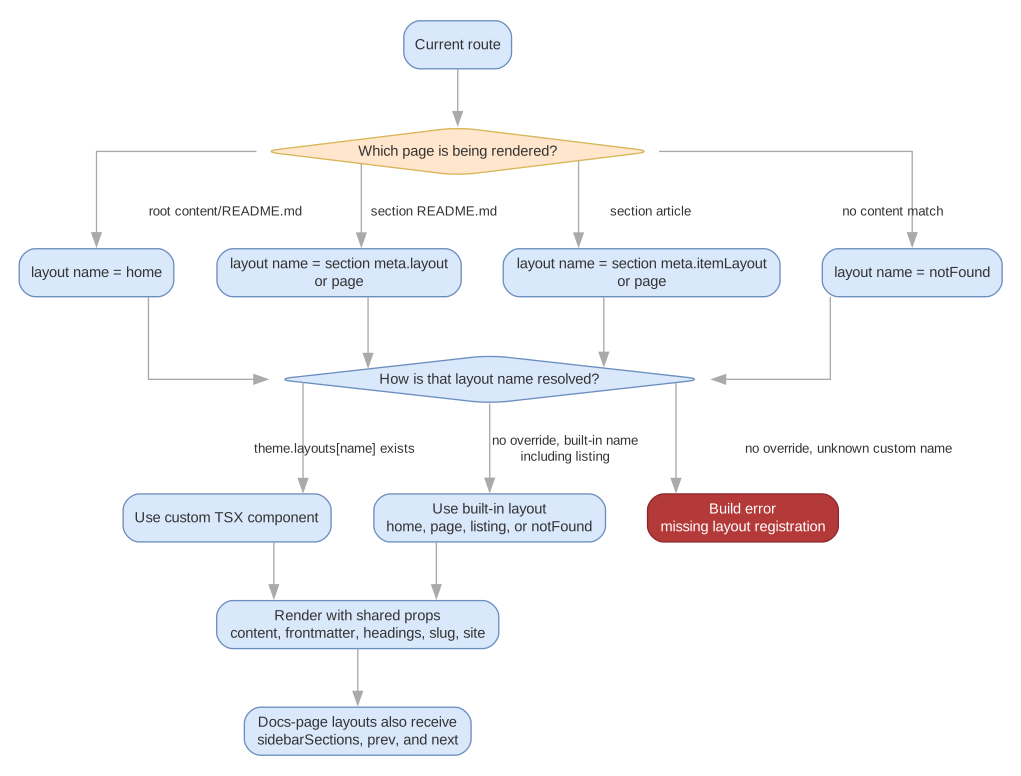
Layout Resolution at a Glance
This diagram shows the two-step resolution process: the current route determines a layout name, then theme.layouts either maps that name to a custom TSX component or falls back to a built-in layout. Notice that section meta.json5 selects the layout name for section landing and item pages, while built-in names such as listing still follow the same resolution and fallback rules.
Built-in Layouts
| Name | File | Used For |
|---|---|---|
home |
DocHome.tsx |
The root content/README.md landing page. Renders hero, features grid, and body content |
page |
DocPage.tsx |
Every documentation page. Three-column grid with sidebar, content, and table of contents |
listing |
DocListing.tsx |
Listing-style pages that render intro content plus grouped cards for child pages |
notFound |
DocNotFound.tsx |
The 404 page shown when a route does not match any content |
When no overrides are configured, these layouts are used automatically. The page layout is still the default for ordinary section landing pages and individual pages.
Overriding via theme.layouts
To replace a built-in layout, add a theme.layouts mapping in pagesmith.config.json5. Each key is a layout name and each value is a file path (relative to the config file) pointing to a TSX component:
{ name: "My Docs", title: "My Docs", theme: { layouts: { // Replace the home page layout home: "./theme/layouts/MyHome.tsx", // Replace the standard page layout page: "./theme/layouts/MyPage.tsx", // Replace the 404 layout notFound: "./theme/layouts/My404.tsx", }, },}The override file is resolved relative to the directory containing pagesmith.config.json5. At build time, the file is bundled with Rolldown (supporting TypeScript and JSX) and its default export is used as the layout component.
Export Resolution
The docs system looks for the layout component in this order:
- The
defaultexport - A named export matching a known alias:
home->DocHomeorHomepage->DocPageorPagelisting->DocListingorListingnotFound->DocNotFoundorNotFound
For custom layout names (beyond the four built-in ones), the system looks for default or an export matching the layout name.
Layout Component Props
Every layout component receives the same base set of props, with the page layout receiving additional navigation-related props.
Base Props (all layouts)
| Prop | Type | Description |
|---|---|---|
content |
string |
The rendered HTML from the markdown file |
frontmatter |
Record<string, any> |
All frontmatter fields from the markdown file |
headings |
Array<{ depth: number; text: string; slug: string }> |
Extracted headings from the markdown, useful for building a table of contents |
slug |
string |
The content slug (URL path segment, e.g. "guide/getting-started") |
site |
object |
Site-wide configuration and navigation data |
Site Object
The site prop is built by getSitePayload(config, model) and contains:
| Field | Type | Description |
|---|---|---|
site.origin |
string |
The production origin URL |
site.basePath |
string |
The URL base path (empty string if root) |
site.homeLink |
string |
Where the header logo links to (defaults to basePath) |
site.trailingSlash |
boolean |
Whether routes are emitted as path/index.html (true) or path.html (false) |
site.name |
string |
Site name for display |
site.title |
string |
Full site title |
site.description |
string |
Site description |
site.language |
string |
HTML lang attribute value |
site.navItems |
Array<{ label: string; path: string }> |
Header navigation items |
site.footerLinks |
Array<{ label: string; path: string }> | Array<{ header?: string; links: Array<{ label: string; path: string }> }> |
Footer links as a flat row or grouped columns |
site.footerText |
string | undefined |
Footer sign-off override |
site.maintainer |
{ name: string; link?: string } | undefined |
Maintainer credit |
site.copyright |
{ projectName?: string; startYear?: number; endYear?: number | null } | undefined |
Copyright bar inputs |
site.search |
{ enabled: boolean; showImages: boolean; showSubResults: boolean } |
Search configuration |
site.sidebar |
{ collapsible: boolean } |
Sidebar configuration |
site.analytics |
{ googleAnalytics?: string } |
Analytics config |
site.theme |
{ lightColor?: string; darkColor?: string; defaultColorScheme: 'auto'|'light'|'dark'; defaultTheme: 'paper'|'high-contrast'; defaultTextSize: 'small'|'base'|'large' } |
Theme defaults and meta-colors |
site.socialImage |
string | undefined |
OG image URL |
site.icon |
string | undefined |
Inline SVG icon (markup) |
site.favicon |
string | undefined |
Resolved favicon URL |
site.faviconFallback |
string | undefined |
Fallback favicon URL (for example, .ico when an .svg is the primary) |
site.appleTouchIcon |
string | undefined |
Apple touch icon URL when public/apple-touch-icon.png exists |
Page Layout Additional Props
Layouts used for non-home pages (page, listing, and any custom item layouts) receive these additional props on top of the base set:
| Prop | Type | Description |
|---|---|---|
sidebarSections |
SidebarSection[] | undefined |
Sidebar navigation data for the current section |
prev |
{ title: string; path: string } | undefined |
Previous page in sidebar order |
next |
{ title: string; path: string } | undefined |
Next page in sidebar order |
breadcrumbs |
Array<{ label: string; href?: string }> |
Breadcrumb trail from site root to current page |
editUrl |
string | undefined |
Computed edit-this-page URL when editLink is configured |
editLabel |
string | undefined |
Edit link label from config.editLink.label |
lastUpdated |
string | undefined |
ISO timestamp from git log when lastUpdated: true |
listingCards |
SiteListingCard[] | undefined |
Cards for listing layouts (also available on the home layout when its section meta requests listing data) |
listingGroups |
SiteListingGroup[] | undefined |
Series-grouped listing cards |
listingTotal |
number | undefined |
Total card count for the listing |
The home layout receives the base props plus listingCards / listingGroups / listingTotal when relevant; sidebar/prev/next/breadcrumb props are omitted because the home page has no surrounding section.
A SidebarSection has:
type SidebarSection = { title: string; slug: string; collapsed?: boolean; items: SidebarItem[];};type SidebarItem = { title: string; path: string; children?: SidebarItem[];};Creating a Custom Layout
Custom layouts are TSX files that use @pagesmith/docs/jsx-runtime for server-side JSX rendering. Here is a minimal custom page layout that reuses the shared Pagesmith docs shell:
import { h } from "@pagesmith/docs/jsx-runtime";import { SiteDocument } from "@pagesmith/docs/components";import { PageShell } from "@pagesmith/docs/layouts";type Props = { content: string; frontmatter: Record<string, any>; headings: Array<{ depth: number; text: string; slug: string }>; slug: string; site: any; sidebarSections?: any[]; prev?: { title: string; path: string }; next?: { title: string; path: string };};export default function MyPage(props: Props) { const { content, frontmatter, headings, slug, site, sidebarSections } = props; const title = frontmatter.title ? `${frontmatter.title} - ${site.title}` : site.title; return ( <SiteDocument title={title} site={site}> <PageShell site={site} currentPath={slug} headings={headings} sidebarSections={sidebarSections} > <div class="prose" innerHTML={content} /> </PageShell> </SiteDocument> );}Key points:
- Import
hfrom@pagesmith/docs/jsx-runtimefor JSX support. - Prefer
@pagesmith/docs/componentsand@pagesmith/docs/layoutswhen you want the stock Pagesmith shell without copying the docs package internals. - Use
innerHTML={content}to render the processed markdown HTML. This is a special prop that sets the element’s inner HTML without escaping. - Include
data-pagefind-body=""on the content-only wrapper so Pagefind indexes the page body without header, sidebar, breadcrumb, or footer chrome. For article layouts, prefer the<article>element instead of a larger shell wrapper. - Reference theme assets at
${site.basePath}/assets/style.cssfor the bundled theme CSS and${site.basePath}/assets/main.jsfor the theme runtime, or import@pagesmith/site/css/chrome/@pagesmith/site/runtime/chromedirectly in custom Vite entries when you are building around the shared site components. - If search is enabled, include the Pagefind CSS and JS assets from
${site.basePath}/pagefind/.
Using meta.json5 for Per-Section Layouts
You can assign different layouts to different sections using the layout and itemLayout fields in a section’s meta.json5.
Section Landing Page Layout
The layout field controls which layout is used for the section’s README.md:
// content/blog/meta.json5{ displayName: "Blog", layout: "blogHome", itemLayout: "blogPost",}Item Layout
The itemLayout field controls which layout is used for all non-landing pages in the section.
In the example above, content/blog/README.md uses the blogHome layout, while all other pages like content/blog/my-post/README.md use the blogPost layout.
Both layout and itemLayout default to "page" when not specified.
Registering Additional Layouts
When you reference a layout name in meta.json5 that is not one of the built-in names, you must register it in theme.layouts:
// pagesmith.config.json5{ theme: { layouts: { blogHome: "./theme/layouts/BlogHome.tsx", blogPost: "./theme/layouts/BlogPost.tsx", changelog: "./theme/layouts/Changelog.tsx", }, },}// content/blog/meta.json5{ displayName: "Blog", layout: "blogHome", itemLayout: "blogPost",}// content/changelog/meta.json5{ displayName: "Changelog", layout: "changelog", itemLayout: "changelog",}The docs system collects all unique layout names from section metas and resolves them at build time. If a layout name is referenced in a meta.json5 but not registered in theme.layouts, the build will fail with an error.
You do not need to register the built-in layout names (home, page, listing, notFound) unless you want to override them. They always have default implementations.
Layout Resolution Order
When rendering a page, the layout is chosen as follows:
- Home page (
content/README.md): always uses thehomelayout. - Section landing page (e.g.
content/guide/README.md): useslayoutfrom the sectionmeta.json5, falling back to"page". - Item page (e.g.
content/guide/getting-started/README.md): usesitemLayoutfrom the sectionmeta.json5, falling back to"page".
For each layout name, the system looks for:
- A registered override in
theme.layouts - The built-in default (only for
home,page,listing, andnotFound)
If a section meta or page frontmatter references a layout name that is neither built in nor registered in theme.layouts, the build throws.
Example: Custom Home Page
Replace the default landing page with a minimal custom design:
// pagesmith.config.json5{ theme: { layouts: { home: "./theme/MyHome.tsx", }, },}// theme/MyHome.tsximport { h } from "@pagesmith/docs/jsx-runtime";export default function MyHome({ content, frontmatter, site }: any) { return ( <html lang={site.language || "en"}> <head> <meta charset="utf-8" /> <meta name="viewport" content="width=device-width, initial-scale=1" /> <title>{site.title}</title> <link rel="stylesheet" href={`${site.basePath}/assets/style.css`} /> </head> <body> <main data-pagefind-body=""> <h1>{frontmatter.title || site.name}</h1> <p>{frontmatter.description || site.description}</p> {frontmatter.actions?.map((action: any) => ( <a href={action.link}>{action.text}</a> ))} {content ? <div class="prose" innerHTML={content} /> : null} </main> </body> </html> );}Example: Custom Article Layout
Create a specialized layout for blog-style content in a specific section:
// pagesmith.config.json5{ theme: { layouts: { article: "./theme/Article.tsx", }, },}// content/blog/meta.json5{ displayName: "Blog", itemLayout: "article", orderBy: "publishedDate",}// theme/Article.tsximport { h } from "@pagesmith/docs/jsx-runtime";export default function Article({ content, frontmatter, site, prev, next }: any) { const title = frontmatter.title ? `${frontmatter.title} - ${site.title}` : site.title; return ( <html lang={site.language || "en"}> <head> <meta charset="utf-8" /> <meta name="viewport" content="width=device-width, initial-scale=1" /> <title>{title}</title> <link rel="stylesheet" href={`${site.basePath}/assets/style.css`} /> </head> <body> <header> <a href={`${site.basePath}/`}>{site.name}</a> </header> <article data-pagefind-body=""> <h1>{frontmatter.title}</h1> {frontmatter.publishedDate ? <time>{frontmatter.publishedDate}</time> : null} {frontmatter.description ? <p class="lead">{frontmatter.description}</p> : null} <div class="prose" innerHTML={content} /> </article> <nav> {prev ? <a href={prev.path}>Previous: {prev.title}</a> : null} {next ? <a href={next.path}>Next: {next.title}</a> : null} </nav> </body> </html> );}This layout renders blog-style pages with a published date, description lead, and prev/next navigation, while the section landing page continues to use the default page layout.